39
Preparing the Camera, Basic Functions
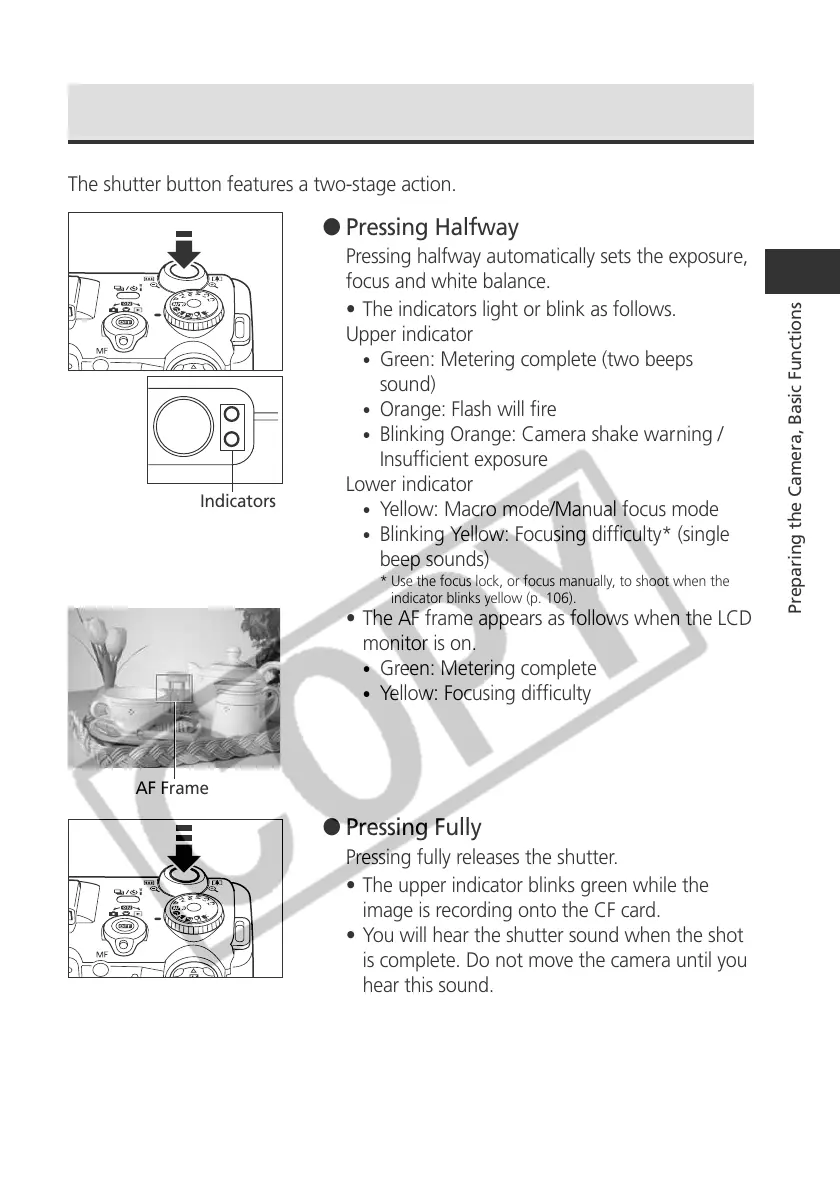
AF Frame
Indicators
Pressing the Shutter Button
The shutter button features a two-stage action.
● Pressing Halfway
Pressing halfway automatically sets the exposure,
focus and white balance.
• The indicators light or blink as follows.
Upper indicator
•
Green: Metering complete (two beeps
sound)
•
Orange: Flash will fire
•
Blinking Orange: Camera shake warning /
Insufficient exposure
Lower indicator
•
Yellow: Macro mode/Manual focus mode
•
Blinking Yellow: Focusing difficulty* (single
beep sounds)
* Use the focus lock, or focus manually, to shoot when the
indicator blinks yellow (p. 106).
• The AF frame appears as follows when the LCD
monitor is on.
•
Green: Metering complete
•
Yellow: Focusing difficulty
● Pressing Fully
Pressing fully releases the shutter.
• The upper indicator blinks green while the
image is recording onto the CF card.
• You will hear the shutter sound when the shot
is complete. Do not move the camera until you
hear this sound.



 To Next Page