38
Using the Optical Viewfinder to Shoot
Setting the LCD monitor to Off (p. 33) and using the optical viewfinder can help
conserve power while shooting.
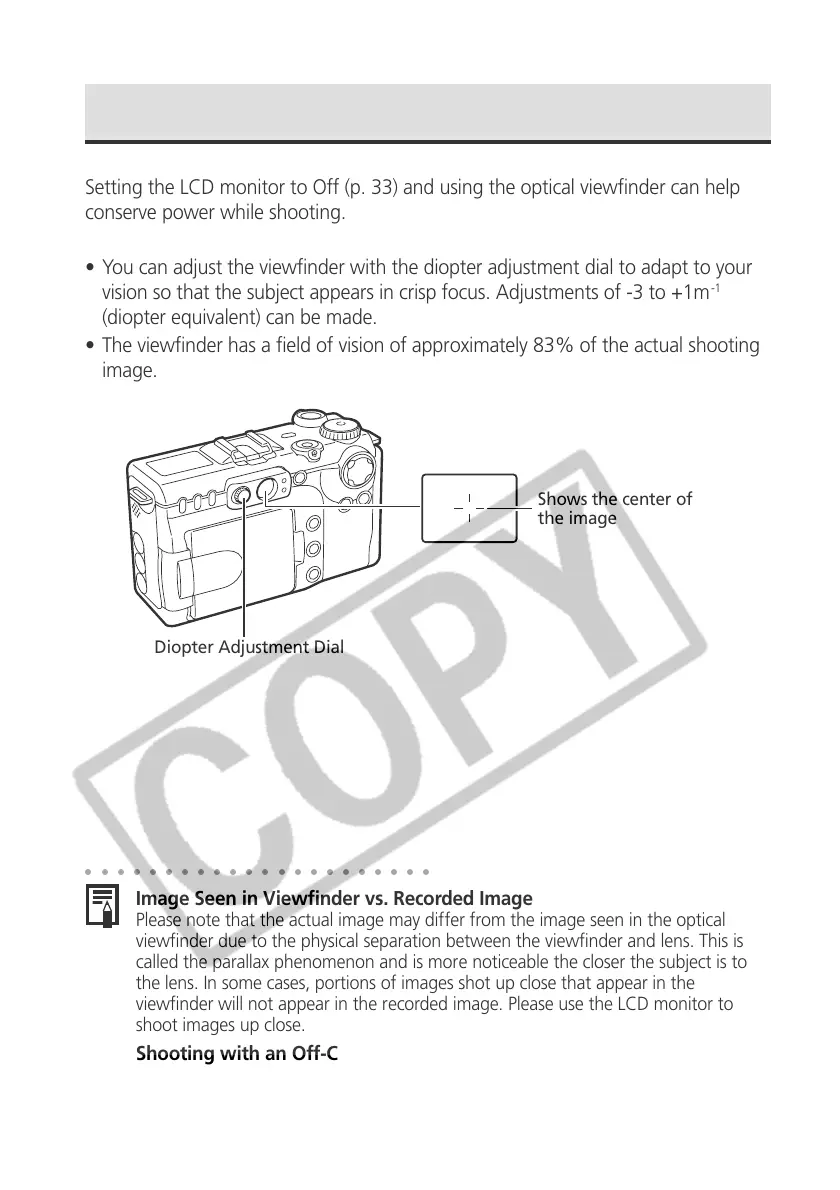
• You can adjust the viewfinder with the diopter adjustment dial to adapt to your
vision so that the subject appears in crisp focus. Adjustments of -3 to +1m
-1
(diopter equivalent) can be made.
• The viewfinder has a field of vision of approximately 83% of the actual shooting
image.
Diopter Adjustment Dial
Shows the center of
the image
○○○○○○○○○○○○○○○○○○○○○○
Image Seen in Viewfinder vs. Recorded Image
Please note that the actual image may differ from the image seen in the optical
viewfinder due to the physical separation between the viewfinder and lens. This is
called the parallax phenomenon and is more noticeable the closer the subject is to
the lens. In some cases, portions of images shot up close that appear in the
viewfinder will not appear in the recorded image. Please use the LCD monitor to
shoot images up close.
Shooting with an Off-Center AF Frame Selected
When setting the AF frame to the desired position to shoot an image, please use the
LCD monitor (See Selecting an AF Frame, p. 82).



 To Next Page