121
Replaying, Erasing
Rotating Images in the Display
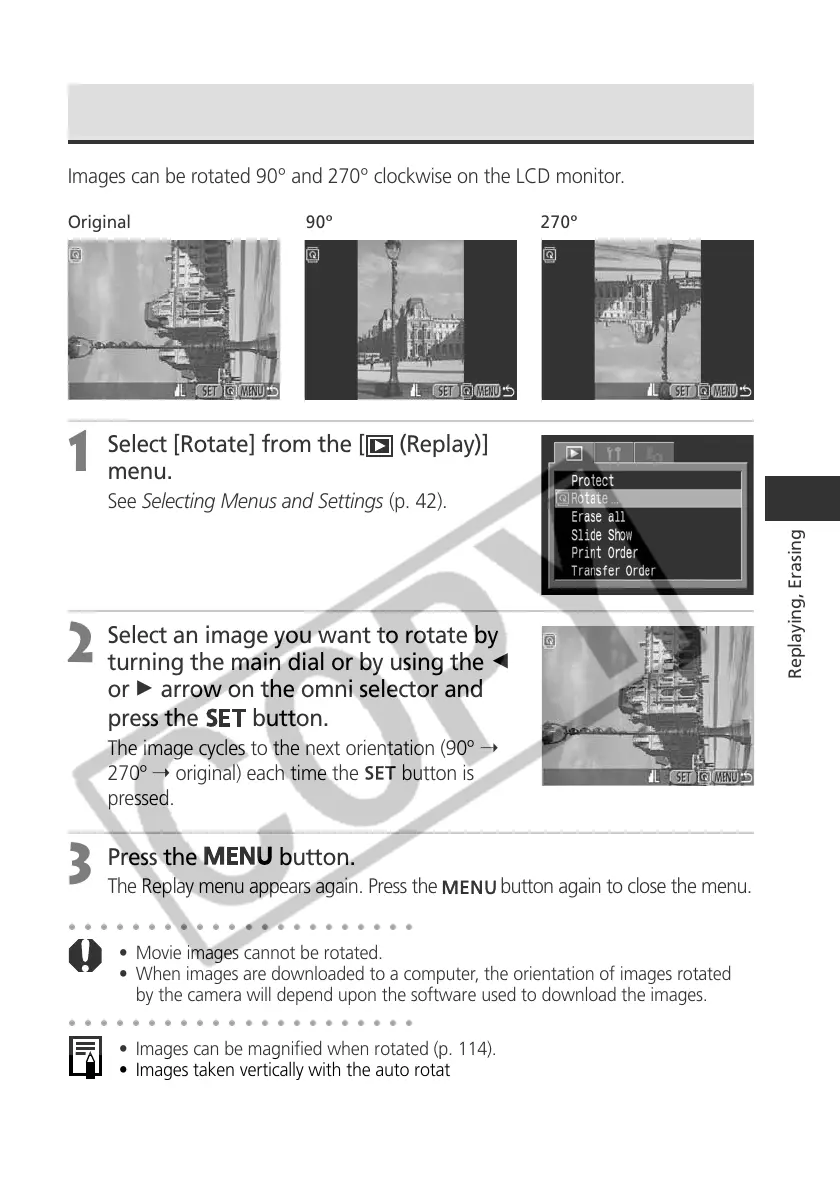
Images can be rotated 90º and 270º clockwise on the LCD monitor.
Original 90º 270º
1
Select [Rotate] from the [ (Replay)]
menu.
See Selecting Menus and Settings (p. 42).
2
Select an image you want to rotate by
turning the main dial or by using the B
or A arrow on the omni selector and
press the
button.
The image cycles to the next orientation (90º ➝
270º ➝ original) each time the
button is
pressed.
3
Press the
button.
The Replay menu appears again. Press the button again to close the menu.
○○○○○○○○○○○○○○○○○○○○○○
• Movie images cannot be rotated.
• When images are downloaded to a computer, the orientation of images rotated
by the camera will depend upon the software used to download the images.
○○○○○○○○○○○○○○○○○○○○○○
• Images can be magnified when rotated (p. 114).
• Images taken vertically with the auto rotate function (p. 111) set to [On] will
automatically be rotated to the vertical position when viewed on the LCD monitor.



 To Next Page