24
Setting the Date / Time
The Set Date/Time menu will appear the first time the camera power is turned on
or whenever the date lithium battery charge is low. Start from Step 5 to set the
date and time.
1
Turn on the camera (p. 28).
2
Press the
button.
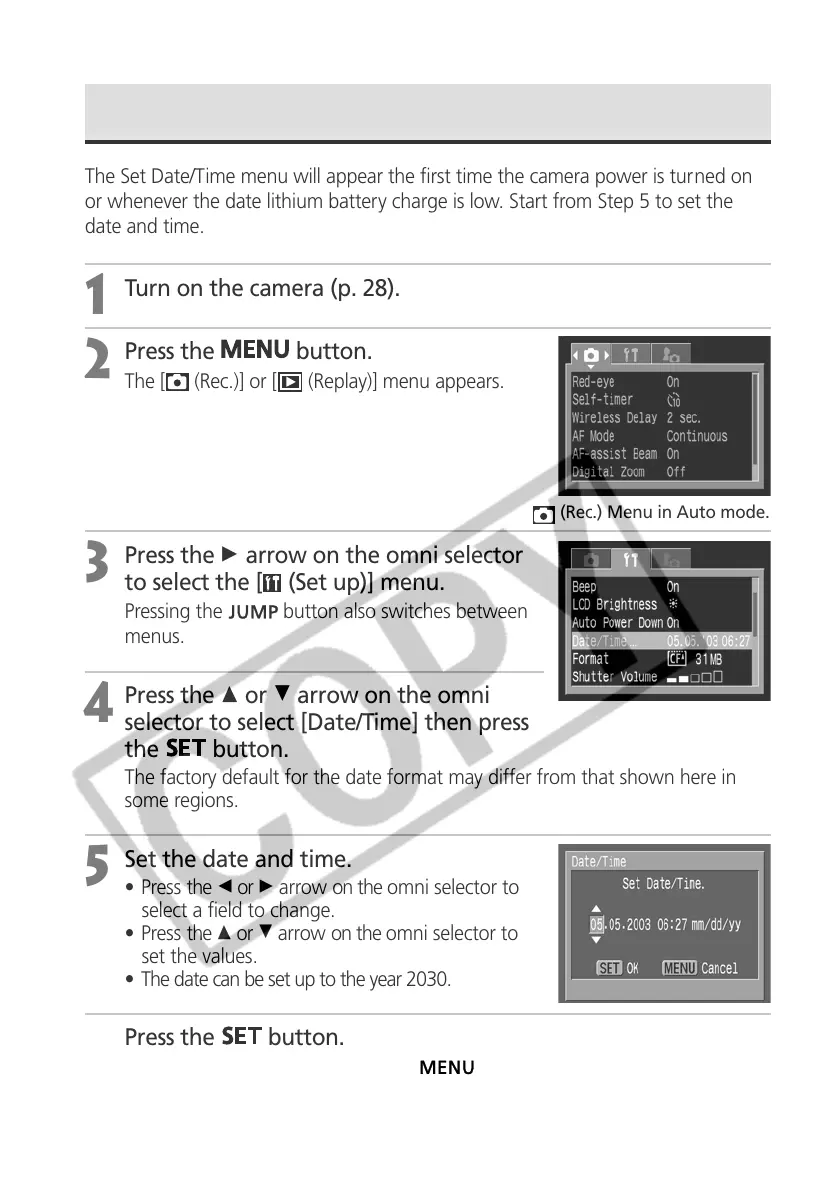
The [ (Rec.)] or [ (Replay)] menu appears.
3
Press the A arrow on the omni selector
to select the [ (Set up)] menu.
Pressing the button also switches between
menus.
4
Press the C or D arrow on the omni
selector to select [Date/Time] then press
the
button.
The factory default for the date format may differ from that shown here in
some regions.
5
Set the date and time.
• Press the B or A arrow on the omni selector to
select a field to change.
• Press the C or D arrow on the omni selector to
set the values.
• The date can be set up to the year 2030.
6
Press the
button.
After adjusting the settings, press the
button to close the menu window.
(Rec.) Menu in Auto mode.



 To Next Page