27
Preparing the Camera, Basic Functions
Attaching the Strap
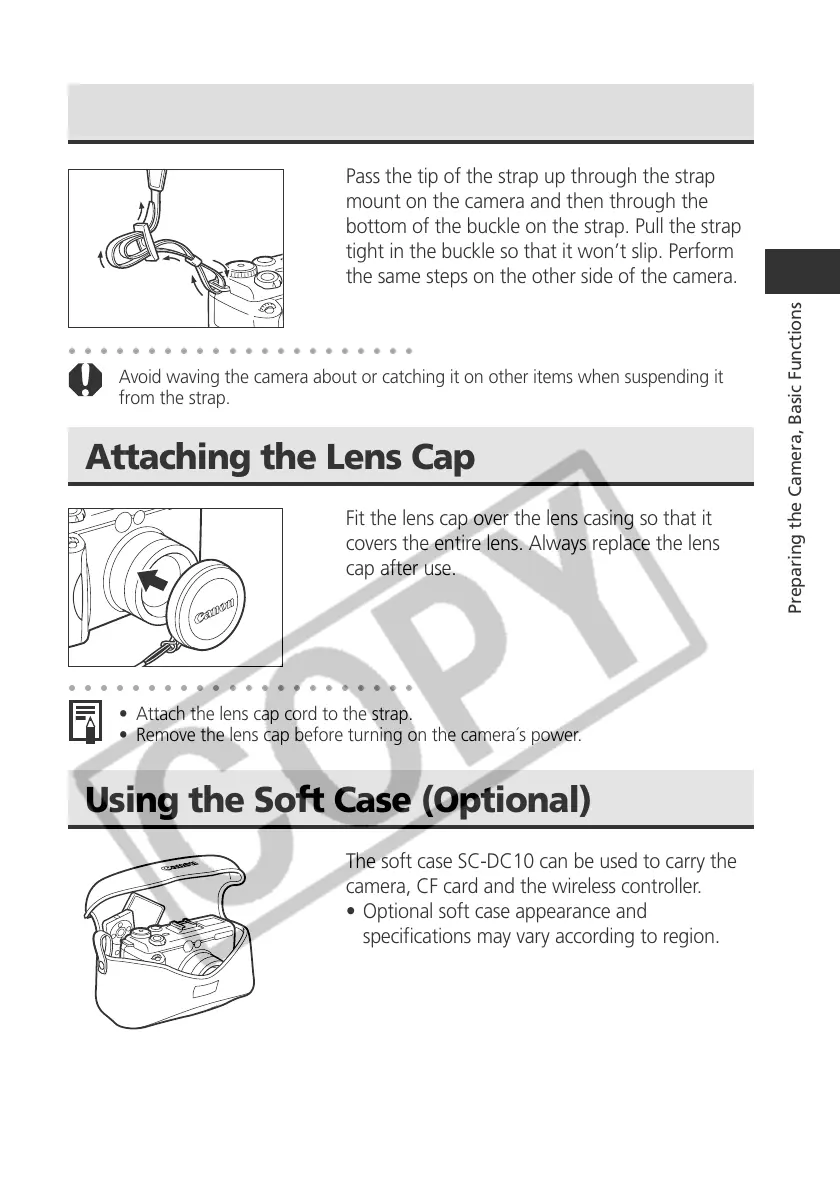
Pass the tip of the strap up through the strap
mount on the camera and then through the
bottom of the buckle on the strap. Pull the strap
tight in the buckle so that it won’t slip. Perform
the same steps on the other side of the camera.
○○○○○○○○○○○○○○○○○○○○○○
Avoid waving the camera about or catching it on other items when suspending it
from the strap.
Attaching the Lens Cap
Fit the lens cap over the lens casing so that it
covers the entire lens. Always replace the lens
cap after use.
○○○○○○○○○○○○○○○○○○○○○○
• Attach the lens cap cord to the strap.
• Remove the lens cap before turning on the camera´s power.
Using the Soft Case (Optional)
The soft case SC-DC10 can be used to carry the
camera, CF card and the wireless controller.
• Optional soft case appearance and
specifications may vary according to region.



 To Next Page