186
q
w
Using a Charge Adapter / Car Battery
Cable Kit (Optional)
Charge Adapter/Car Battery Cable Kit CR-560 (optional) can be used to charge
battery packs or to power the camera from a car’s cigarette lighter socket. You can
also charge Battery Pack BP-511 or Battery Pack BP-512 (optional) from a
household power source without using the camera by connecting Compact Power
Adapter CA-560 (supplied with the charger adapter) to Charge Adapter/Car
Battery Cable Kit CR-560. Two battery packs can be charged at a time.
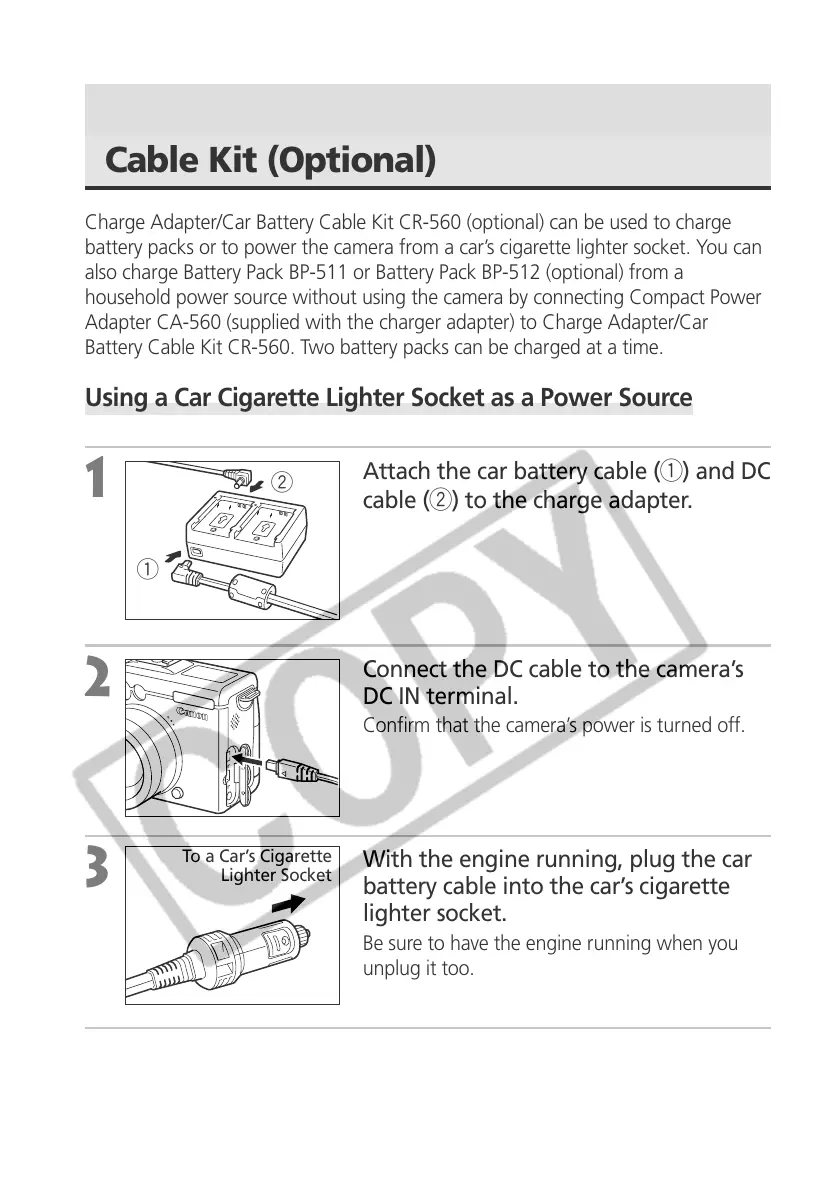
Using a Car Cigarette Lighter Socket as a Power Source
1
Attach the car battery cable (q) and DC
cable (w) to the charge adapter.
2
Connect the DC cable to the camera’s
DC IN terminal.
Confirm that the camera’s power is turned off.
3
With the engine running, plug the car
battery cable into the car’s cigarette
lighter socket.
Be sure to have the engine running when you
unplug it too.
4
Turn the camera on.
To a Car’s Cigarette
Lighter Socket



 To Next Page