4
4
4-8
4-8
Parts Replacement and Cleaning Procedure > Main Units/Parts (Reader) > Removing the Platen Glass > Action to Take after Replacing the Platen Glass
Parts Replacement and Cleaning Procedure > Main Units/Parts (Reader) > Removing the Platen Glass > Action to Take after Replacing the Platen Glass
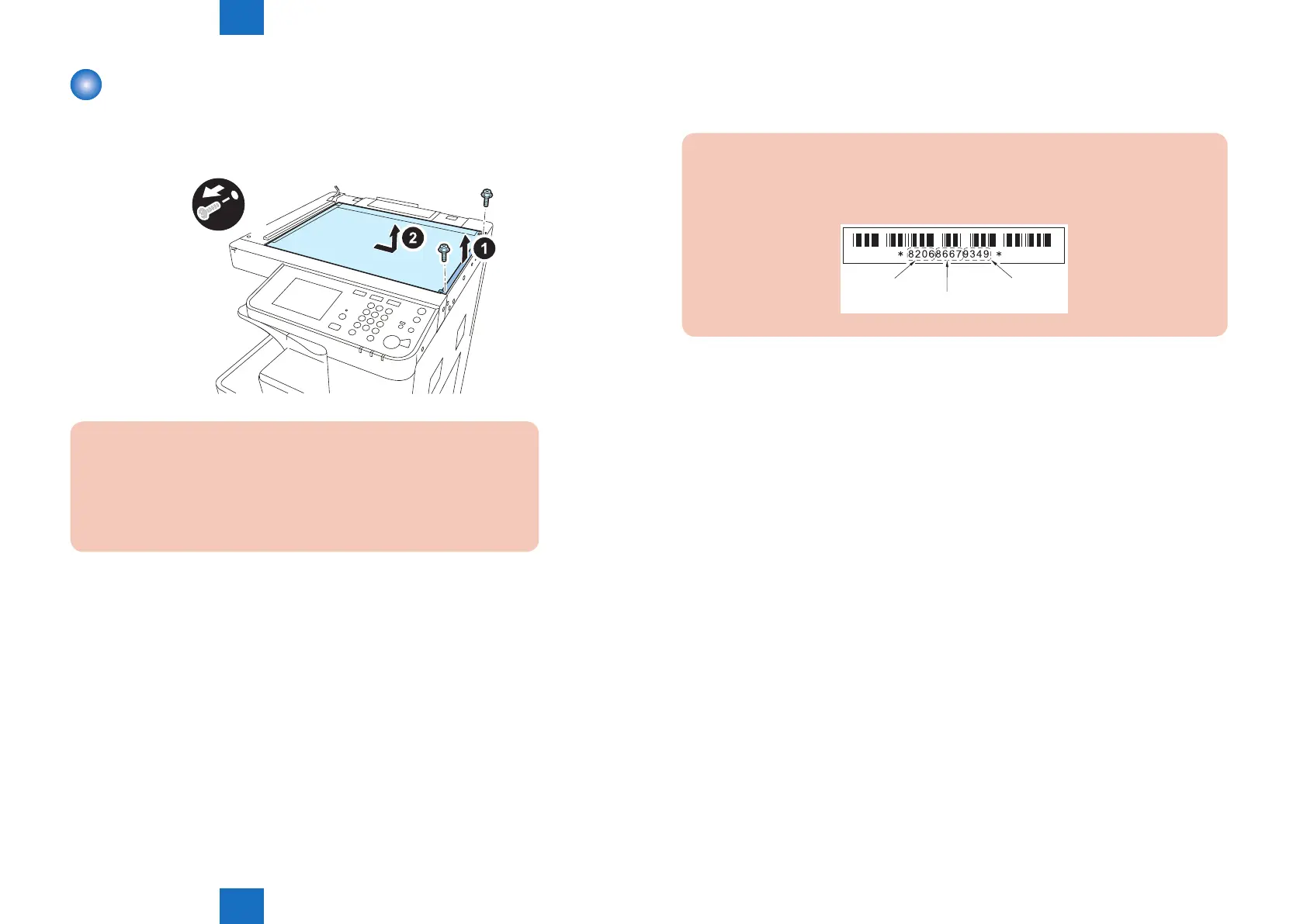
Removing the Platen Glass
1) Open the platen cover (platen board cover/ADF).
2) Remove the glass retainer.
• 2 screws
x2
CAUTION:
When removing the platen glass, take care not to touch the following
parts with your ngers:
• Glass surface
• Standard white plate
Soils on these parts may cause white/black lines on images.
If they are soiled, clean them with a lint-free paper moistened with alcohol.
■
Action to Take after Replacing the Platen Glass
Take the action stated below in the service mode.
CAUTION:
Be sure to make the white plate data adjustment before ADF white level adjustment.
W-PLT-X
W-PLT-Y
W-PLT-Z
F-4-16
1.Enter the value indicated on the platen glass in the following service mode:
COPIER > ADJUST > CCD > W-PLT-X/Y/Z (Input of standard white plate data)
2.Enter the service mode, and then select the following:<D1 Only>
COPIER > FUNCTION > CCD > DF-WLVL1/2/3/4 (DF white level adjustment)
1) Place a sheet of paper that the user usually uses on the platen glass, enter the service
mode, and then select COPIER > FUNCTION > CCD > DFWLVL1.
Read the white level in the BOOK mode. (Check the transparency of the glass for BOOK
mode.)
2) Place a sheet of paper that the user usually uses on the DF, enter the service mode, and
then select COPIER > FUNCTION > CCD > DF-WLVL2.
Read the white level in the DF mode (stream reading). (Check the transparency of the
glass for stream reading.)(Read both sides of the chart.)
3) Place a sheet of paper that the user usually uses on the platen glass, enter the service
mode, and then select COPIER > FUNCTION > CCD > DFWLVL3.
Read the white level in the BOOK mode. (Check the transparency of the glass for BOOK
mode.)
4) Place a sheet of paper that the user usually uses on the DF, enter the service mode, and
then select COPIER > FUNCTION > CCD > DF-WLVL4.
Read the white level in the DF mode (stream reading). (Check the transparency of the
glass for stream reading.)(Read both sides of the chart.)
F-4-15



 To Next Page