4
4
4-5
4-5
Parts Replacement and Cleaning Procedure > Main Units/Parts (Reader) > Removing the CCD Unit
Parts Replacement and Cleaning Procedure > Main Units/Parts (Reader) > Removing the CCD Unit
Main Units/Parts (Reader)
Removing the CCD Unit
1) When replacing with a new CCD unit, enter the following service mode to output a
P-PRINT.
COPYER> FUNCTION> MISC-P> P-PRINT
2) Open the platen cover (ADF/platen board cover).
3) Remove the reader right cover.("Removing the Reader Right Cover"(page 4-3).)
4) Remove the right glass retainer.
5) Remove the platen glass.("Removing the Platen Glass"(page 4-8).)
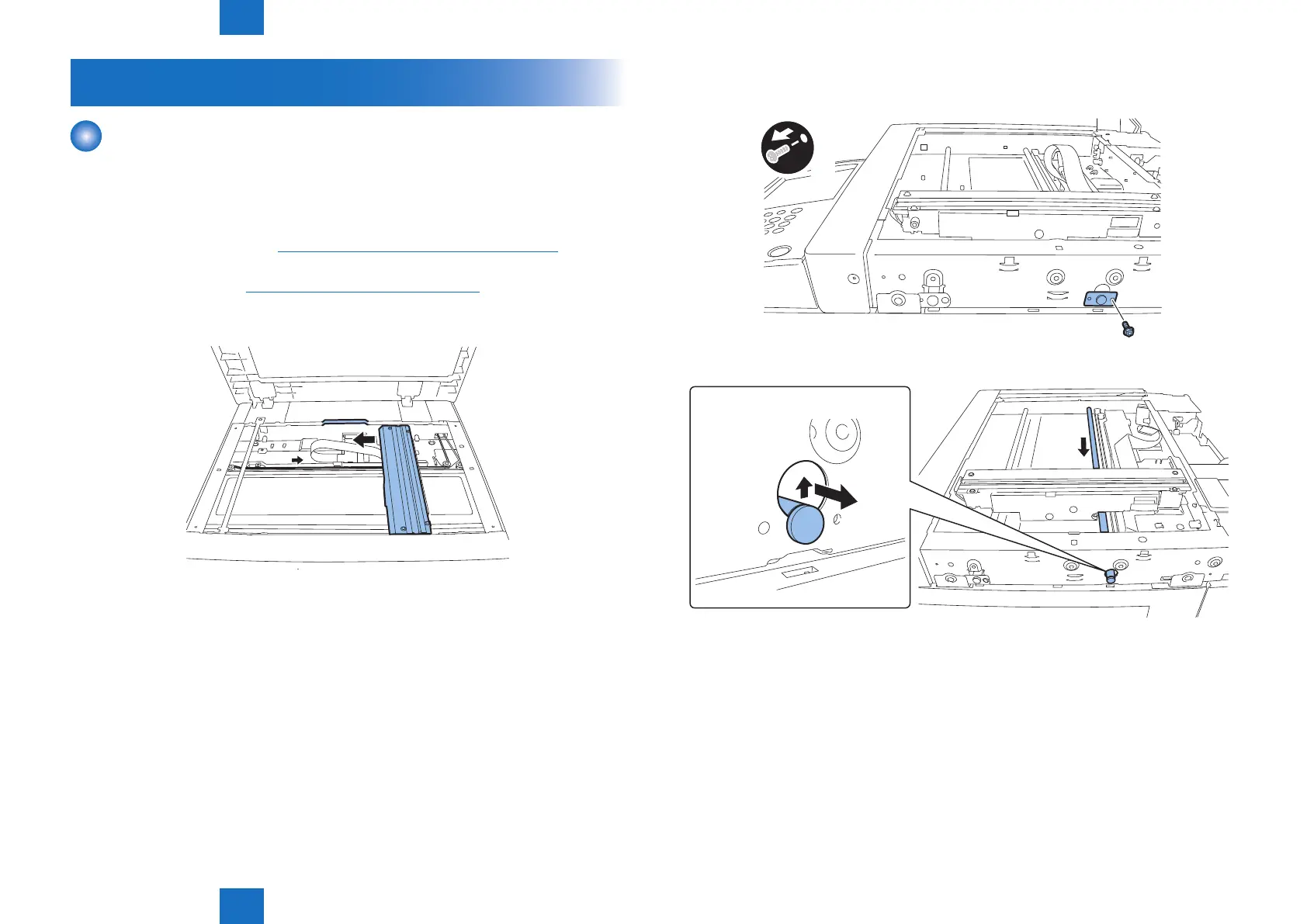
6Move the belt in the direction of the arrow and move the CCD unit to the position of the
groove in the frame.
F-4-9
7) Remove the shaft retaining blade.
• 1 screw
x1
8) Remove the shaft.
F-4-10
F-4-11



 To Next Page