4
4
4-19
4-19
Parts Replacement and Cleaning Procedure > Clutch Solenoid Motor Fan PCB (DADF) > Removing the Release Motor(M2)
Parts Replacement and Cleaning Procedure > Clutch Solenoid Motor Fan PCB (DADF) > Removing the Release Motor(M2)
Clutch Solenoid Motor Fan PCB (DADF)
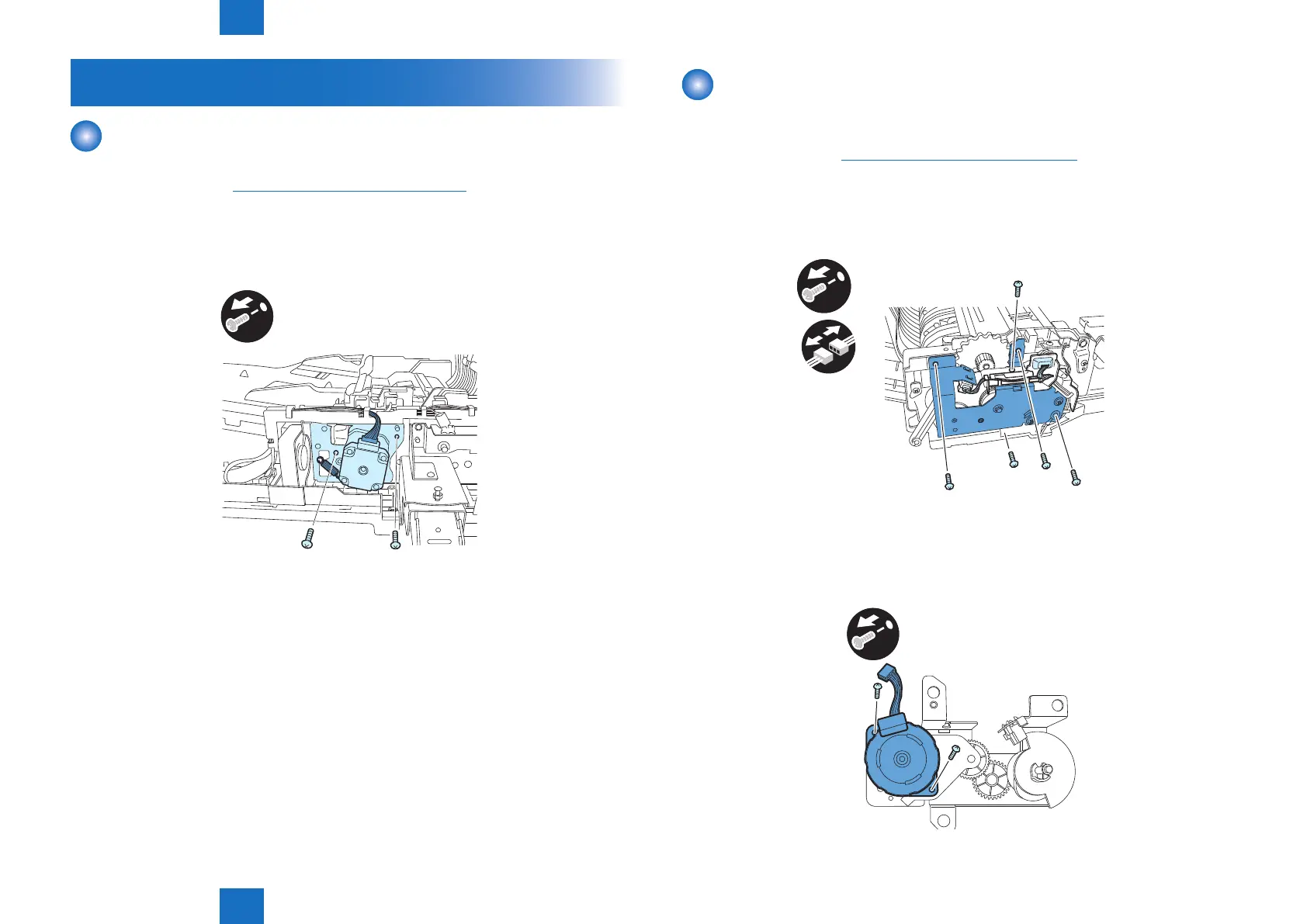
Removing the ADF Motor(M1)
1) Open the feeder cover.
2)Remove the rear cover.("Removing the Rear Cover"(page 4-13).)
3) Remove the ADF motor unit.
- Connector 1 pc.
- Tension spring 1 pc.
- Screw 2 pcs.
x2
F-4-38
Removing the Release Motor(M2)
1) Open the feeder cover.
2 Open the DADF.
3) Detach the front cover.("Removing the Front Cover"(page 4-13).)
4) Close the DADF.
5) Remove the release motor support plate.
- Connector 2 pcs.
- Screw 5 pcs.
x5
x2
6) Remove the release motor.
- Screw 2 pcs.
x2
F-4-39
F-4-40



 To Next Page