-----------------------_e
••••
About this Manual
About
the
Multi
Selector
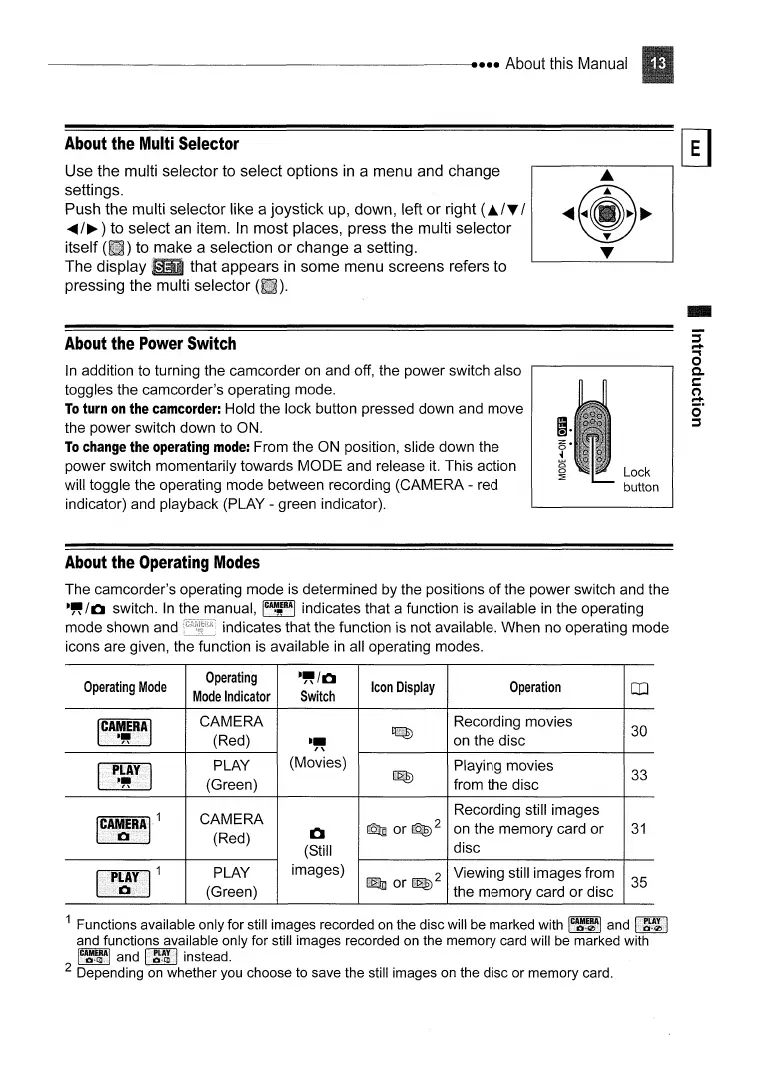
Use the multi selector
to
select options
in
a menu and change
settings.
Push the multi selector like a joystick
up,
down, left or right
(J..lT
/
.....
/~
to select
an
item.
In
most places, press the multi selector
itself
to
make a selection or change a setting.
The display that appears
in
some menu screens refers to
pressing the multi selector
About
the
Power
Switch
..
In
addition to turning the camcorder
on
and off, the power switch also
toggles the camcorder's operating mode.
To
turn
on
the
camcorder:
Hold the lock button pressed down and move
the power switch down to ON.
To
change
the
operating
mode:
From the ON position, slide down the
power switch momentarily towards MODE and release
it.
This action
will toggle the operating mode between recording (CAMERA - red
indicator) and playback (PLAY - green indicator).
Lock
button
About
the
Operating
Modes
The camcorder's operating mode is determined by
the
positions
of
the power switch and the
·~/CI
switch.
In
the manual,
IC~E8A1
indicates that a function is available
in
the operating
mode shown and indicates that the function is not available. When no operating mode
icons are given, the function is available
in
all operating modes.
Operating
Mode
I
CAMERA
I
."
Operating
·~/CI
Icon
Display
Operation
CO
Mode
Indicator
Switch
CAMERA Recording movies
30
(Red)
.~
~
on the disc
PLAY
(Movies)
Playing movies
33
(Green)
~
from the disc
CAMERA
Recording still images
(Red)
1:1
Q]
or~2
on the memory card or
31
(Still
disc
PLAY
images)
~
Viewing still images from
35
(Green)
or
the memory card or disc
1 Functions available only for still images recorded
on
the disc will be marked with
I~I.I~I
and
and functions available only for still images recorded on the memory card will be marked
I~~~~I
and
li~~l
instead.
2 Depending
on
whether you choose to save the still images on the disc or memory card.



 To Next Page