Still
Image
Options
•••••
----------------------
Copying
Still
Images
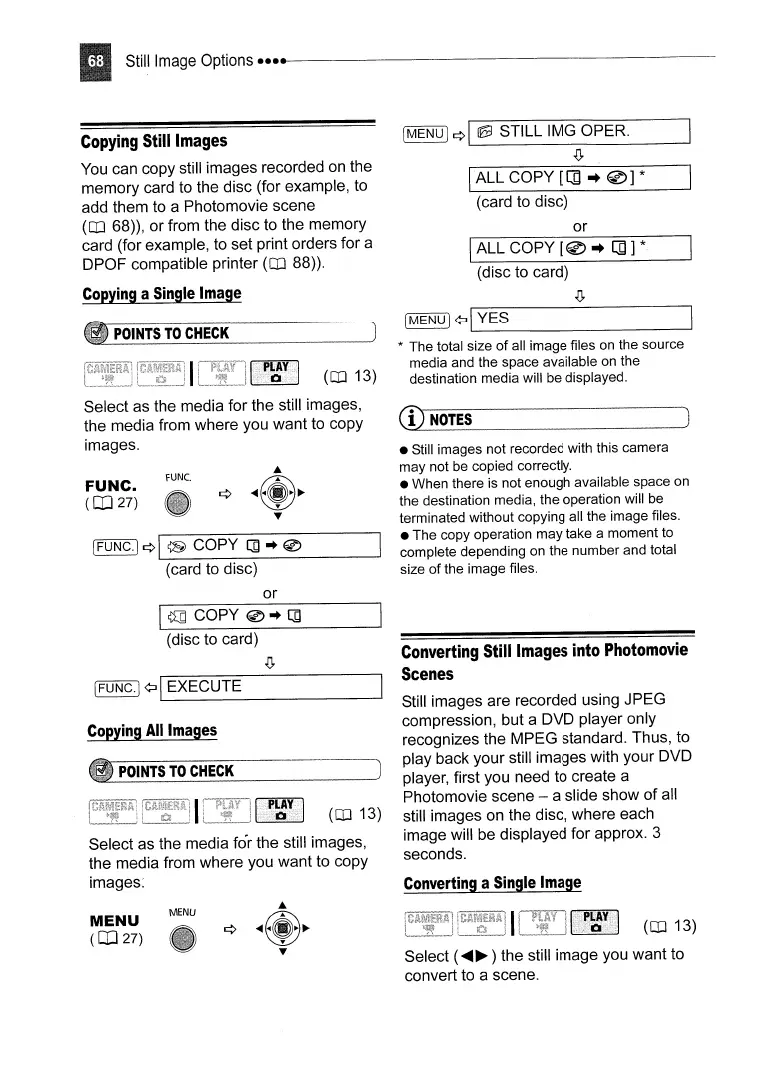
You
can copy still images recorded
on
the
memory card to the disc (for example, to
add them to a Photomovie scene
(OJ 68)), or from the disc to the memory
card (for example, to set print orders for a
DPOF compatible printer
(OJ 88)).
Copying
a
Single
Image
[MENU)
¢I
~
STILL IMG OPER.
.(J,
IALL
COpy
[[]
..
@]
*
(card to disc)
or
IALL
COpy
[@
..
[]]
*
(disc to card)
.(J,
POINTS
TO
CHECK
[FUNC·I
¢\
@
COpy
[]
..
0
(card to disc)
IMENUl
¢l1_Y_E_S
_
* The total size
of
all image files
on
the source
media and the space available on the
destination media will be displayed.
• Still images not recorded with this camera
may not
be
copied correctly.
• When there
is
not enough available space on
the destination media, the operation will be
terminated without copying all the image files.
• The copy operation may take a moment to
complete depending on the number and total
size of the image files.
CD
NOTES
rUNe.
FUNC.
(CD
27)
(OJ 13)
Select
as
the media for the still images,
the media from where you want to copy
images.
or
I~
COpy
0"
[]
(disc to card)
.(J,
[FUNC.]
¢II
EXECUTE
Copying
All
Images
POINTS
TO
CHECK
(OJ 13)
Select as the media for the still images,
the media from where you want to copy
images:
Converting
Still
Images
into
Photomovie
Scenes
Still images are recorded using JPEG
compression, but a DVD player only
recognizes the MPEG standard. Thus, to
play back your still images with your DVD
player, first you need to create a
Photomovie scene - a slide show of all
still images on the disc, where each
image will be displayed for approx. 3
seconds.
Converting
a
Single
Image
MENU
(CD
27)
MENU
(OJ 13)
Select (
....
~
) the still image you want to
convert to a scene.



 To Next Page