Getting
to
Know
the
Camcorder
•••••
------------------
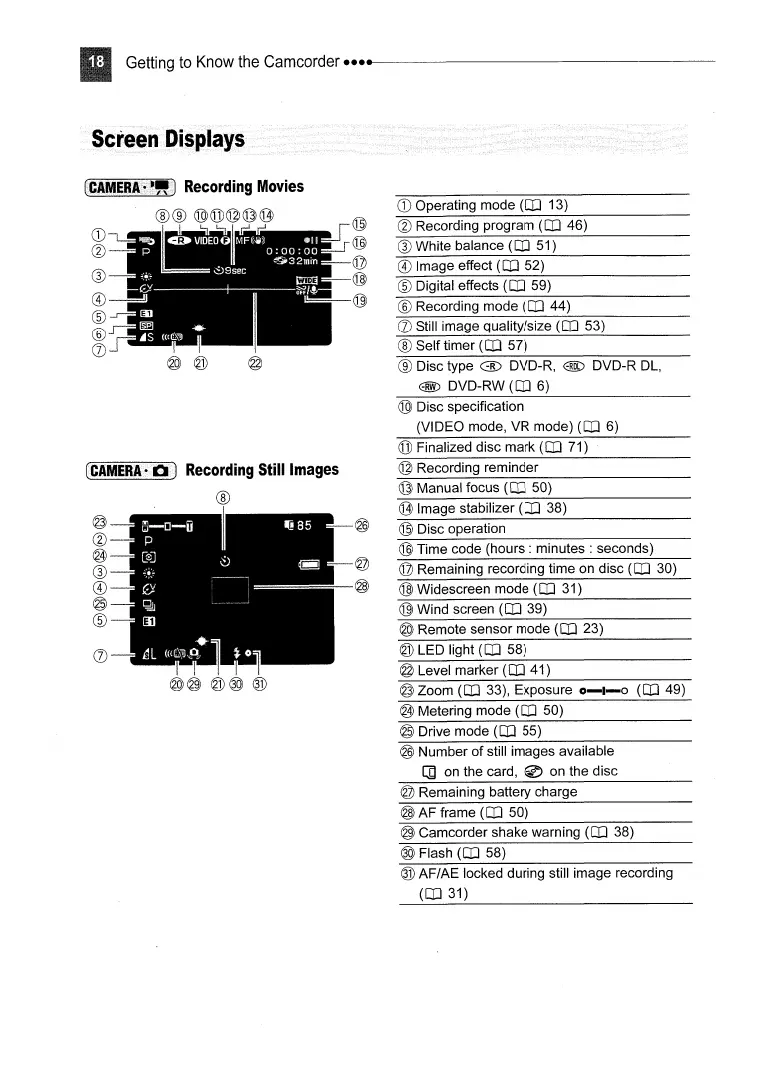
® Digital effects
(CD
59)
® Disc type @ DVD-R, @ DVD-R
DL,
@ DVD-RW
(CD
6)
® White balance
(CD
51)
® Image effect
(CD
52)
® Self timer
(CD
57)
@ Recording program
(CD
46)
® Recording mode
(CD
44)
CD
Operating mode
(CD
13)
(J)
Still image quality/size
(CD
53)
@
@
~~-==--@
@
®
CD
@._.
__
..
_-_
..
- •
®
®
®
®
(J)
LC.l\IIEBI.~~"J
Recording
Movies
®®
@@@@@
r.:
@ Disc specification
(VIDEO mode, VR mode)
(CD
6)
@ Finalized disc mark
(CD
71)
CCAMERAHlIlJ
Recording
Still
Images
®
@ Time code
(hours:
minutes : seconds)
@ Zoom
(CD
33), Exposure
0-1-0
(CD
49)
@ Metering mode
(CD
50)
® Wind screen
(CD
39)
@ Level marker
(CD
41)
@ LED light
(CD
58)
@ Remote sensor mode
(CD
23)
@ Remaining recording time on disc
(CD
30)
@ Widescreen mode
(CD
31)
@ Recording reminder
@ Image stabilizer
(CD
38)
@ Disc operation
@ Manual focus
(CD
50)
@
===--@
I
@@
@@
®
@~""_I!
@-
@
®
®
@
®
(J)
@ Drive mode
(CD
55)
@ Number of still images available
[]
on
the card, @ on the disc
@ Remaining battery charge
@ AF frame
(CD
50)
@ Camcorder shake warning
(CD
38)
@ Flash
(CD
58)
® AF/AE locked during still image recording
(CD
31)



 To Next Page