~~~~~~~~~~~~~~~~~~~
••••
Still
I~age
Recording
Options
-
»
a.
<
C),
:::J
(')
(1)
a.
'TI
s:::
:::J
(')
....
()"
:::J
en
• Default value
~
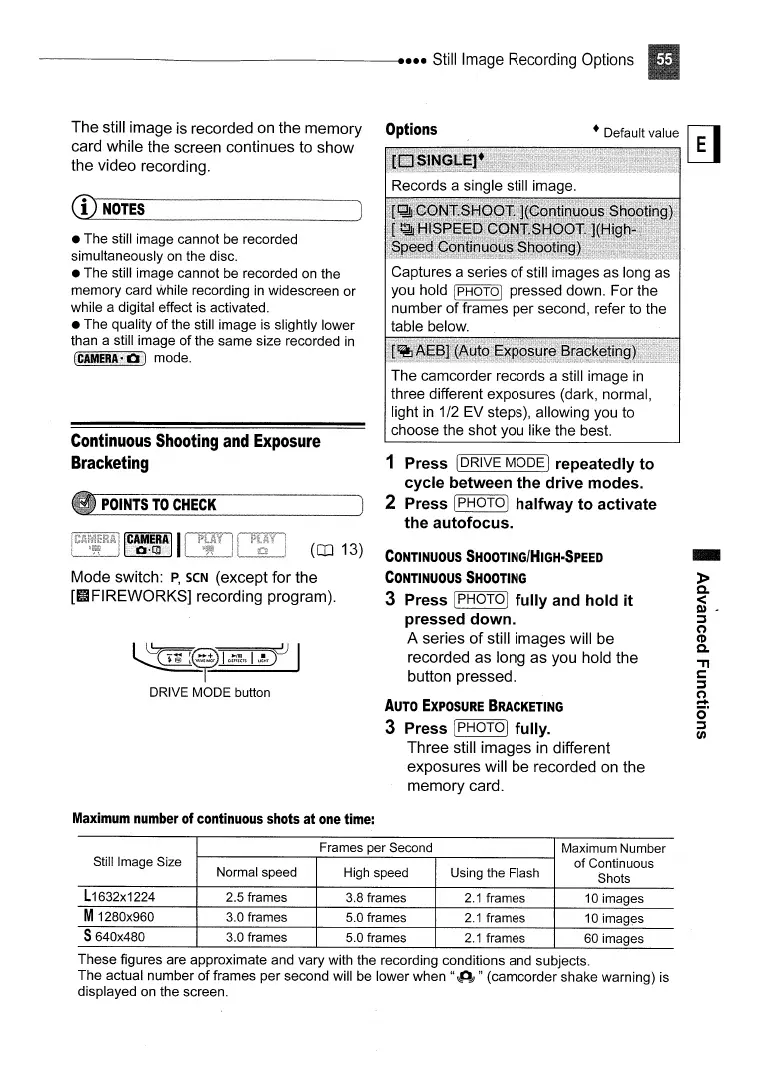
The camcorder records a still image
in
three different exposures (dark, normal,
light
in
1/2 EV steps), allowing you to
choose the shot you like the best.
CONTINUOUS
SHOOTING/HIGH-SPEED
CONTINUOUS
SHOOTING
3 Press [PHOTOI
fully
and
hold
it
pressed
down.
A series
of
still images will
be
recorded as long as you hold the
button pressed.
AUTO
EXPOSURE
BRACKETING
3 Press IPHOTOI fulIy.
Three still images
in
different
exposures will
be
recorded
on
the
memory card.
1 Press IDRIVE MODE I repeatedly
to
cycle
between
the
drive
modes.
2 Press IPHOTOI
halfway
to
activate
the
autofocus.
(CD
13)
~~~01
~~~
DRIVE MODE button
ICAM.ERAII
0-1.]
POINTS
TO
CHECK
Mode switch:
P,
seN (except for the
[IIFIREWORKS] recording program).
• The still image cannot be recorded
simultaneously on the disc.
• The still image cannot be recorded on the
memory card while recording
in
widescreen or
while a digital effect is activated.
•
The
quality
of
the still image is slightly lower
than a still image
of
the same size recorded
in
(CAMERJ~Di)
mode.
Continuous
Shooting
and
Exposure
Bracketing
The still image is recorded on the memory Options
card while the screen continues to show
the video recording.
CD
NOTES
Maximum
number
of
continuous
shots
at
one
time:
Frames per Second
Maximum Number
Still Image Size
of
Continuous
Normal speed High speed
Using the Flash
Shots
L1632x1224
2.5 frames 3.8 frames
2.1
frames
10 images
M1280x960
3.0 frames 5.0 frames
2.1
frames
10 images
S640x480 3.0 frames 5.0 frames
2.1
frames 60 images
These figures are approximate and vary with the recording conditions and subjects.
The actual number
of
frames per second will be lower when
"~Odl
" (camcorder shake warning) is
displayed on the screen.



 To Next Page