----------------------a
••••
Still Image Options
[FUNC.)
¢:J
IEXECUTE
[FUNC.]
¢I
¢OJ
CONVERT TO SCENE
.IJ,
«l!~~~!
J 0
Initializing the
memory
card
(OJ
70) will
permanently erase all recorded still images,
even the protected ones.
.....................................
_
.....
)
POINTS
TO
CHECK
Protecting
a
Single
Image
rUNe.
FUNC.
(OJ
27)
(OJ
13)
(OJ 13)
I
PLAY
I
Q.r:g
rUNe.
I
CAMERA
II
Q.Qj
IFUNC.) ¢ I
00FF
PROTECT
.IJ,
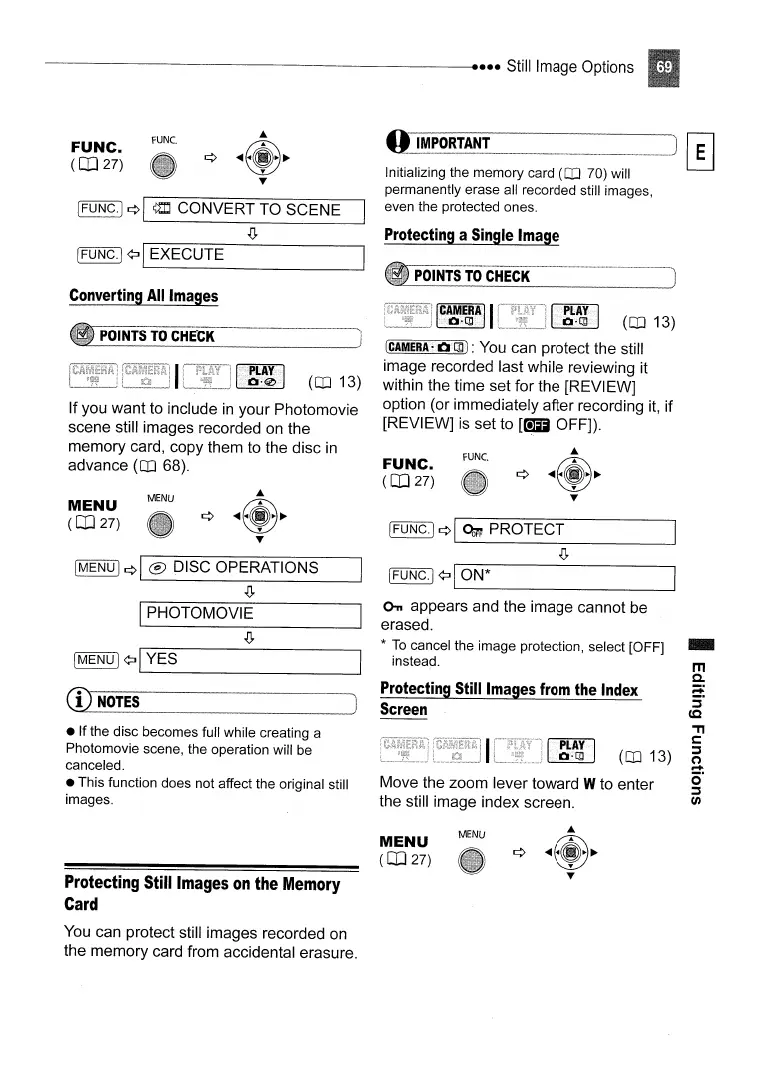
Move the zoom lever toward Wto enter
the still image index screen.
[FUNC.j
¢:JI_O_N_*
_
C>n
appears and the image cannot be
erased.
*
To
cancel the image protection, select [OFF]
instead.
Protecting
Still
Images
from
the
Index
Screen
FUNC.
(OJ
27)
(CAMERA'O£:Qj:
You can protect the still
image recorded last while reviewing it
within the time set for the [REVIEW]
option (or immediately after recording
it,
if
[REVIEW] is set to
[C+D
OFF]).
MENU
--_._-_
..
__
_-_
•.•.•..
_-._
_.
__
_--_
__
_
~_
- )
~_P_O_IN_TS_TO_C_H_E1_C_K
--->1
IMENUl
¢I
® DISC OPERATIONS
.IJ,
IPHOTOMOVIE
• If the disc becomes full while creating a
Photomovie scene, the operation will be
canceled.
• This function does not affect the original still
images.
(OJ 13)
If you want to include
in
your Photomovie
scene still images recorded on the
memory card, copy them to the disc
in
advance (OJ 68).
MENU
(OJ
27)
Converting
All
Images
~
¢:JI_Y_E_S
---I
CD
NOTES
Protecting
Still
Images
on
the
Memory
Card
You can protect still images recorded on
the memory card from accidental erasure.
MENU
(OJ
27)
MENU



 To Next Page