Still
I~age
Recording Options
•••••
~~~~~~~~~~~~~~~~~~
~
On
a
DVD·R
or
DVD·RW
disc
in
VIDEO
mode
~
On
a
DVD·R
DL
disc
in
VIDEO
mode
CD
NOTES
• Depending on the
number
of
images on the
memory
card
or
disc
(Windows: more than
1,800 images; Macintosh: more than 1,000
images), you
may
not be able to download
images to a computer. Try using a card reader
to download the still images recorded on the
memory
card.
• Connection to a PictBridge compatible printer
will not work when the
memory
card contains
more than 1,800 images. For best performance,
we
recommend to keep the
number
of
images
on the
memory
card
under
100.
~
On
a
DVD·RW
disc
in
VR
mode
(CD
13)
• Default value
rUNe.
FUNC.
(Q]27)
~
01
STILL
I.
REC
OFF·
Capturing
a Still
Image
while
Recording
Movies
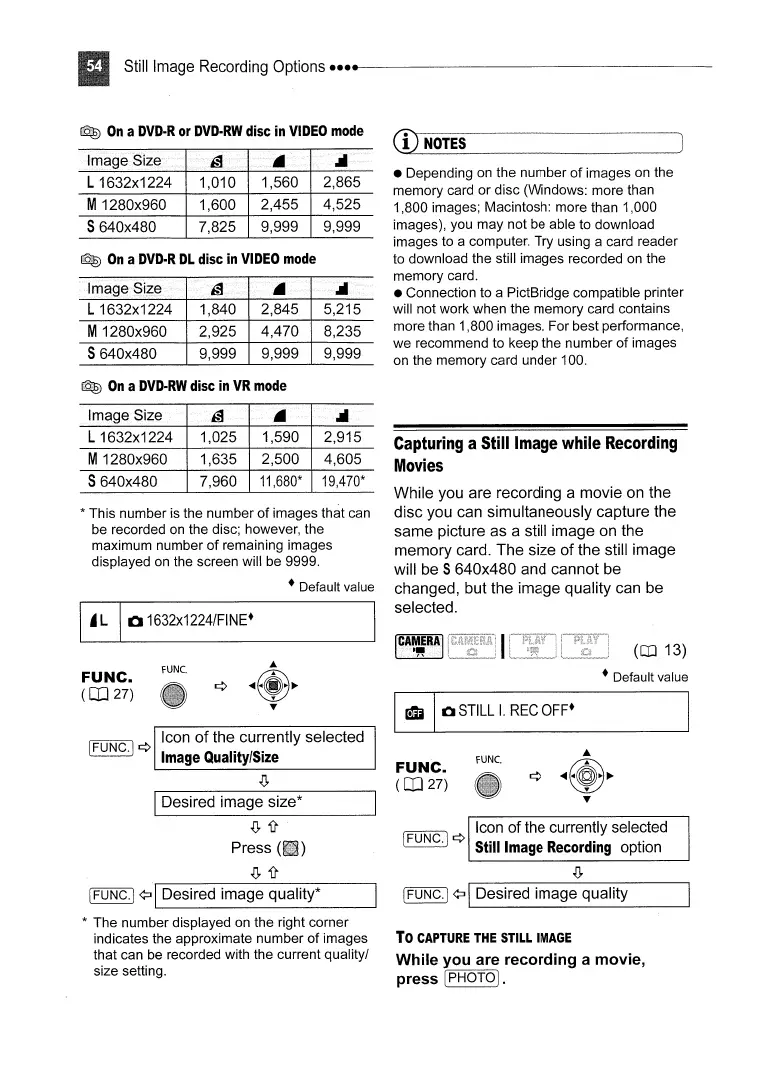
While you are recording a movie on the
disc you can simultaneously capture the
same picture as a still image on the
memory card. The size of the still image
will be
S 640x480 and cannot be
changed, but the image quality can be
selected.
I
CAMERA
I
."
4,605
2,915
19,470*
2,500
1,590
11,680*
7,960
1,635
1,025
rUNe.
Icon
of
the currently selected
Image
Quality/Size
IDesired image size*
S640x480
M1280x960
L 1632x1224
Image Size
FUNC.
(Q]27)
* This
number
is the
number
of
images that can
be recorded on the disc; however, the
maximum
number
of
remaining images
displayed on the screen will be 9999.
• Default value
EI
01632x1224/FINE·
.(J,i!
Press
.(J,i!
Icon of the currently selected
[FUNG.j ¢ Still
Image
Recording
option
.(J,
IFUNG.) ¢:J IDesired image quality*
*
The
number
displayed on the right corner
indicates the approximate
number
of
images
that can be recorded with the current quality/
size setting.
IFUNG.) ¢:J IDesired image quality
To
CAPTURE
THE
STILL
IMAGE
While you are recording a movie,
press·
(PHOTO
I.



 To Next Page