----------------------e
••••
Still Image Options
~~!~.!Q.
CHE~~.
J
[I
Cc
.......••..........
,"'.==1
(OJ 13)
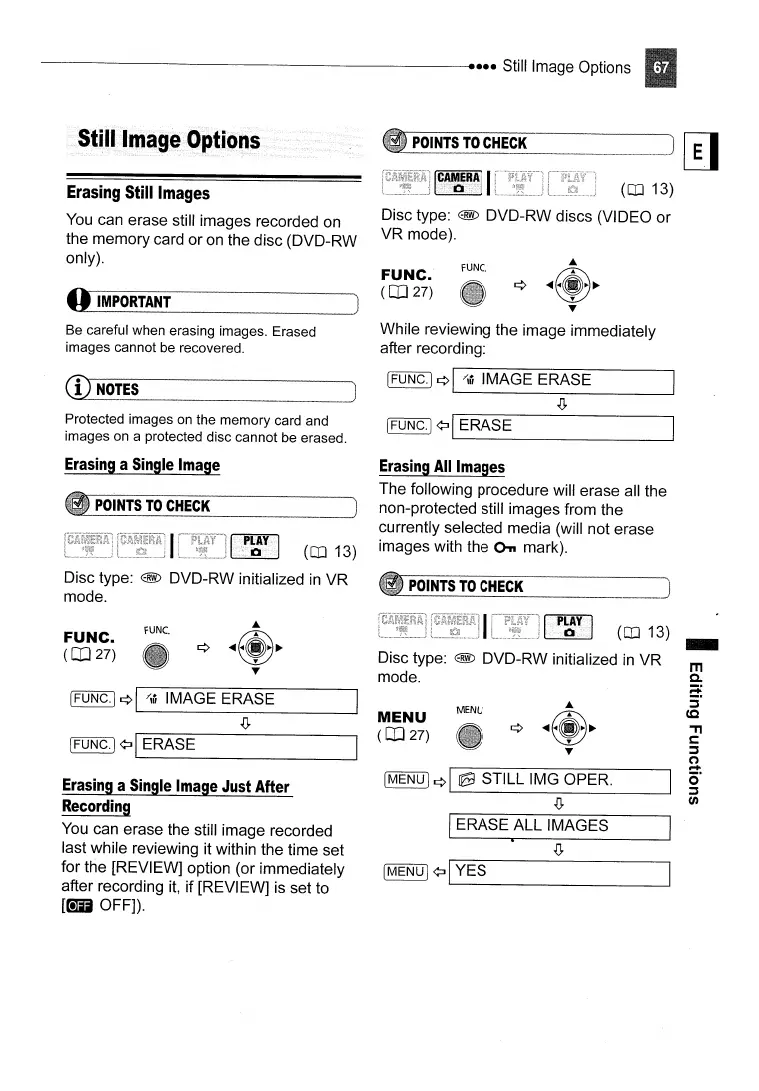
Disc type: @ DVD-RW discs (VIDEO
or
VR mode).
Erasing
Still
Images
You
can erase still images recorded on
the memory card or on the disc (DVD-RW
only).
o
IMPORTANT
FUNC.
(OJ
27)
FUNe.
Be careful when erasing images. Erased
images cannot
be
recovered.
CD
NO~ES
While reviewing the image immediately
after recording:
[FUNC.I
¢I
"tit
IMAGE ERASE
.!J,
Protected images
on
the memory card and
images on a protected disc cannot be erased.
[FUNG.j ¢:J
I_E_R_A_S_E
----l
Erasing
a
Single
Image
POINTS
TO
CHECK
Erasing
All
Images
The following procedure will erase all the
non-protected still images from the
currently selected media (will not erase
(OJ 13) images with the
On
mark).
m
Co
;::+
:i"
(Q
'TI
c:
:::s
(')
....
0"
:::s
(J)
(OJ 13) _
MENU
IERASE ALL IMAGES
~_P_OI_NT
__
S_T_O_C_H_EC_K
J
[MENUj
¢I
@9
STILL IMG OPER.
.!J,
Disc type: @ DVD-RW initialized
in
VR
mode.
MENU
(OJ
27)
FUNe.
IFUNG.] ¢:J
I'--E_R_A_S_E
_
[FUNG.j
¢I
"tit
IMAGE ERASE
.!J,
Disc type: @ DVD-RW initialized
in
VR
mode.
FUNC.
(OJ
27)
Erasing
a
Single
I
mage
Just
After
Recording
You
can erase the still image recorded
last while reviewing it within the time set
for the [REVIEW] option (or immediately
after recording it,
if
[REVIEW] is set to
[@1D
OFF]).



 To Next Page