~~~~~~~~~~~~~~~~~~
••••
Still
I~age
Recording
Options
-
»
c.
<
C)
•
:::s
C')
CD
C.
'TI
s::
:::s
C')
r+
o'
:::s
tA
55
90
.II
365
(QJ
13)
50
30
•
285
30
20
165
L 1632x1224
Image Size
S640x480
M1280x960
Qg
On
a
128
MB
memory
card
Selecting
the
Size
and
Quality
of
Still
Images
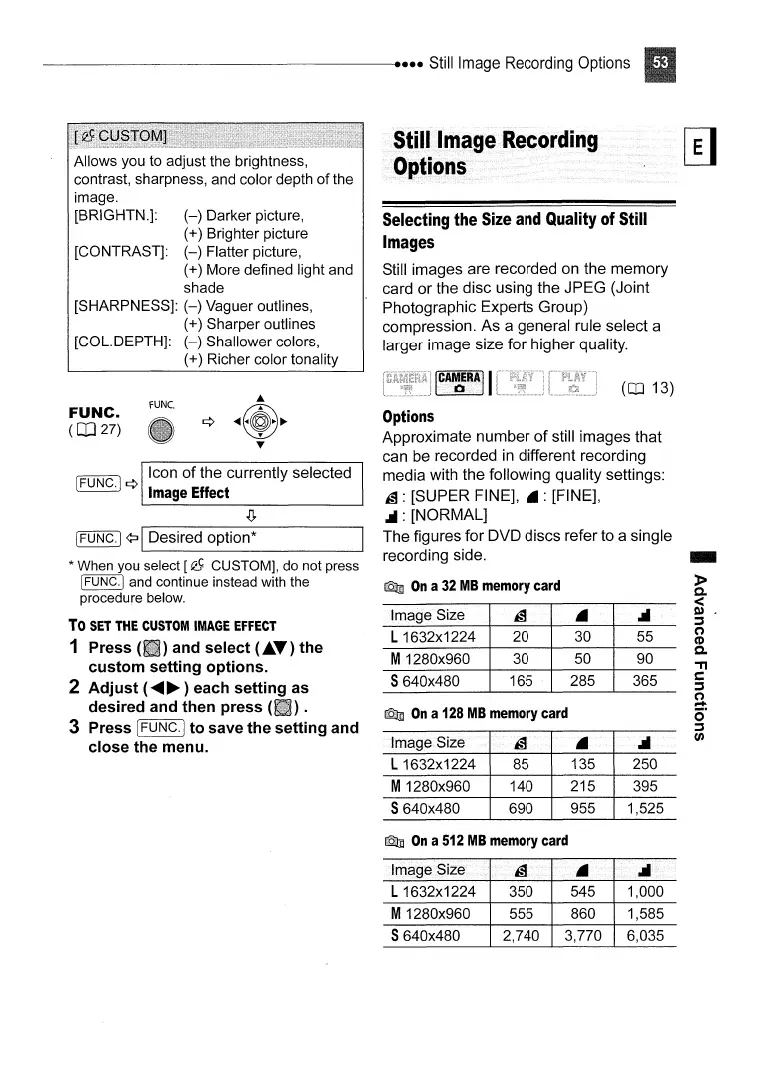
Still images are recorded on the memory
card or the disc using the JPEG (Joint
Photographic Experts Group)
compression. As a general rule select a
larger image size for higher quality.
IC~~~~II
Options
Approximate number
of
still images that
can be recorded
in
different recording
media with the following quality settings:
~ : [SUPER FINE],
.:
[FINE],
.II: [NORMAL]
The figures for DVD discs refer to a single
recording side.
Qg
On
a
32
MB
memory
card
fUNC.
Allows you to adjust the brightness,
contrast, sharpness, and color depth
of
the
image.
[BRIGHTN.]:
(-)
Darker picture,
(+) Brighter picture
[CONTRAST]:
(-)
Flatter picture,
(+) More defined light and
shade
[SHARPNESS]:
(-)
Vaguer outlines,
(+) Sharper outlines
[COL.DEPTH]:
(-)
Shallower colors,
(+) Richer color tonality
Icon
of
the currently selected
(FUNC.j ¢
Image
Effect
[FUNC·I
¢:J
IDesired option*
* When you select [Q) CUSTOM], do not press
[FUNC·I
and continue instead with the
procedure below.
To
SET
THE
CUSTOM
IMAGE
EFFECT
1 Press and select (
...
T)
the
custom setting options.
2 Adjust (
......
~
) each setting as
desired and then press (
).
3 Press [FUNC.j to save the setting and
close the men
u.
FUNC.
(CD
27)
Qg
On
a
512
MB
memory
card
L 1632x1224
350
545 1,000
M1280x960 555
860 1,585
S640x480 2,740
3,770
6,035



 To Next Page