Recording
•••••
---------------------------
Recording
Movies
Before
You
Begin
Recording
Make a test recording first to check if the
camcorder operates correctly. Since
recordings made
on
a DVD-R or DVD-R
DL disc cannot be deleted, we recommend
you use a DVD-RW disc to make the test
recordings.
ICAMERA]
IIJ'
(OJ
13)
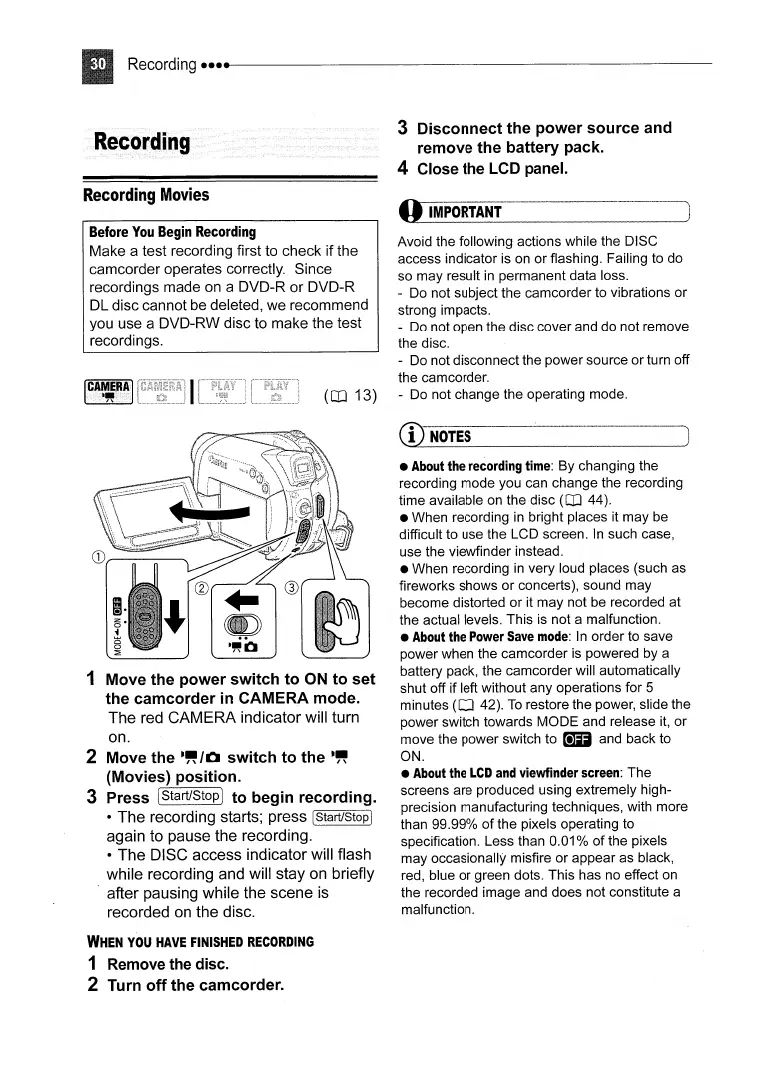
3
Disconnect
the
power
source
and
remove
the
battery pack.
4 Close the LCD panel.
OIMPORTANf·_
...
---·
...
_··_-_
...
·_-_
..
·
..
__
·_·_
.........
·-
..
~
Avoid the following actions while the DISC
access indicator is on
or
flashing. Failing to do
so
may
result
in
permanent data loss.
...
Do not subject the camcorder to vibrations
or
strong impacts.
- Do not open the disc cover and do not remove
the disc.
- Do not disconnect the power source
or
turn off
the camcorder.
- Do not change the operating mode.
1 Move
the
power
switch
to
ON
to
set
the
camcorder
in CAMERA mode.
The red CAMERA indicator will turn
on.
2 Move the
-"
/0
switch
to
the
-"
(Movies)
position.
3 Press IStart/StopI
to
begin recording.
• The recording starts; press [Start/Stop I
again to pause the recording.
• The DISC access indicator will flash
while recording and will stay on briefly
. after pausing while the scene is
recorded
on
the disc.
WHEN
YOU
HAVE
FINISHED
RECORDING
1 Remove the disc.
2 Turn
off
the camcorder.
CD--
..
----·--··--
..
-·--·~--_
....
·--
..
_-·_
..
-
...
-·---··-·
...
-----_
..
_----)
1
NOTES
•
About
the
recording
time:
By changing the
recording mode you can change the recording
time available on the disc
(OJ
44).
• When recording
in
bright places it may be
difficult to use the LCD screen.
In
such case,
use the viewfinder instead.
• When recording
in
very loud places (such as
fireworks shows
or
concerts), sound may
become distorted
or
it
may
not be recorded at
the actual levels. This is not a malfunction.
•
About
the
Power
Save
mode:
In
order to save
power when the camcorder is powered by a
battery pack, the camcorder will automatically
shut off if left without any operations for 5
minutes
(OJ
42).
To
restore the power, slide the
power switch towards
MODE
and release
it,
or
move the power switch to _ and back to
ON.
•
About
the
LCD
and
viewfinder
screen:
The
screens are produced using extremely high-
precision manufacturing techniques, with more
than 99.99%
of
the pixels operating to
specification. Less than 0.01 %
of
the pixels
may occasionally misfire
or
appear as black,
red, blue
or
green dots. This has no effect on
the recorded image and does not constitute a
malfunction.



 To Next Page