--------------------------
••••
Playback
Zooming
POINTS
TO
CHECK
(CO
13)
L~IMEcRI~!"):
In addition to the 10x optical
zoom, the 200x digital zoom is also
available
(CO
38).
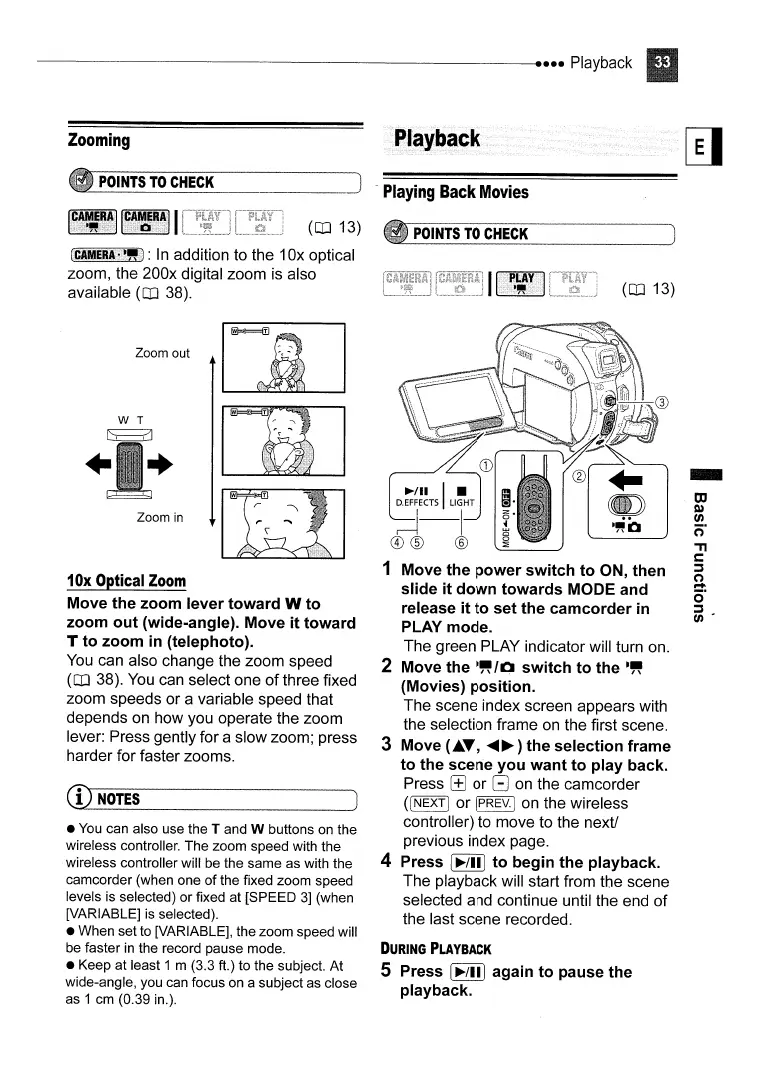
Zoom out
W T
~
+ +
Zoom
in
10x
Optical
Zoom
Move the zoom lever toward W to
zoom out (wide-angle). Move it toward
T to zoom
in
(telephoto).
You
can also change the zoom speed
(CO
38).
You
can select one
of
three fixed
zoom speeds or a variable speed that
depends on how you operate the zoom
lever: Press gently for a slow zoom; press
harder for faster zooms.
CD
NOTES
• You can also use the T and W buttons on the
wireless controller.
The
zoom speed with the
wireless controller will be the same as with the
camcorder (when one
of
the fixed zoom speed
levels is selected)
or
fixed at [SPEED
3]
(when
[VARIABLE] is selected).
• When set to [VARIABLE], the zoom speed will
be faster
in
the record pause mode.
• Keep
at
least 1 m (3.3 ft.) to the subject.
At
wide-angle, you can focus on a subject as close
as 1 cm (0.39 in.).
-
Playing
Back
Movies
POINTS
TO
CHECK
(CO
13)
~/II
I •
D.EFFECTS
LIGHT
.J--I
.~i:J
®®
®
1 Move the power switch to ON, then
slide it down towards MODE and
release it to set the camcorder
in
PLAY mode.
The green PLAY indicator will turn on.
2 Move the
·~/O
switch to the
.~
(Movies) position.
The scene index screen appears with
the selection frame on the first scene.
3 Move
(.T,
.....
~)
the selection frame
to the scene you want to play back.
Press
[±]
or G on the camcorder
(INEXTI
or IPREV.I on the wireless
controller) to move to the next!
previous index page.
4 Press
[~/III
to begin the playback.
The playback will start from the scene
selected and continue until the end of
the last scene recorded.
DURING
PLAYBACK
5 Press
[~/ill
again to pause the
playback.
-
OJ
Q)
fA
n·
'TI
c:
:::s
(')
....
Cr
:::s
fA'



 To Next Page