-------------------------------
........
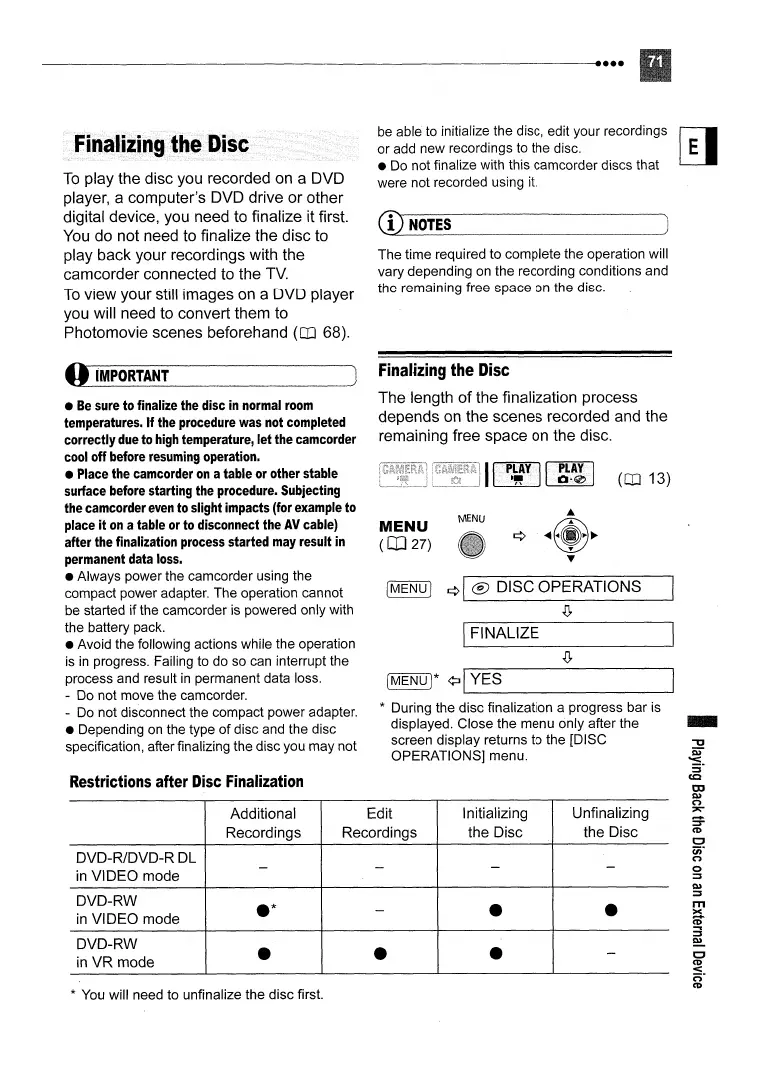
To
play the disc you recorded on a DVD
player, a computer's DVD drive or other
digital device, you need to finalize it first.
You
do not need to finalize the disc to
play back your recordings with the
camcorder connected to the
TV.
To
view your still images on a DVD player
you will need to convert them to
Photomovie scenes beforehand
(OJ 68).
be able to initialize the disc, edit your recordings
or add new recordings to the disc.
• Do not finalize with this camcorder discs that
were not recorded using
it.
CD
NOTES
The time required to complete the operation will
vary depending on the recording conditions and
the remaining free space on the disc.
Additional
Edit
Initializing Unfinalizing
Recordings
Recordings
the Disc the Disc
DVD-R/DVD-R
DL
in
VIDEO mode
- - -
-
DVD-RW
.*
in
VIDEO mode
-
•
•
DVD-RW
•
in
VR mode
•
•
-
-
(OJ 13)
MENU
MENU
(CO2?)
IFINALIZE
[MENU!
¢I
® DISC OPERATIONS
.[J,
[MENU)*
¢:II
YES
'--------------
* During the disc finalization a progress bar is
displayed. Close the menu only after the
screen display returns to the [DISC
OPERATIONS] menu.
Finalizing
the
Disc
The length
of
the finalization process
depends on the scenes recorded and the
remaining free space on the disc.
li
..
i~~iiiii.1
J
Restrictions after
Disc
Finalization
* You will need to unfinalize the disc first.
•
Be
sure
to finalize
the
disc
in
normal
room
temperatures.
If
the
procedure
was
not
completed
correctly
due
to
high
temperature,
let
the
camcorder
cool
off
before
resuming
operation.
•
Place
the
camcorder
on
atable
or
other stable
surface
before
starting
the
procedure.
Subjecting
the
camcorder
even
to slight impacts (for
example
to
place
it
on
a table
or
to
disconnect
the
AV
cable)
after
the
finalization
process
started
may
result
in
permanent
data
loss.
• Always power the camcorder using the
compact power adapter. The operation cannot
be started if the camcorder
is
powered only with
the battery pack.
• Avoid the following actions while the operation
is
in
progress. Failing to do so can interrupt the
process and result
in
permanent data loss.
- Do not move the camcorder.
- Do not disconnect the compact power adapter.
• Depending on the type
of
disc and the disc
specification, after finalizing the disc you may not
o
iMPORTANT



 To Next Page