Still Image Options
•••••
----------------------
IMENU]
¢I
~
STILL IMG OPER.
.(J,
I
..
On
PROTECT
.(J,
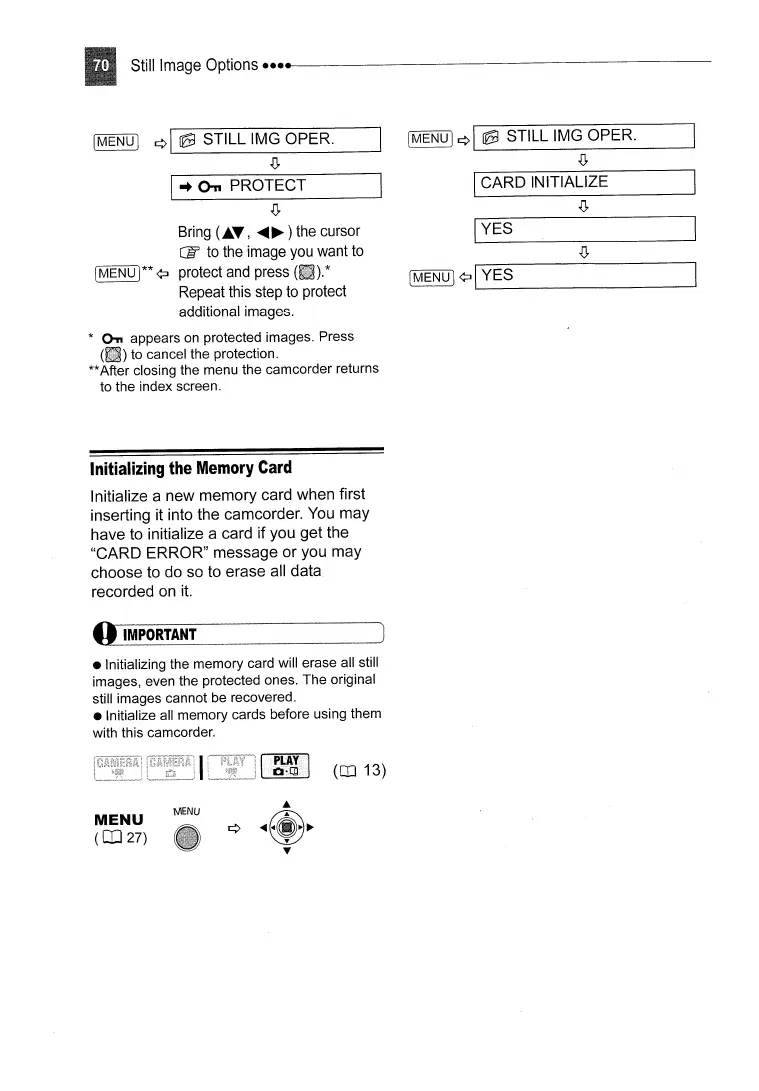
Bring
(1..
..
,
.....
~ ) the cursor
CIt
to
the image
you
want
to
[MENU
1**
¢:J protect
and
press
Repeat this step
to
protect
additional images.
*
On.
appears
on
protected images. Press
(iii)
to cancel the protection.
**After closing the menu the camcorder returns
to the index screen.
Initializing
the
Memory
Card
Initialize a new memory card when first
inserting it into the camcorder. You may
have to initialize a card if you
get
the
"CARD ERROR" message
or
you may
choose to do so to erase all data
recorded on
it.
{I
IMPORTANT
• Initializing the memory card will erase all still
images, even the protected ones. The original
still images cannot be recovered.
• Initialize all memory cards before using them
with this camcorder.
IMENU]
¢I
~
STILL IMG OPER.
.(J,
I
CARD
INITIALIZE
IYES
(MENU I¢:J
I'--Y_E_S
_
(OJ 13)
MENU
(CD
27)
MENU



 To Next Page