------------------------.
••••
First Time Settings
Setting
the
Date
and
Time
~
DATE/TIME SETUP
.(J,
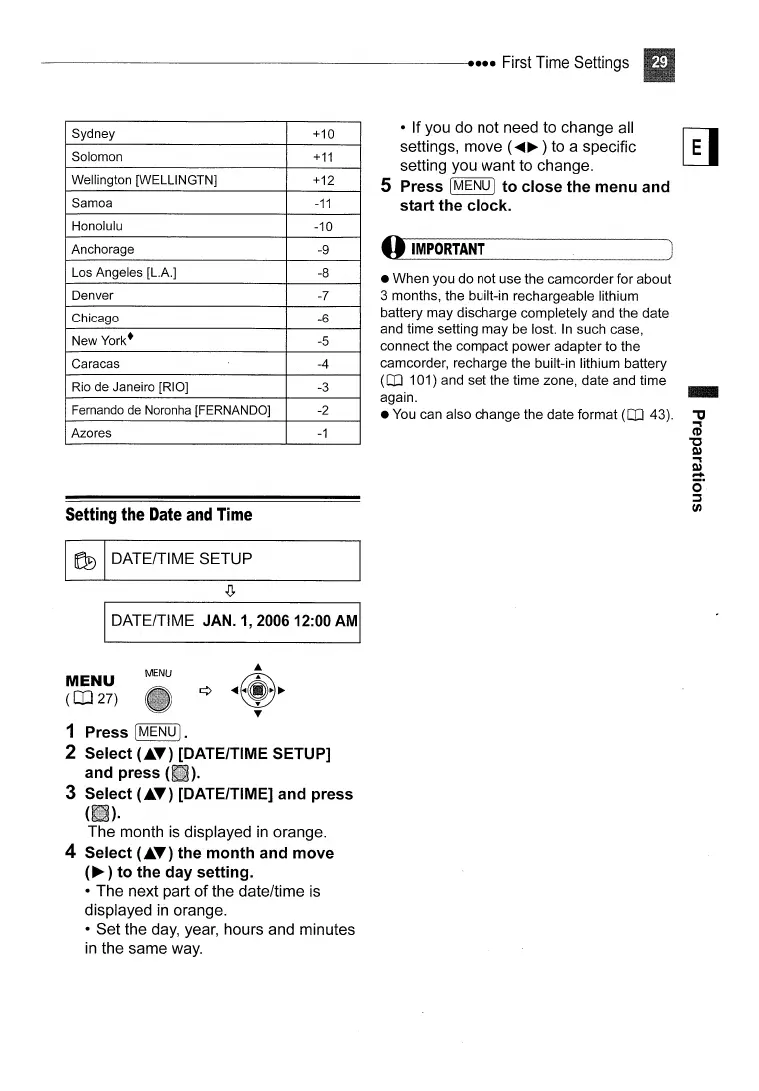
Sydney
+10
Solomon
+11
Wellington [WELLlNGTN]
+12
Samoa
-11
Honolulu
-10
Anchorage
-9
Los Angeles [L.A.] -8
Denver
-7
Chicago
-6
New
York·
-5
Caracas
-4
Rio
de
Janeiro [RIO] -3
Fernando de Noronha [FERNANDO]
-2
Azores
-1
• If you do not need to change all
r-;;-J
settings, move (
.....
~
) to a specific
l!.J
setting you want to change.
S Press I
MENU
I to close the menu and
start the clock.
o
IMPORTANT
• When you do not use the camcorder for about
3 months, the built-in rechargeable lithium
battery may discharge completely and the date
and time setting may be lost.
In
such case,
connect the compact power adapter to the
camcorder, recharge the built-in lithium battery
(CO
101) and set the time zone, date and time
again.
•
You
can also change the date format
(CO
43).
IDATE/TIME JAN.
1,
200612:00
AMI
MENU
(co
27)
MENU
1 Press
[MENU
I.
2 Select
(.~T)
[DATE/TIME SETUP]
and press
(iii).
3 Select
(.T)
[DATE/TIME] and press
{(ID·
The month
is
displayed
in
orange.
4 Select
(.T)
the month and move
(~
) to the
day
setting.
• The next part
of
the date/time is
displayed
in
orange.
• Set the day, year, hours and minutes
in
the same way.



 To Next Page