Recording ........
-------------------------
- Do not
disconnect
the
power
source
or
turn
off
the
camcorder.
-
Do
not
change
the
position
of
the
,~/O
switch
or
the
operating mode.
CD
NOTES
If
the
subject
is
not
suitable for autofocus, 0
turns yellow.
Keep
IPHOTOI
pressed
halfway
and
adjust
the
focus
manually
with
the
multi
selector (
....
~
).
Selecting
the
Media
for
the
Still
Images
You
can record still images
on
the
memory card or the disc. The default
media for still images
is
the memory card.
As long as you do not change the
recording destination, still images will be
recorded on the last selected media.
1 Press
[MENU].
2 Select
("T)
[SYSTEM SETUP] and
press
(liD.
3 Select
("T)
[MEDIA SEL.
0]
and
press (
).
4 Select
("T)
[DISC] or [CARD] and
press ( ) to save the setting and
close the menu.
When recording, the operating mode
symbol will change to
~
(DISC stills) or
Qg
(CARD stills), depending on the
media selected.
In
playback mode, the
operating mode symbol will change to
~
(DISC stills) or
~
(CARD stills),
respectively.
(CD
13)
MENU
fCA'gRAII
MENU
(OJ
27)
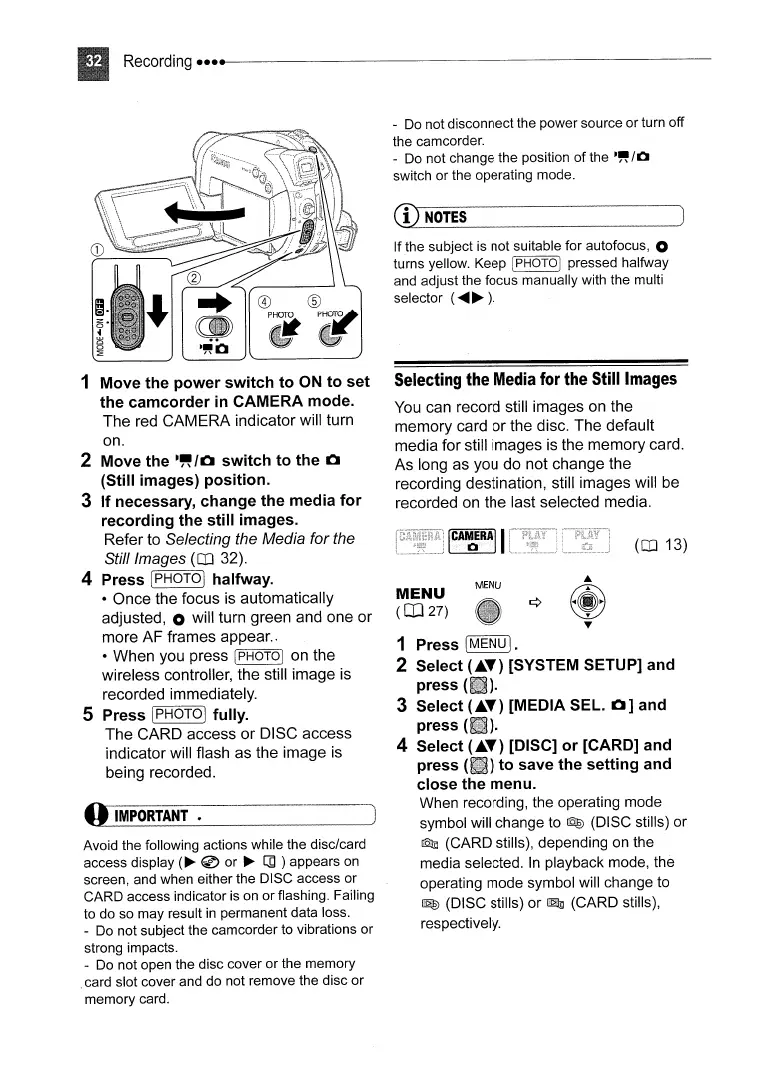
1 Move the power switch to
ON
to set
the camcorder
in
CAMERA mode.
The
red
CAMERA indicator will turn
on.
2 Move the
.~
10
switch to the 0
(Still images) position.
3 If necessary, change the media for
recording the still images.
Refer to Selecting the Media for the
Still Images
(CD
32).
4 Press (PHOTOj halfway.
• Once the focus is automatically
adjusted, 0 will turn green and one or
more AF frames appear..
• When you press
[PHOTOI on the
wireless controller, the still image
is
recorded immediately.
5 Press IPHOTO]
fu
lIy.
The CARD access or DISC access
indicator will flash as the image is
being recorded.
Avoid
the
following actions
while
the
disc/card
access
display
(~
@
or
~
[]
)
appears
on
screen, and
when
either
the
DISC
access
or
CARD
access
indicator is
on
or
flashing. Failing
to
do
so
may
result in
permanent
data loss.
-
Do
not
subject
the
camcorder
to
vibrations
or
strong impacts.
- Do
not
open
the
disc
cover
or
the
memory
.card slot
cover
and
do
not
remove
the
disc
or
memory
card.



 To Next Page