-----------------------__e
••••
Getting Started
Getting
Started
Preparing
the
Power
Supply
The camcorder can be powered with a
battery pack or directly using the compact
power adapter. Charge the battery pack
before use.
CHARGE
indicator
-~~~
em
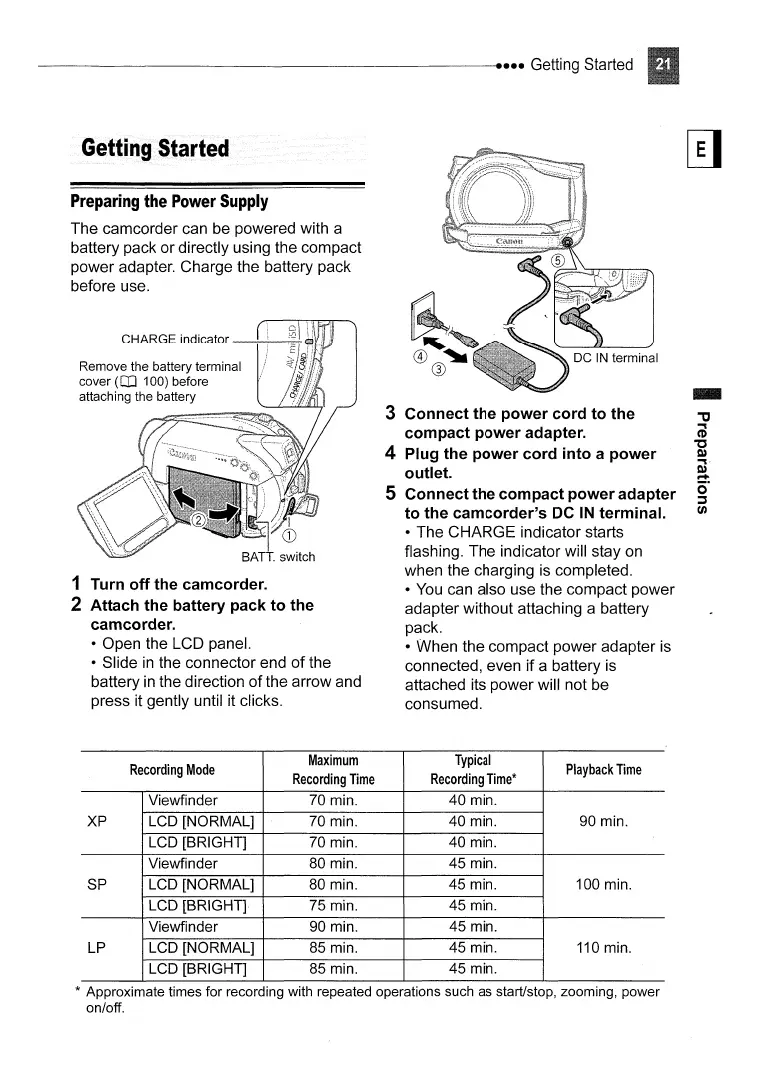
1 Turn off the camcorder.
2 Attach the battery pack to the
camcorder.
• Open the LCD panel.
• Slide
in
the connector end
of
the
battery
in
the direction
of
the arrow and
press it gently until it clicks.
3 Connect the power cord to the
compact power adapter.
4 Plug the power cord into a power
outlet.
S Connect the compact power adapter
to the camcorder's
DC
IN
terminal.
• The CHARGE indicator starts
flashing. The indicator will stay on
when the charging is completed.
•
You
can also use the compact power
adapter without attaching a battery
pack.
• When the compact power adapter is
connected, even if a battery is
attached its power will not be
consumed.
Recording
Mode
Maximum
Typical
Playback
Time
Recording
Time
Recording
Time*
Viewfinder
70 min. 40 min.
XP LCD [NORMAL]
70 min. 40 min. 90 min.
LCD [BRIGHT] 70 min.
40 min.
Viewfinder 80 min.
45 min.
SP
LCD [NORMAL]
80
min. 45 min. 100 min.
LCD [BRIGHT] 75 min.
45 min.
Viewfinder 90 min.
45 min.
LP LCD [NORMAL]
85 min.
45 min.
110
min.
LCD [BRIGHT] 85 min.
45 min.
* Approximate times for recording with repeated operations such as start/stop, zooming, power
on/off.



 To Next Page