ConnectingtoaTVorVCR
•••
~.~~~~~~~~~~~~~~~~~~~-
Connection
Diagrams
Open the terminal
cover to access
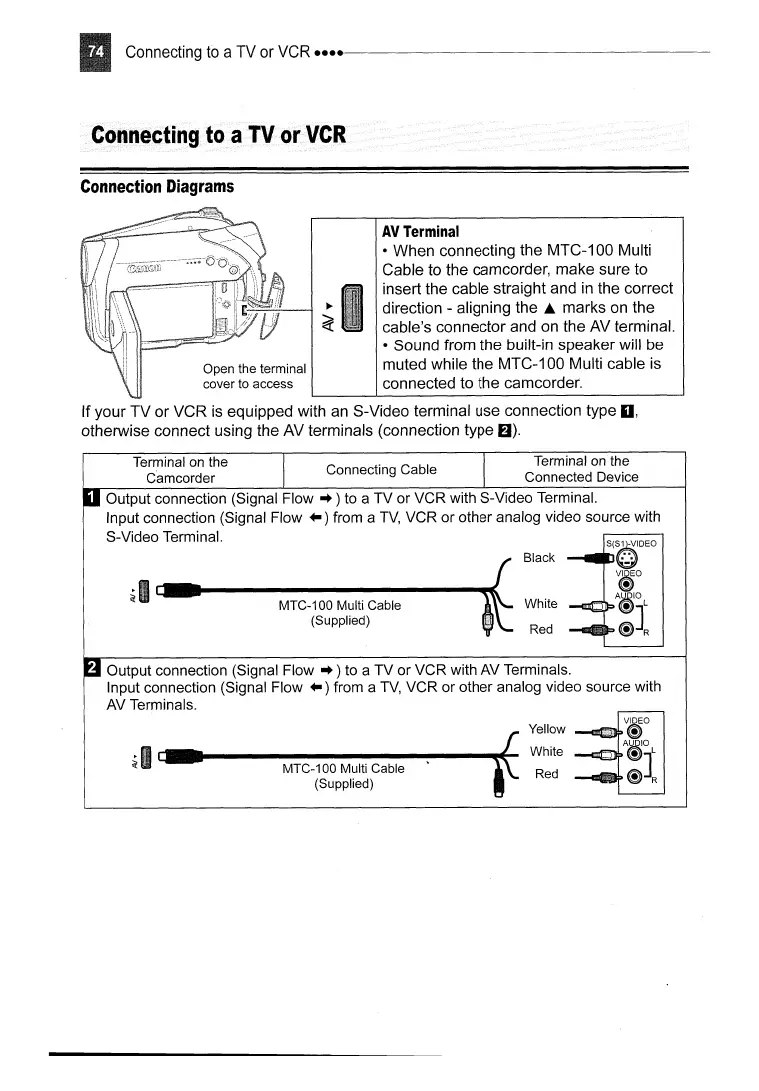
AVTerminal
• When connecting the MTC-100 Multi
Cable to the camcorder, make sure to
insert the cable straight and
in
the correct
direction - aligning
the.
marks
on
the
cable's connector and on the AV terminal.
• Sound from the built-in speaker will be
muted while the MTC-100 Multi cable
is
connected to the camcorder.
If your TV or VCR is equipped with
an
S-Video terminal use connection type
0,
otherwise connect using the AV terminals (connection type
6).
Terminal
on
the Terminal
on
the
C'amcorder Connecting Cable Connected Device
S(SQ-VIDEO
A
~
vMo
~
Aj;lgIO
~JL
~R
White
Red
Black
~I
c-._----------1IIIIIIIlt
MTC-100 Multi Cable
(Supplied)
Output connection (Signal
Flow"
) to a TV or VCR with S-Video Terminal.
Input connection (Signal Flow
..
) from a
TV,
VCR or other analog video source with
S-Video Terminal.
Output connection (Signal Flow
..
) to a TV or VCR with AV Terminals.
Input connection (Signal Flow
..
) from a
TV,
VCR or other analog video source with
AV Terminals.
~
I c:.·
...
----M-T-C--1-0-0-M-u-lt-j
C-a-b-le----
.....
fE-
(Supplied)
Yellow
White
Red



 To Next Page