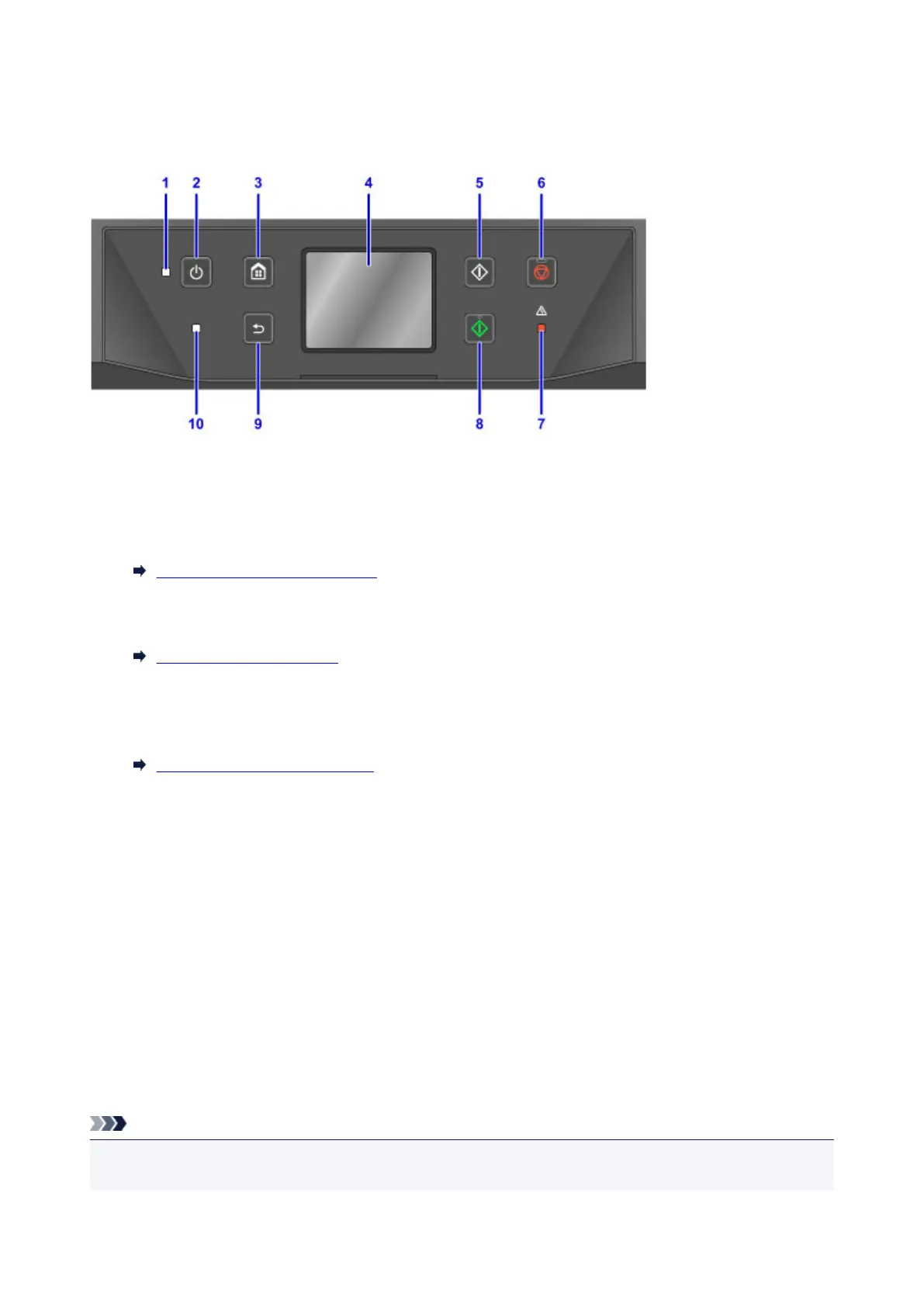
Operation Panel
* Here, all operation panel indicators are shown lit for the purpose of illustration.
(1) POWER lamp
Remains lit after flashing when the machine is turned on.
(2) ON button
Turns the machine on or off.
Turning the Machine On and Off
(3) HOME button
Used to display the HOME screen.
Using the Operation Panel
(4) touch screen
Displays messages, menu items, and operating status. Touch the screen lightly with your finger to
select a menu item or button.
Basic Touch Screen Operations
(5) Black button
Starts black-and-white copying, scanning, or faxing.
(6) Stop button
Cancels printing, copying, scanning, or faxing in progress.
(7) Alarm lamp
Lights up or flashes in case of errors.
(8) Color button
Starts color copying, scanning, or faxing.
(9) Back button
Returns to the previous screen.
(10) FAX Memory lamp
When lit, indicates that there are received or unsent documents in the machine's memory.
Note
• The machine beeps or plays alarm tones in response to touching button on the operation panel. You
can adjust the volume in Device user settings > Sound control.
266









 To Next Page