Sending Faxes by Entering Fax/Telephone Number
This section describes dialing and sending faxes directly by entering the fax/telephone numbers.
Important
• It may be possible that faxes will reach unintended recipients due to the misdialing or incorrect
registration of fax/telephone numbers. When you send important documents, we recommend that you
send them after speaking on the telephone.
Sending Fax after Speaking on Telephone
1.
Make sure that printer is turned on.
2.
Load documents on platen glass or in ADF.
Note
•
For details on the types, conditions of document, and how to load the document:
Loading Originals
3.
Flick HOME screen, and then tap FAX.
Using the Operation Panel
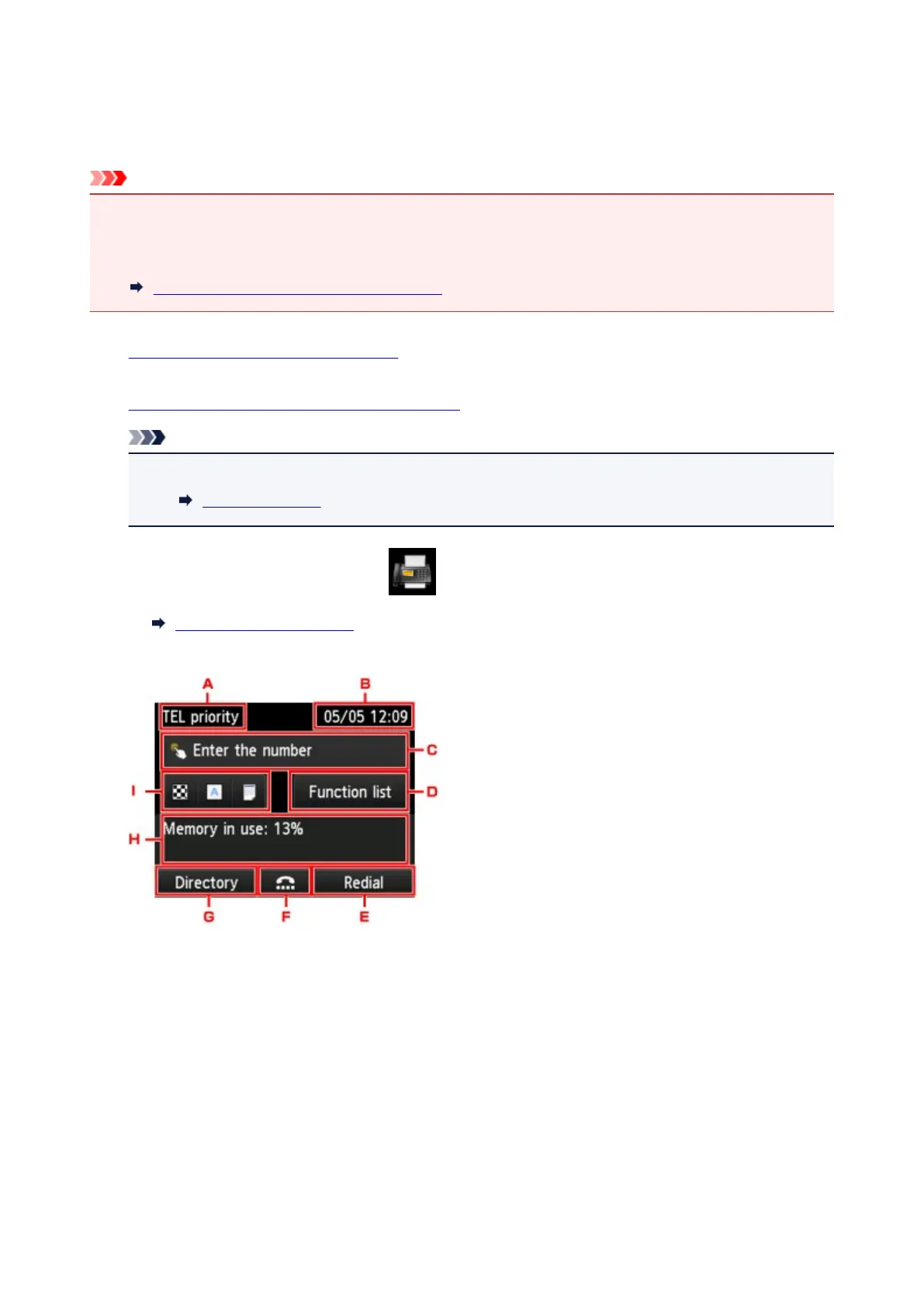
The Fax standby screen is displayed.
A.
Receive mode
The receive mode selected currently is displayed.
B.
Date and time
The date and time are displayed.
C.
Entry field of fax/telephone numbers
Tap to display the screen to enter the fax/telephone numbers.
D.
Function list
You can use the each fax function and change the setting for the fax.
940









 To Next Page