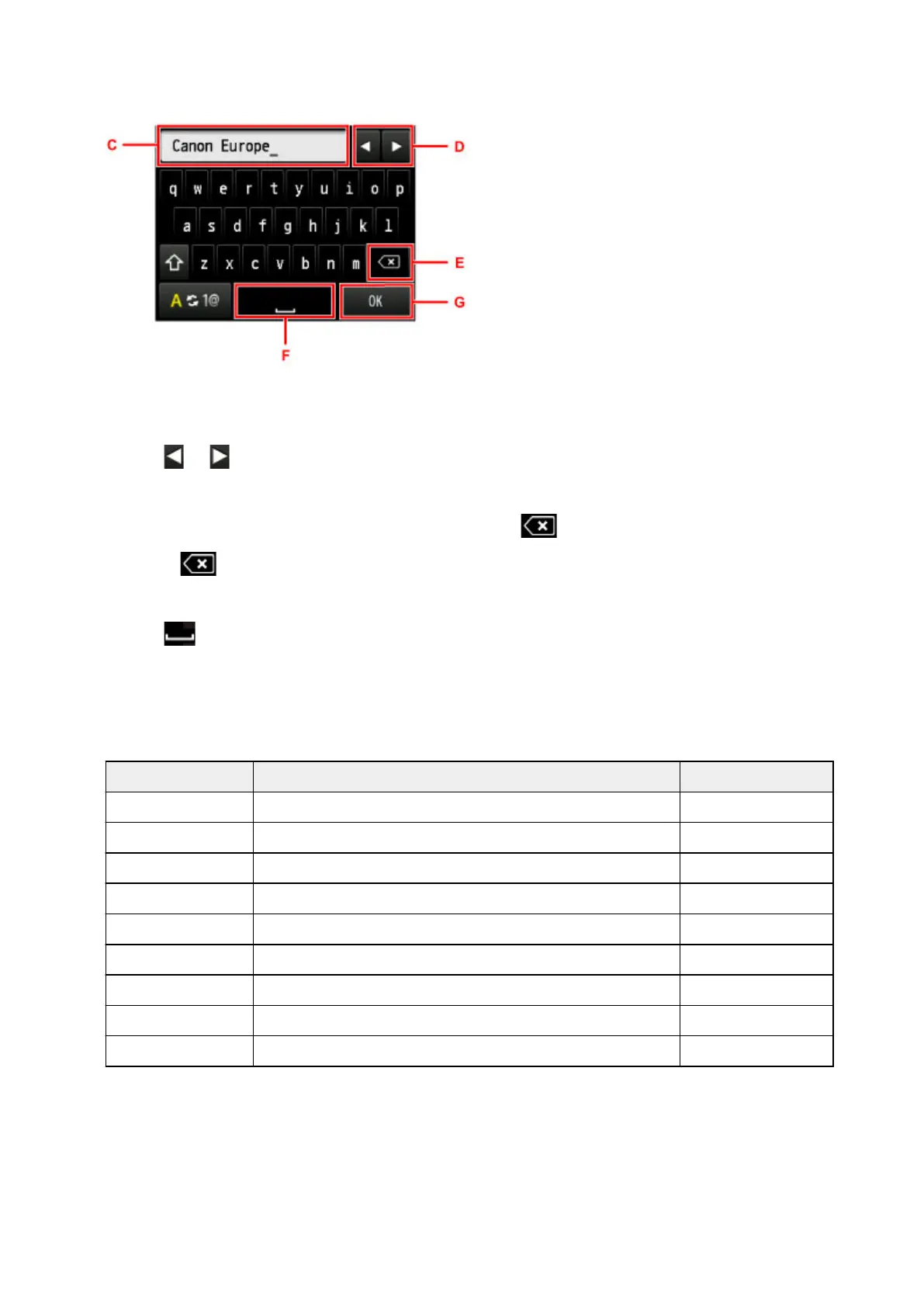
Entering or Editing Numbers, Letters, and Symbols
Enter information as follows.
• To move the insertion point (cursor position) in the input field (C)
Tap or (D).
• To delete an entered character
Move the cursor to the character to delete, and then tap (E).
Touch to keep deleting characters.
• To insert a space
Tap (F).
After you are finished entering information, tap OK (G).
Entering Letters With Accents or Diacritics
Tap the same key repeatedly until the desired character is displayed in the input field (C).
Key Lowercase Uppercase
a / A a å ä á à ã â æ A Å Ä Á À Ã Â Æ
c / C c ç C Ç
e / E e ë é è ê E Ë É È Ê
i / I i ï í ì î I Ï Í Ì Î
n / N n ñ N Ñ
o / O o ø ö ó ò õ ô O Ø Ö Ó Ò Õ Ô
p / P p þ P Þ
u / U u ü ú ù û U Ü Ú Ù Û
y / Y y ý Y Ý
279





 To Next Page