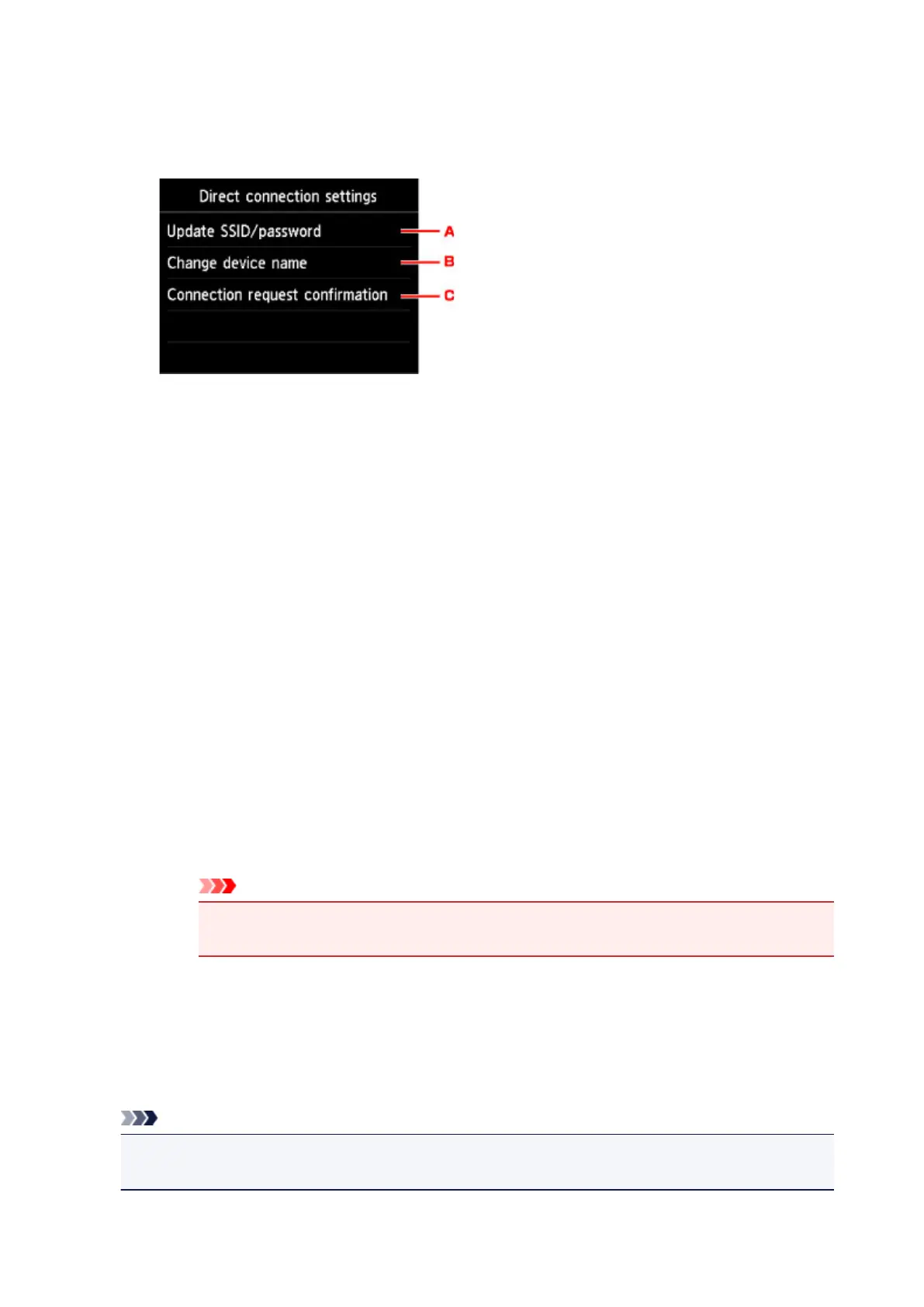
6. Tap Direct connection settings.
7. Change settings as necessary.
•
To update the identifier (SSID) and the password for direct connection
Tap A to display the confirmation screen. To update the identifier (SSID) and the password,
tap Yes.
To check the security setting and the updated password, tap Details and tap Yes on the
screen displayed next.
•
To change the printer's name displayed on the Wi-Fi Direct compatible device
Tap B to display the printer's name (device name) displayed on a Wi-Fi Direct compatible
device.
Follow the procedure below to change the name.
1. Tap touch screen.
2. Enter device name (up to 32 characters).
3. Tap OK to finish entering device name.
4.
Tap OK to finish specifying device name.
• To change the confirmation screen setting when a Wi-Fi Direct compatible device is
connecting to the printer
Tap C to display the confirmation screen. If you want the printer to display the screen to inform
you a Wi-Fi direct compatible device is connecting to the printer, tap Yes.
Important
•
To prevent an unauthorized access, we recommend you should not change the setting
from the default.
When you finished performing the settings, the printer returns to the Direct connection settings
screen.
8. Press HOME button.
The HOME screen is displayed.
Note
• If you change the direct connection setting of the printer, also change the wireless router setting of
the device.
614


 To Next Page
 Loading...






