SECTION 25 - FRONT AXLES 131
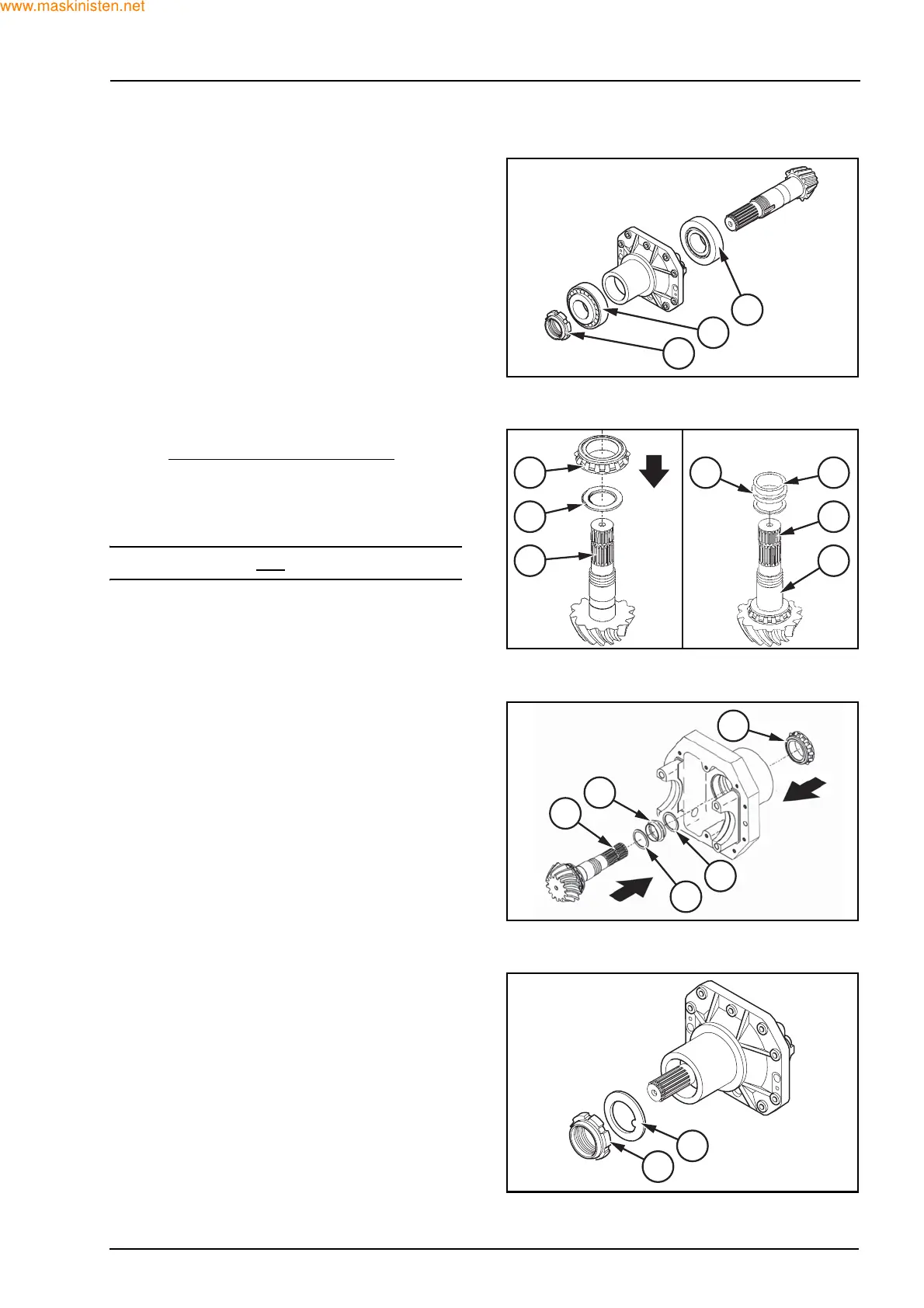
Remove the “false differential box” special tool from
the differential supports (7).
Remove the ring nut (10), the “false pinion” and the
bearing (3) and (8).
Once you have chosen and inserted the suitable
shim (2) with the chamfer against the gear
, force the
bearing (3) into the pinion shaft (1) with the special
tool 380002224 under a press, making sure that it is
well set.
Insert the shims (4) and (6) and a new spacer (5).
NOTE: use always a new spacer (5).
Insert the pinion assy (1) into the differential support
housing (7) and the bearing (8).
In order to force the bearing (8) into position, use the
special tool 380002224 and a hammer.
It is advisable to offer resistance, for example a
sledge, to the beating force.
Insert the washer (9) and screw in a new ring nut
(10) on the pinion.
F28109
8
10
3
F27334
3 5
2
1
6
4
1
F28112
6
4
5
8
1
F27463
9
10



 To Next Page