Programmable DC Electronic Load 63600 Series Operation & Programming Manual
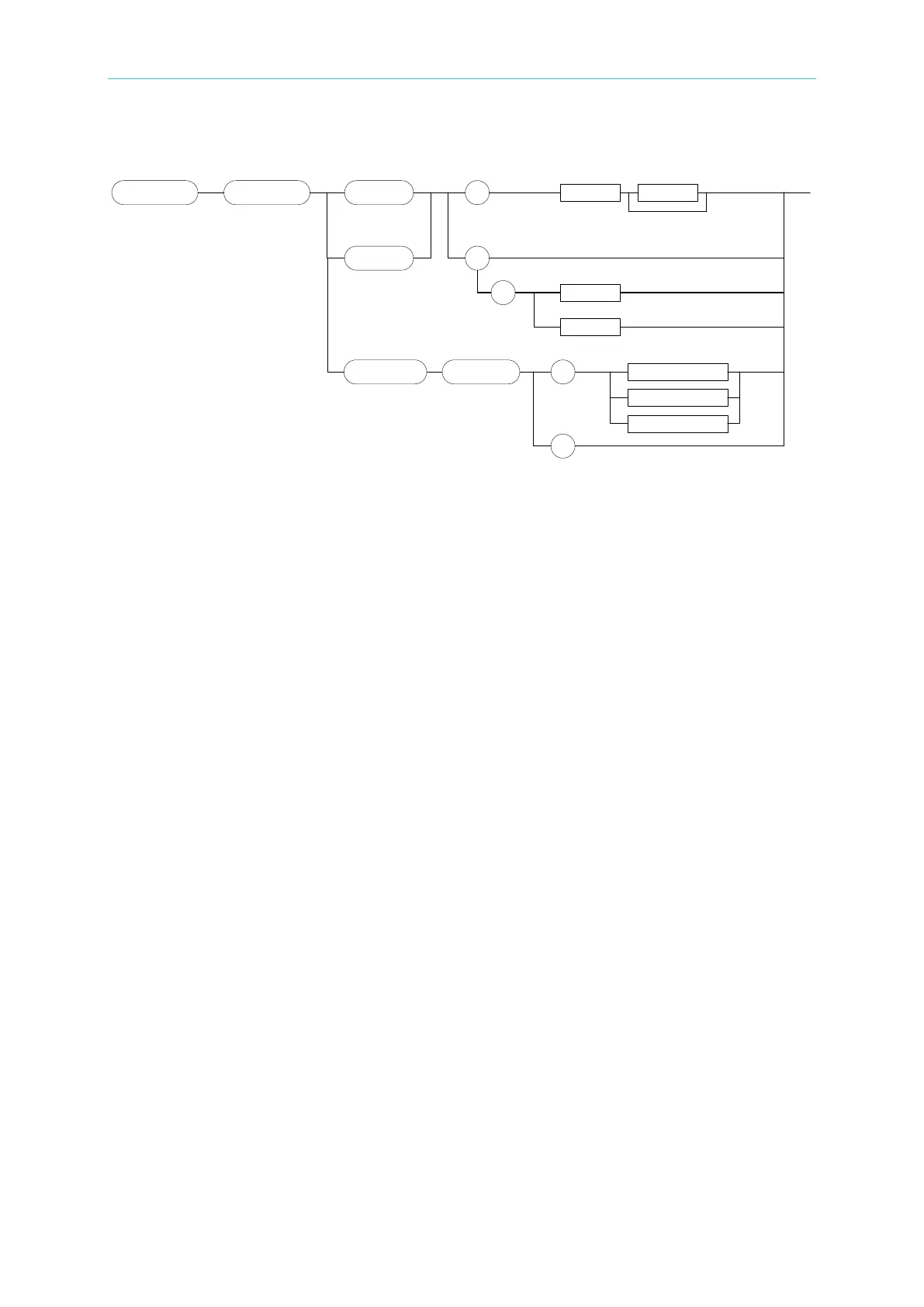
5.3.2.14 RESISTANCE Subsystem
:STATic
:L2
:L1
SP
<NRf+>
?
SP
MAX
MIN
<NR2>
Suffix
<NR2>
<NR2>
:RESistance
:CURRent
:RANGe
SP
?
LOW / L / 0
MIDDLE / M / 1
HIGH / H / 2
<CRD>
RESistance:STATic:L1
Type: Channel-Specific
Description: Set static resistance level for constant resistance mode.
Setting Syntax: RESistance:STATic:L1<space><NRf+>[suffix]
Setting Parameters:Refer to respective specification for valid value range.
Setting Example: RES:STAT:L1 20 Set constant resistance = 20Ω
for Load L1.
RES:STAT:L1 10 OHM Set constant resistance = 10Ω
for Load L1.
RES:STAT:L1 MAX Set constant resistance = maximum
value for Load L1.
RES:STAT:L1 MIN Set constant resistance = minimum
value for Load L1.
Query Syntax: RESistance:STATic:L1?[<space><MAX | MIN>]
Return Parameters:<NR2>, [Unit = OHM]
Query Example: RES:STAT:L1?
RES:STAT:L1? MAX
RES:STAT:L1? MIN
RESistance:STATic:L2
Type: Channel-Specific
Description: Set static resistance level for constant resistance mode.
Setting Syntax: RESistance:STATic:L2<space><NRf+>[suffix]
Setting Parameters:Refer to respective specification for valid value range.
Setting Example: RES:STAT:L2 20 Set constant resistance = 20Ω
for Load L2.
RES:STAT:L2 10 OHM Set constant resistance = 10Ω
for Load L2.
RES:STAT:L2 MAX Set constant resistance = maximum
value for Load L2.
RES:STAT:L2 MIN Set constant resistance = minimum
value for Load L2.
Query Syntax: RESistance:STATic:L2?[<space><MAX | MIN>]
Return Parameters:<NR2>, [Unit = OHM]
Query Example: RES:STAT:L2?
RES:STAT:L2? MAX






 To Next Page