000 299 119 5 - BA ROLLANT 240 - 250 - 254 - 255 10.4.1
Control Terminal
COUNTER
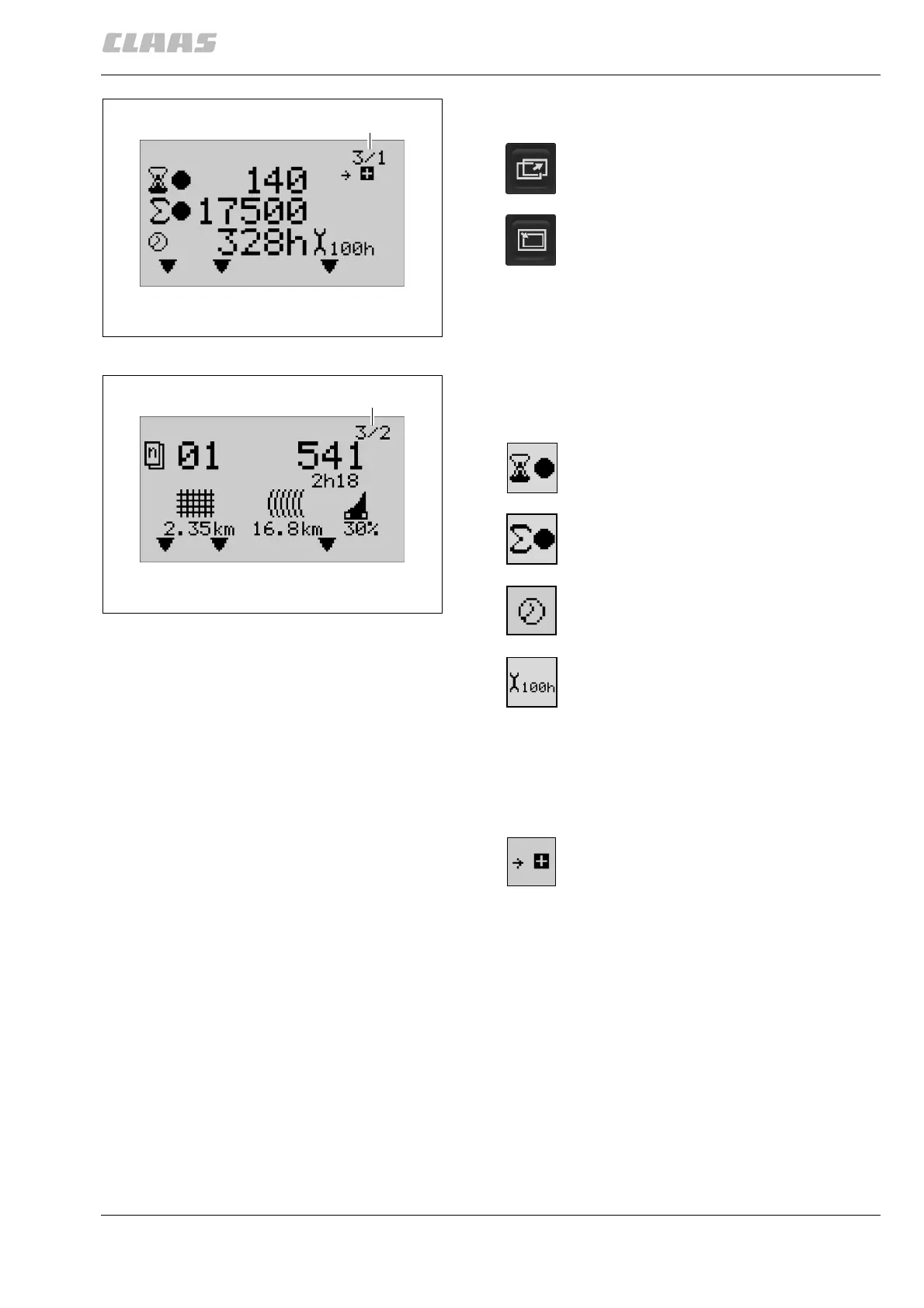
Check the menu desired on the menu display (F).
Daily and overall counter
The counter menu shows the following data:
(Fig. 1, 2)
F
200415
1
Press this key as many times as needed
until the counter menu display appears.
Press this key to switch between submenu
3/1, “Daily and overall counter”, (Fig. 1),
and submenu 3/2, “Special counter”, (Fig.
2).
F
200416
2
Daily counter: number of bales produced
(can be reset to zero)
Overall counter: total number of bales
produced (cannot be reset)
Overall counter: Number of operating hours
(cannot be reset)
Maintenance display:
Maintenance intervals of 5 h, 10 h, 50 h or
100 h are displayed when due.
Carry out necessary maintenance work:
see Operator’s Manual, sections
“Maintenance” and “Lubrication chart”. After
maintenance, see “Reset maintenance
display”.
Press (+) to open the “Reset daily counter”
menu.
Control Terminal


 To Next Page
 Loading...