11.1.6 BA ROLLANT 240 - 250 - 254 - 255 - 000 299 119 5
CLAAS COMMUNICATOR
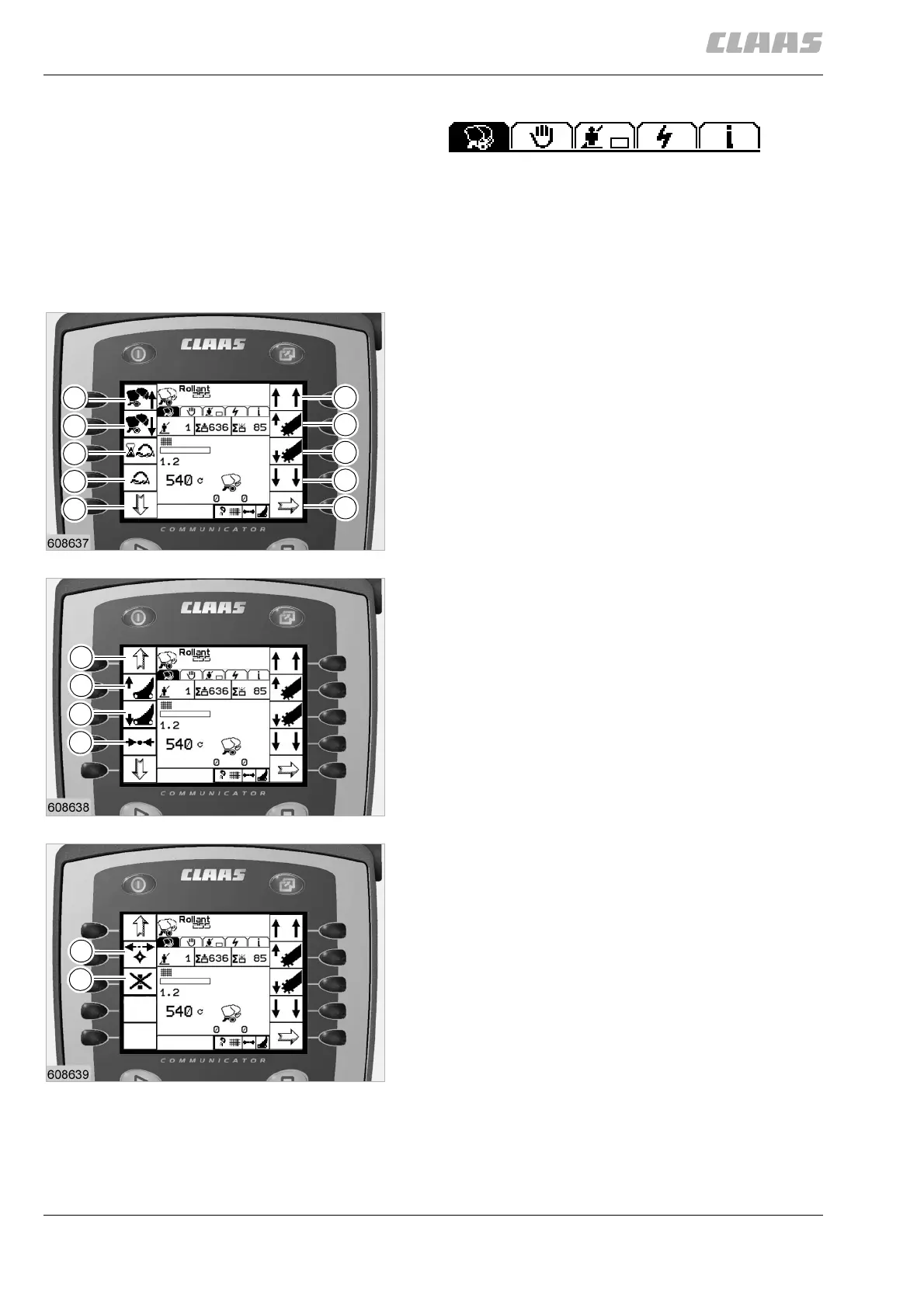
Application menu
The application menu complies with the basic menu,
which is displayed while working with the baler. The
application menu includes 12 work functions.
The work functions are displayed in the right and left
part of the display.
Work functions
1. Lift pick-up to end position
2. Lift the pick-up
3. Lower pick-up
4. Lower pick-up to end position; pick-up oscillating
5. To the next menu (»Setup menu«)
6. Open tailgate
7. Close the tailgate
8. Delaying wrapping
9. Manual tying
10. Access to preceding work functions
11. Access to previous work functions
12. Activate cutting unit
13. Deactivate the cutting unit
14. Reloading the pressure manually / reloading the
pressure automatically starting with the first bale
15. Turn rotor back
16. Fault deletion
(Fig.6,7,8)
6
2
4
5
3
6
7
9
10
8
4
1
11
13
14
12
7
15
16
8


 To Next Page
 Loading...