5.5 Setting the matrix type
The Eclipse HX-Median, Eclipse HX-Omega and Eclipse HX-Delta matrices run common
software, which means that when you upgrade the application code for the CPU card, the
CPU card cannot automatically distinguish between the two matrix types. You must
therefore set the matrix type in EHX.
Note: The Eclipse HX-PiCo runs its own matrix-specific software, and will always identify itself
as an Eclipse HX-PiCo on hardware discovery. There is therefore no requirement to set
the matrix type for the Eclipse HX-PiCo.
To set the matrix type:
1) In EHX, select Diagnostics > Event Log.
2) In the Matrix Event Log tab, Click the Play icon [ ].
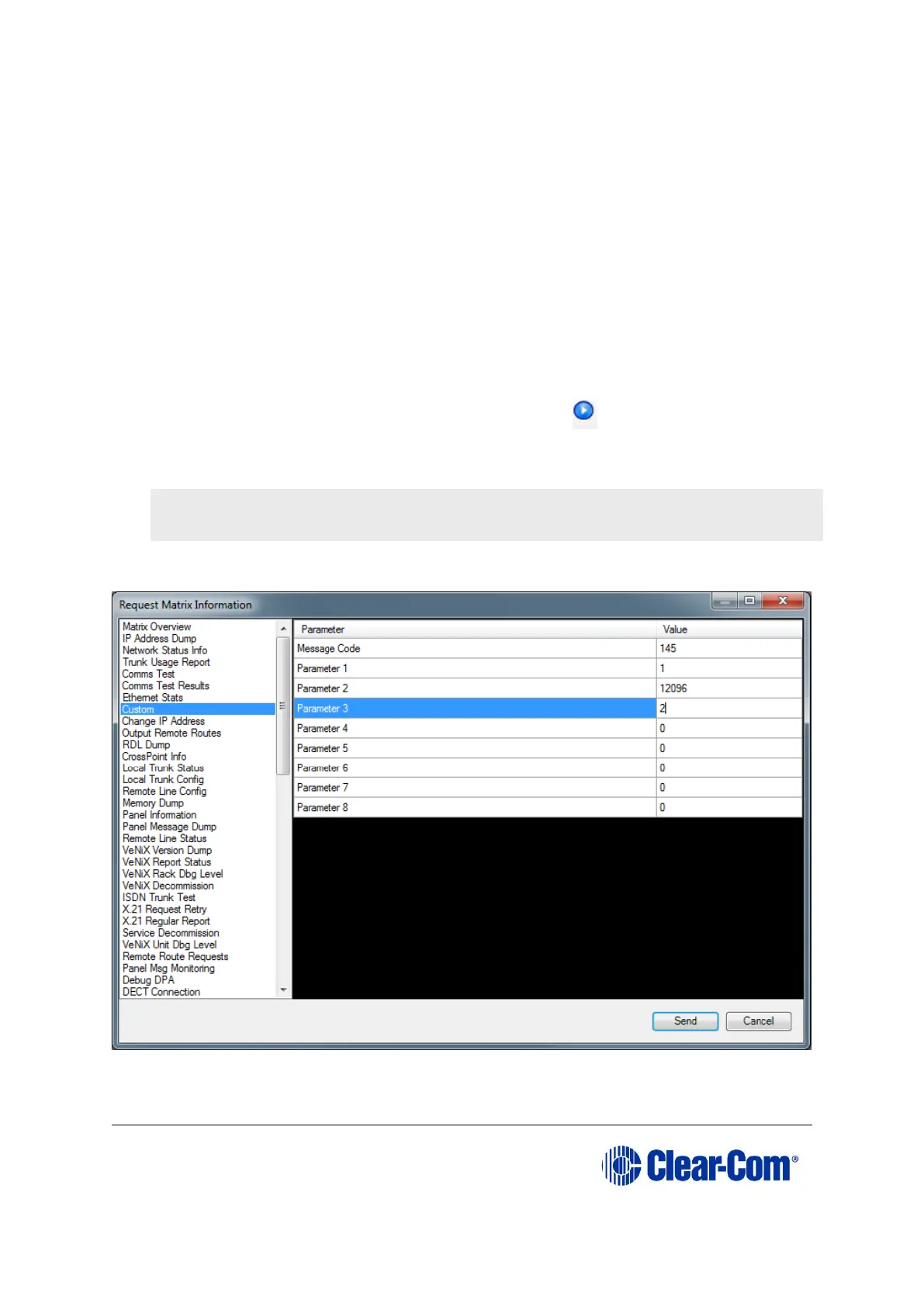
3) Click Request info. In the dialog (see Figure 5-12: Setting the matrix type),
enter the following custom command:
Custom 145.1.12096. <2 == Eclipse HX-Median, 3 == Eclipse HX-Omega,
4 == Eclipse HX-Delta>
Click Send.
Figure 5-12: Setting the matrix type
Note: If the Event Log does not display, stop and restart the EHX software.



 To Next Page