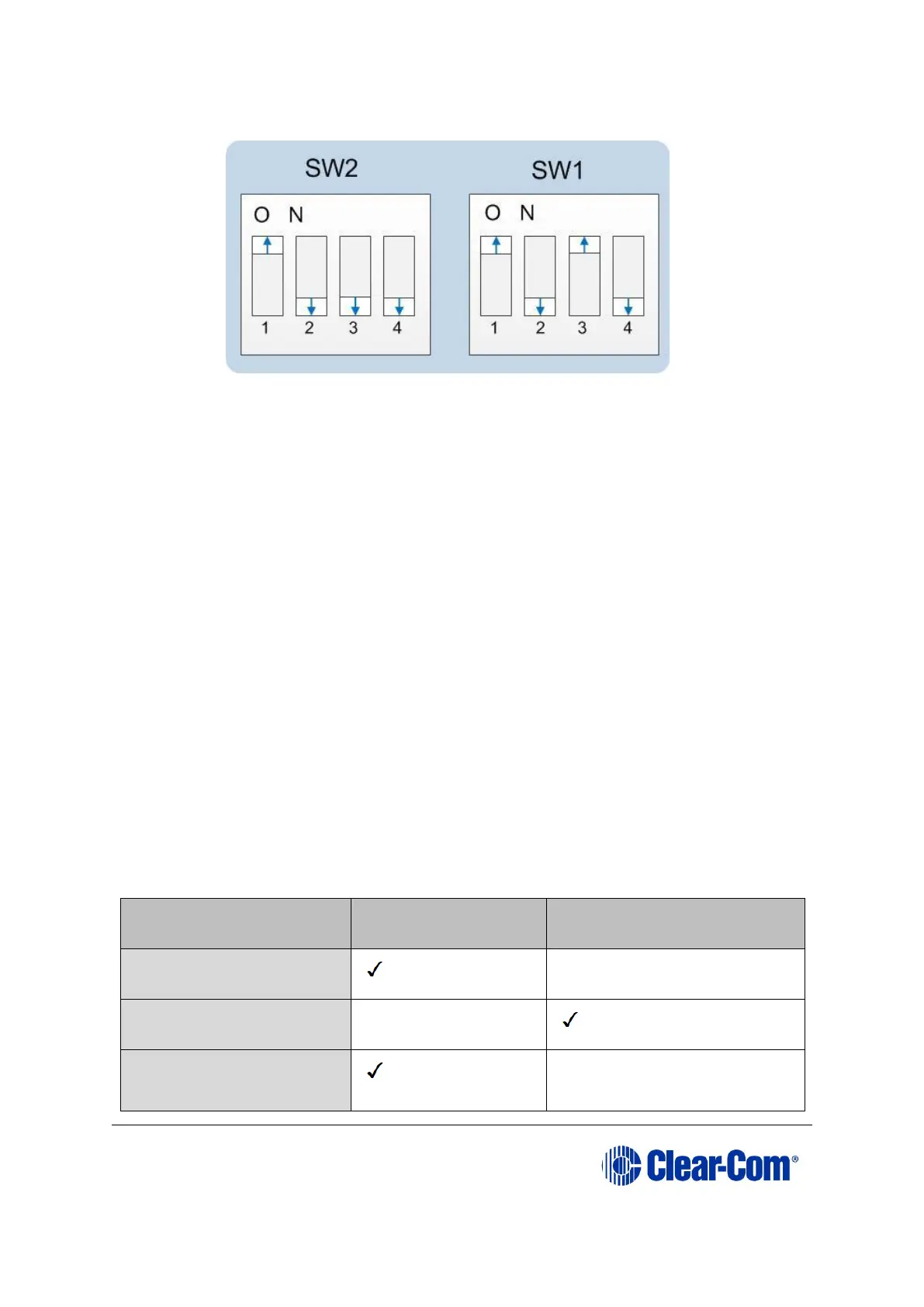
e. Set the DIP switches to normal running mode (watchdogs enabled):
Figure 6-12: DIP switches set to normal running mode (watchdogs enabled)
f. Power cycle the Eclipse HX-PiCo so the DIP switch changes come into
effect.
Note: If the download fails the matrix OK LED displays a long flash/ off rate. Tera Term does
not indicate a failure onscreen and continues to download.
In this case, re-erase the matrix by placing the SW1 and SW2 into Test mode and
repeating the steps that follow. Check your cabling.
6.4 Upgrading the Eclipse HX-PiCo MVX code
The Eclipse HX-PiCo has two MVX cards (or sections) on the same PCB, both of which
require upgrading.
If you are upgrading from ECS v5.2.5, Clear-Com recommends upgrading the Eclipse
HX-PiCo with the combined MVX boot and application code file (*.mot), using the
Renesas Flash Development Tool (FDT).
If you are upgrading an existing Eclipse HX installation, you can upgrade:
• The MVX application code separately (*.fwc), using EHX.
• The MVX boot code separately (*.mot), using the Renesas FDT method.
• The MVX boot and application code simultaneously, using the Renesas FDT
method and the combined MVX boot and application code file (*.mot).



 To Next Page