PBD175 (Spire 3.0) Service Manual
Publication Number: 620062609SER - 14 - ©2015-2016, Cornelius Inc.
ENTERING SERVICE MODE
Service Screen
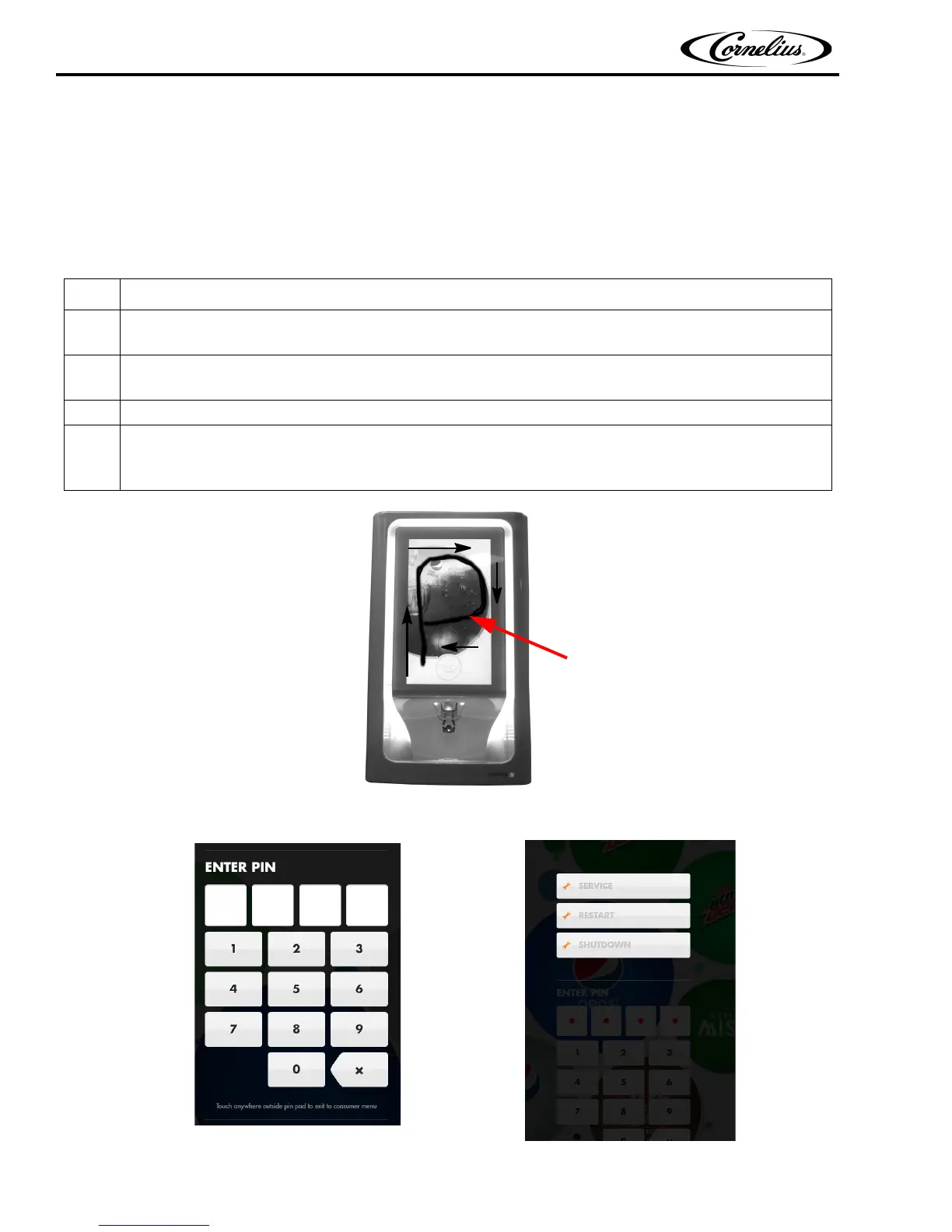
Start at the bottom and around
the P
The unit contains a service mode that is accessed through the front panel display. This allows service personnel to set up the
unit or service it.
To shut down the computer through the service screen, perform the procedure in Table 2.
Figure 15.
Table 2.
Step Action
1
Enter the service menu by using your finger to draw two large “P”s on the front panel display (Figure 15),
one right after the other. Do not lift your finger while drawing the letter “P”.
2
After the two “P”s have been accepted, the PIN number screen is displayed, as shown in Figure 16 .
Enter the correct PIN number.
3
When the PIN number is entered, the next screen shown in Figure 16 is displayed.
4
When the Service button is pressed in Figure 17, the screen shown in Figure 18 is displayed. This dis-
plays the service menus allowing the technician to map valves, prime valves and shutdown the com-
puter, as well as other service related functions.
Figure 16.
Figure 17.














 To Next Page