10.ANGLE MEASUREMENT
• Please refer to section: “21.2 record the angle measurement data”, to learn about
recording measurements
10.1 Measuring the horizontal angle between two points
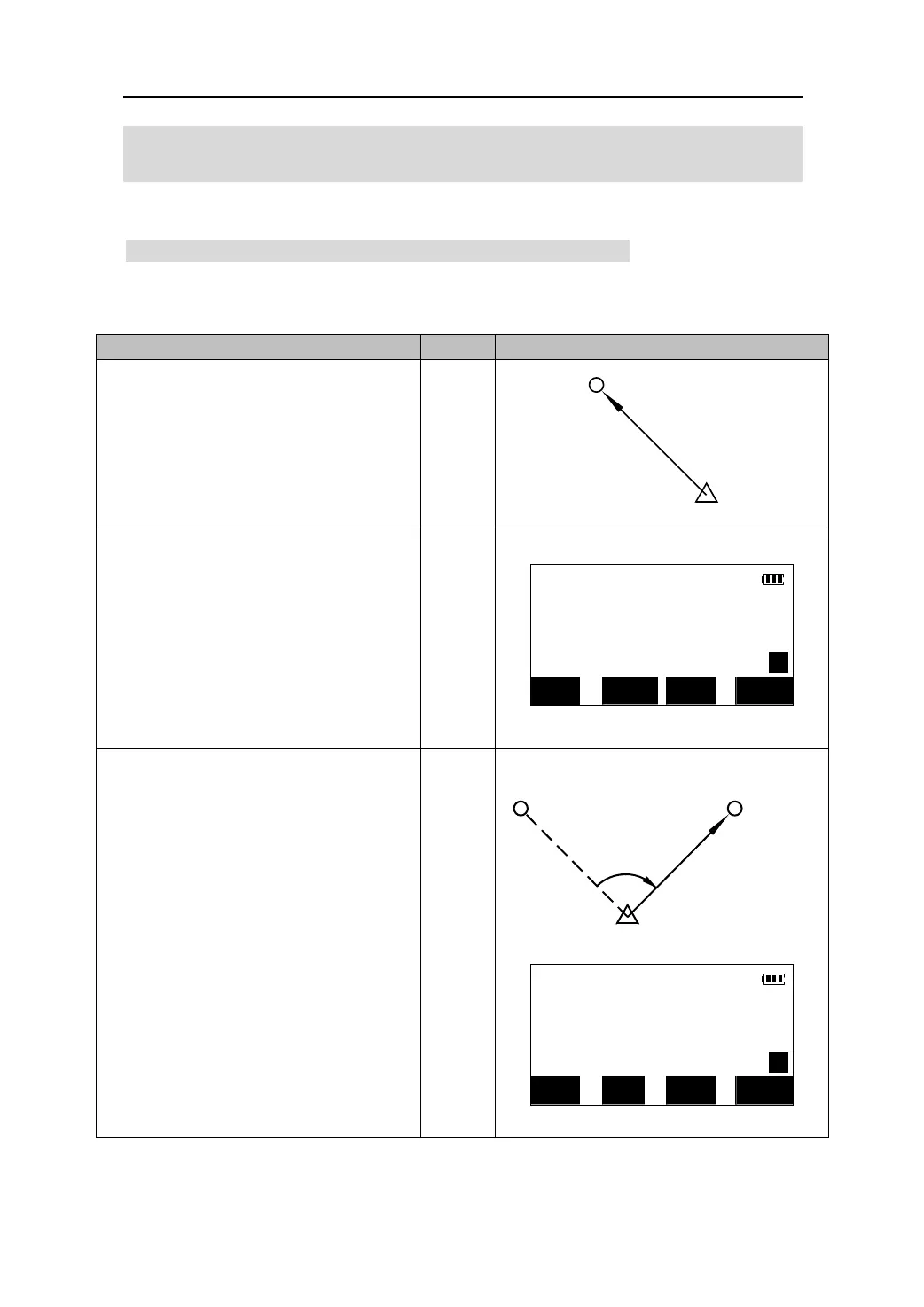
Use the “0 SET” function to measure the included angle between two points. The
horizontal angle can be set to 0 at any direction.
O
eratin
Ke
s Dis
la
1. Using the telescope and tangents, sight the
first target as shown in the diagram to the
right.
1st target
Instrument Station
2. Press the 【0SET】key on the second page
of the Meas Mode screen, 【0SET】 will flash,
so press it again. The horizontal angle will
then be set to 0° at the first.
MEAS
H
【0SET】
ZA 99°43′13″
【0SET】
HAR P2 0°00′00″
0SET CRD S-O REC
3. Now site the second target as shown.
Once you have sighted the second target,
the angle displayed will be the angle
between the first and second target points.
In this case that angle is: 120°21′12″
Instrument Station
2nd target
1st target
MEAS
H
ZA 99°43′13″
HAR P2 120°21′12″
0SET CRD S-O REC
17











 To Next Page