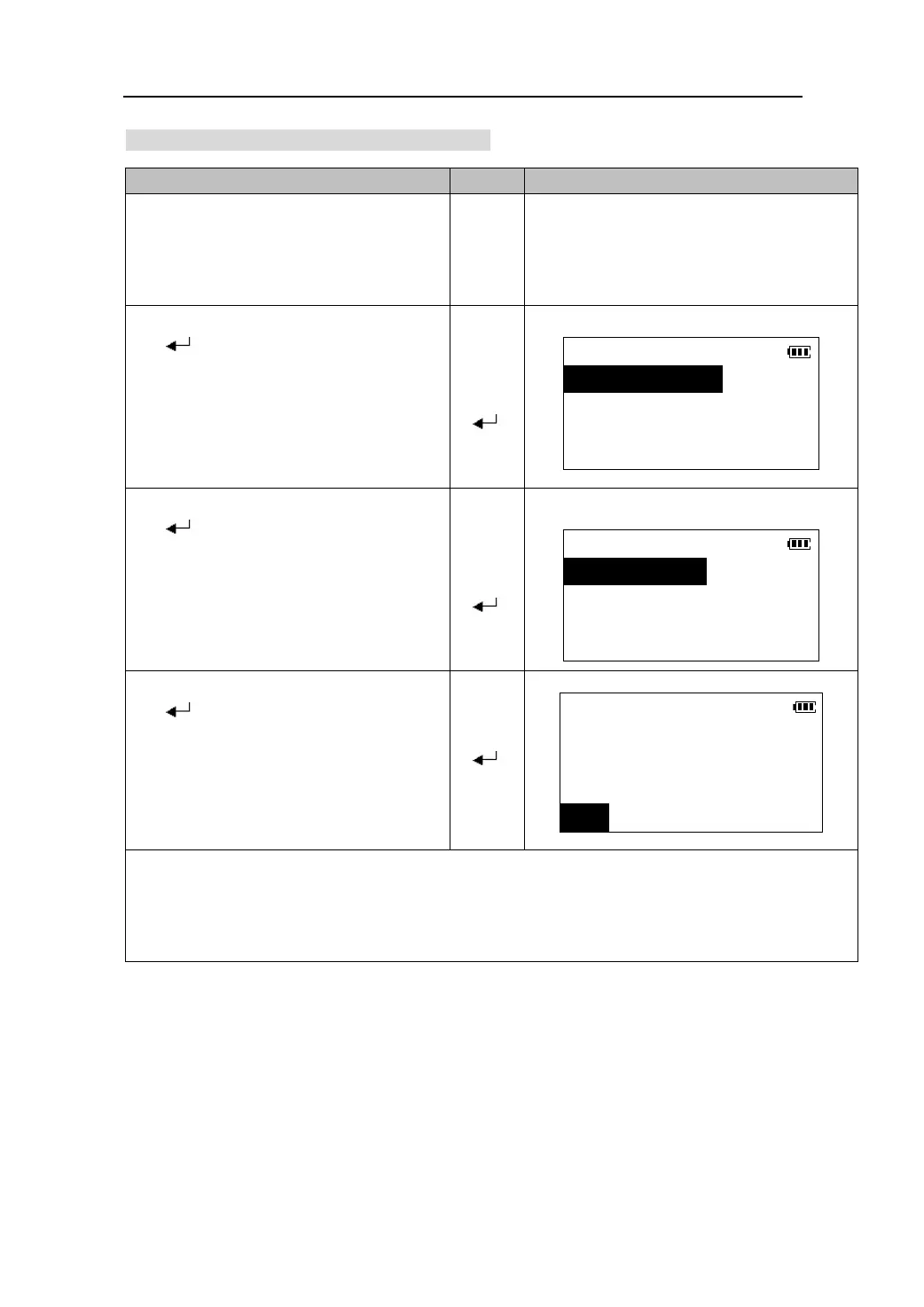
20.1.4 Outputting job data to computer
Ke
s Dis
la
O
eratin
1. Connect the total station to computer.
Run TS-link communication software on
PC.
2. Select the job in the job list, and Press
【 】to go to the job management
screen.
【】
【】
【
】
JOB
1.View
2.Comms output
3.Rename
4.Del
3. Select “2. Comms output” and press
【 】. The output format choice menu
is displayed on the screen.
DATA FORMAT
【】
【】
【
】
1.Coord. data
2.Raw data
3. Select the output format and press
【 】. Output starts. When the output
is complete ,the job file list is restored.
z Press 【STOP】to stop output.
Job/Comms output
Job: JOB001…
【 】
Transferring: 23
STOP
The communication protocol the total station comply with is:RS232 interface ,8 data bit,1
stop bit, none parity ,baud rate 1200,2400,4800,9600,19200.
Before output, make sure the computer is set to the same protocols.
Please see “22.2 Instrument Configuration”.
73






 To Next Page