4.BASIC OPERATION
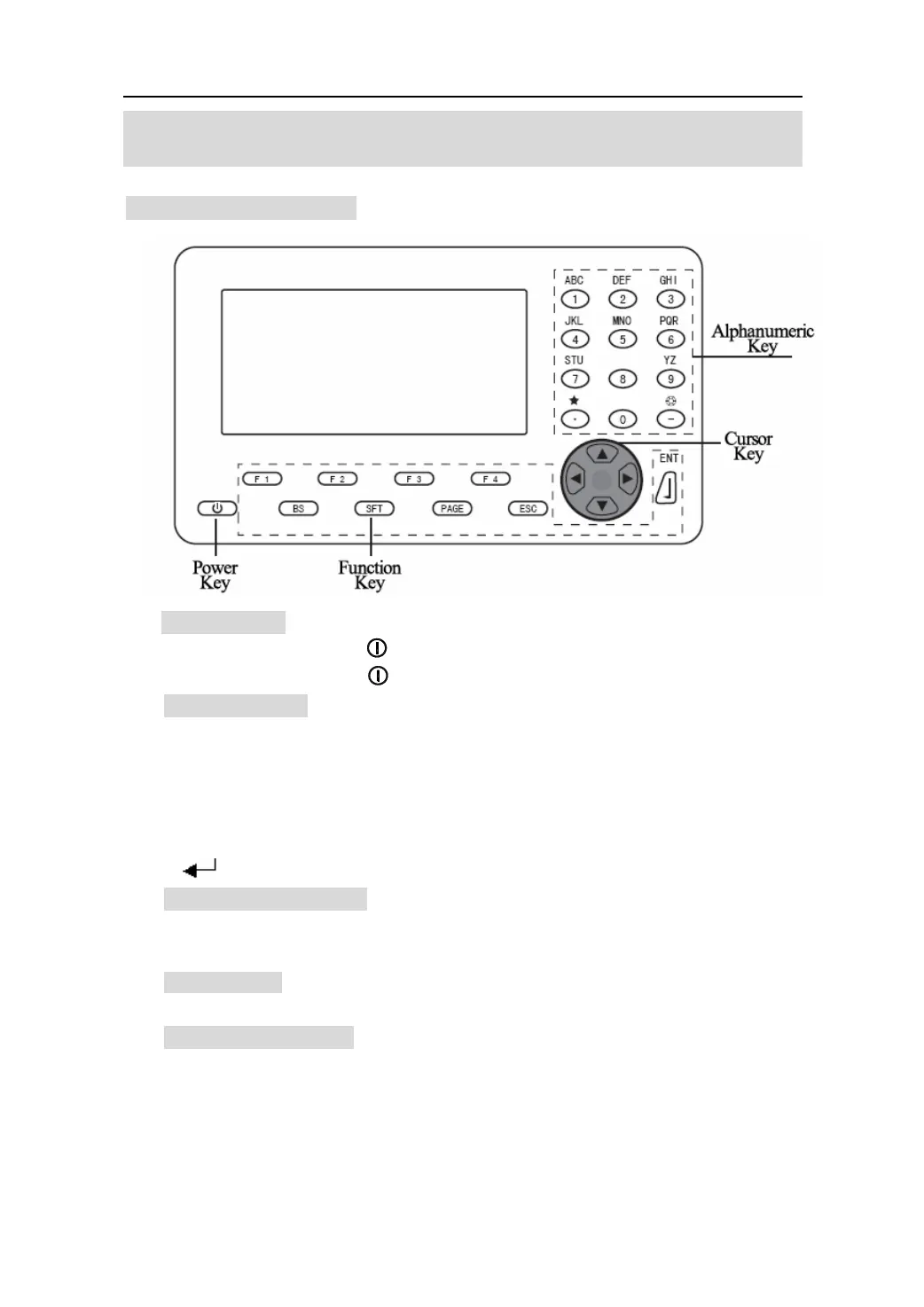
4.1 Basic key operation
1.Power Key
Power on :press 【
】。
Power off :press 【
】, hold on 2 second.
2.Function key
【F1】~【F4】: Select the function of matching the soft keys.
【ESC】:Cancel the input data or return to the previous screen.
【SFT】:Switch between upper and lower case.
【BS】: Delete a character on the left.
【PAGE】:Toggle between the display pages.
【
】:Select the item/ Accept input value /Accept the option.
3.Keyboard shortcuts
【SFT】+【*】:Press【SFT】, and then press【*】,enter the star key mode.
【SFT】+【一】:Press【SFT】,and then press【一】, enter the EDM signal checking.
4. Cursor key
:Left, right, up and down cursor or select other option
5.Alphanumeric key
【0】~【9】: During numeric input, input number of the key. During alphabetic
input, input the characters displayed above the key in the order
they are listed.
【.】:Input a decimal point.
【-】:Input minus sign.
7










 To Next Page