System Setup Menu Operation
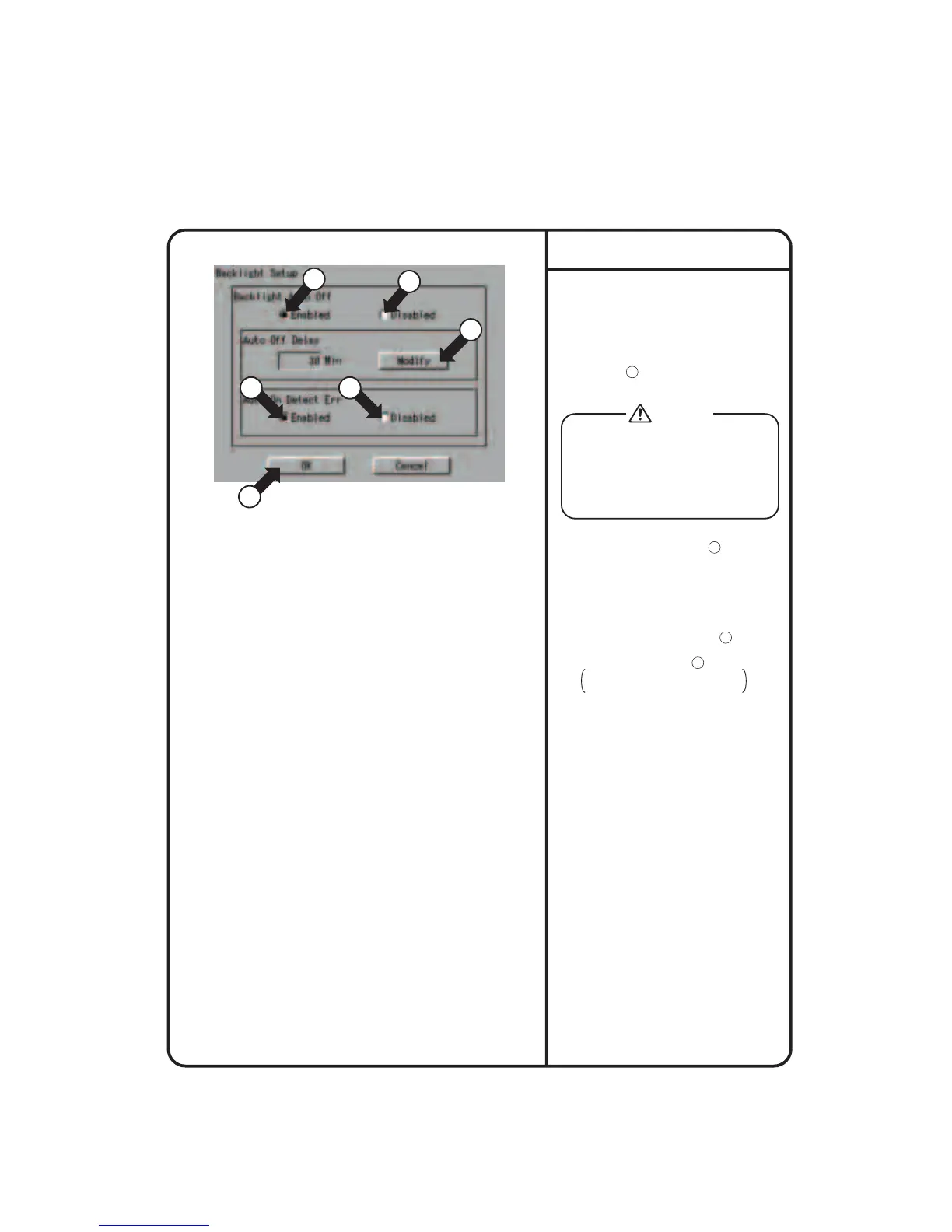
Screen 1 Backlight Setup
4
1
3 3
1
2
1.
Select Backlight Setup as described on
page 56.
2.
Screen 1 Backlight Setup, which is
shown on the left, appears.
3.
Press Enable or Disable for Backlight
Auto Off 1 .
If you select Disabled, go to step 6.
4.
Press the [Modify] button 2 .
Input dialog is displayed.
Set the time for automatic OFF.
5.
Set whether the backlight should be
automatically turned ON when any error
is generated in air conditioners by
selecting Enable or Disable 3 .
6.
Backlight setup
Press the [OK] button 4 .
To cancel the setting, press the
[Cancel] button.
For longer service life of the backlight, select
Enable whenever the backlight does not need
to be illuminated all the time. The backlight
once turned OFF is illuminated again when
the panel is touched or automatically activated
by any error generated in the air conditioner if
Enable is selected for 5. Auto On Detect Err.
Caution
59











 To Next Page