7.
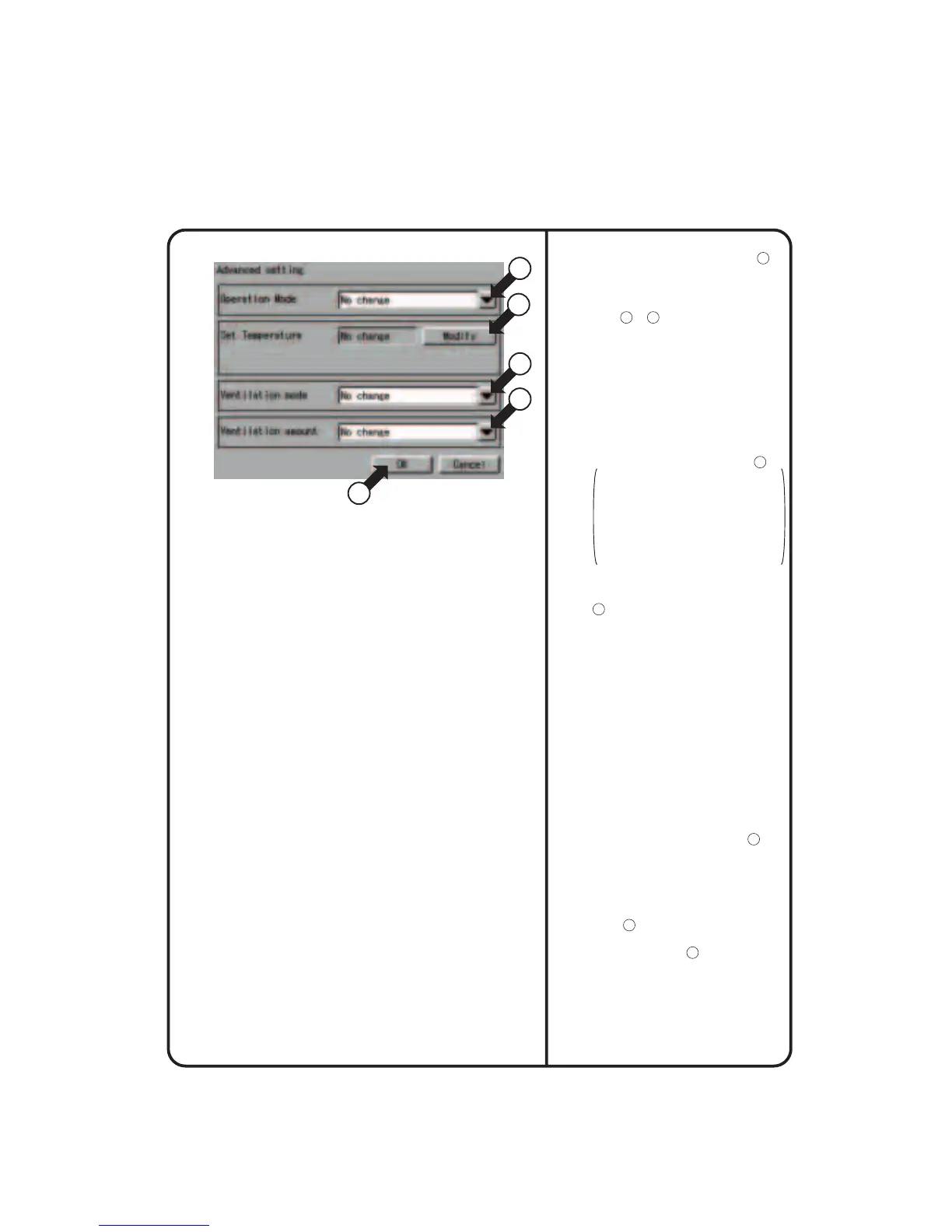
Push the [Advanced setting] button
18
on the Event setup screen Screen 3 to
display an advanced setup screen
Screen 4. The current settings of
events are shown at the left side of the
buttons
21
to
24
.
• Operation Mode :
Refers to the operation mode for a
zone or group. Select Cool, Heat,
Auto, Fan, Set Point or No change.
Note that only three modes (Set Point,
Fan and No change) are available
when a target zone or group (being
subject to mode selection) does not
provide you with an option for
selecting “heating” or “cooling.” In
this case, you may select one of the
modes from the pull-down menu
21
.
Temperature adjustment :
Refers to cooling or heating. When
“cooling” or “heating” has been set in
an air-conditioner (providing you
with an option for selecting “heating”
or “cooling”), the air-conditioner
works according the selected
cooling or heating operation mode.
• Set Temperature :
Set thetemperature of a zone or group.
Push the [Modify] or [Disabled] button
22
according to purpose. When
displaying a keyboard to register a
temperature and entering a desired
temperature on that keyboard, push the
[Modify] button. The Disabled button is
displayed only when the [Modify] button
is pushed once and the desired
temperature is set. Push the [Disabled]
button to cancel the temperature set
through the [Modify] button.
When ventilation is to be scheduled, the
following settings can be made.
Though this setting menu is displayed
regardless of ventilation, no ventilation
control takes place even if the setting is
made.
• Ventilation mode :
Set the ventilation mode.You can select
Auto, Normal, All heat exchange or No
change from the pull-down menu
23
.
• Ventilation amount :
Set the volume of ventilation.You can
select Auto (Normal), Weak (Normal),
Strong (Normal), Auto (Freshen up),
Weak (Freshen up), Strong (Freshen
up) or No change from the pull-down
menu
24
.
After making the advanced settings,
push the [OK] button
25
to return to
Screen 3 on the previous page.
Screen 4 Advanced Setup
25
21
22
23
24
System Setup Menu Operation
69











 To Next Page