15
.
16
.
17
.
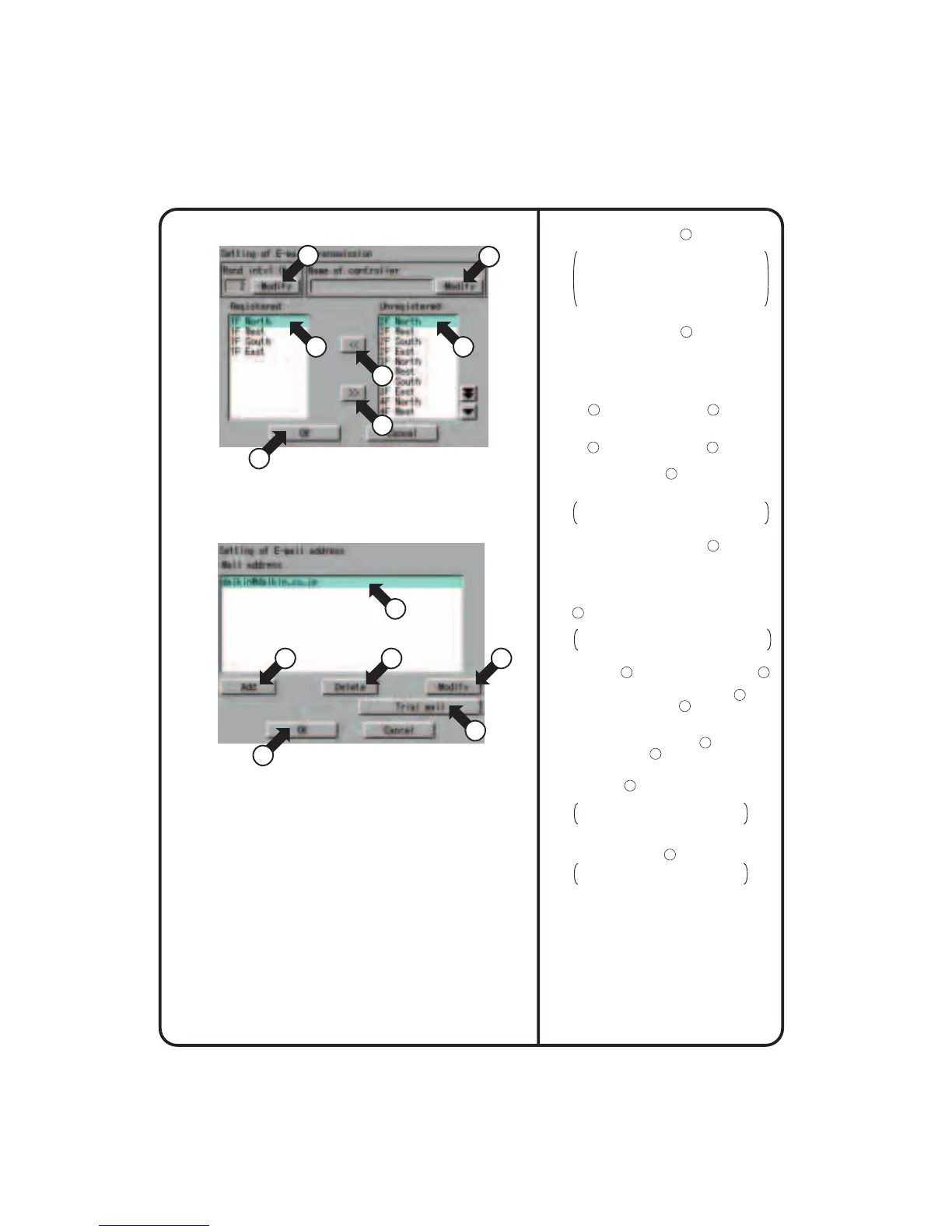
Push the [Modify] button
13
and enter a
retransmission interval on the input screen.
The retransmission interval is an e-mail
retransmission interval when faults occur
consecutively with the equipment. This
interval time (hour) must be a value from 1
to 72. Initially, it is set to 2 hours.
Push the [Modify] button
14
and enter an ITC
identifier on the input screen. The name
specified here is displayed in the Subject field
during e-mail transmission.
When adding an air-conditioner for fault
confirmation by e-mail, select the air-conditioner
at 15 and push the [<<] button 16 .
When deleting an air-conditioner for fault
confirmation by e-mail, select the air-conditioner
at 17 and push the [>>] button 18 .
After finishing the necessary edit operations,
push the [OK] button 19 to return to the
Setting of E-mail screen on the previous page
Screen 1.
To cancel the settings made, push the
[Cancel] button.
18
.
Push the [Mail add. Set] button
20
on the
previous page to display the Setting of E-mail
address screen Screen 4.
20
.
When sending test e-mail, select a
destination e-mail address at
22
and push the
[Trial mail] button
25
.
21
.
After making the necessary settings, push the
[OK] button
26
to return to the Setting of
E-mail screen on the previous page Screen 1.
To cancel the settings made, push the
[Cancel] button.
19
.
When adding an e-mail address for fault
notification by e-mail, push the [Add] button
21
and enter the e-mail address on the input
screen.
Note that a maximum of 3 e-mail addresses
can be registered.
When deleting an e-mail address, select the
address at
22
and push the [Delete] button
23
.
In addition, when changing the registered
e-mail address, select the address at
22
and
push the [Modify] button
24
.
Screen 3 Setting of E-mail transmission
Screen 4 Setting of E-mail address
3
13
3
14
17
16
18
15
22
25
19
26
22
.
After finishing the necessary setting for e-mail,
push the [OK] button
27
.
To cancel the settings made, push the
[Cancel] button.
21
3
23 24
System Setup Menu Operation
78












 To Next Page