System Setup Menu Operation
8.
In the Screen 3 Event setting on the previous page,
pressing the [Advanced setting] (See
14
) will
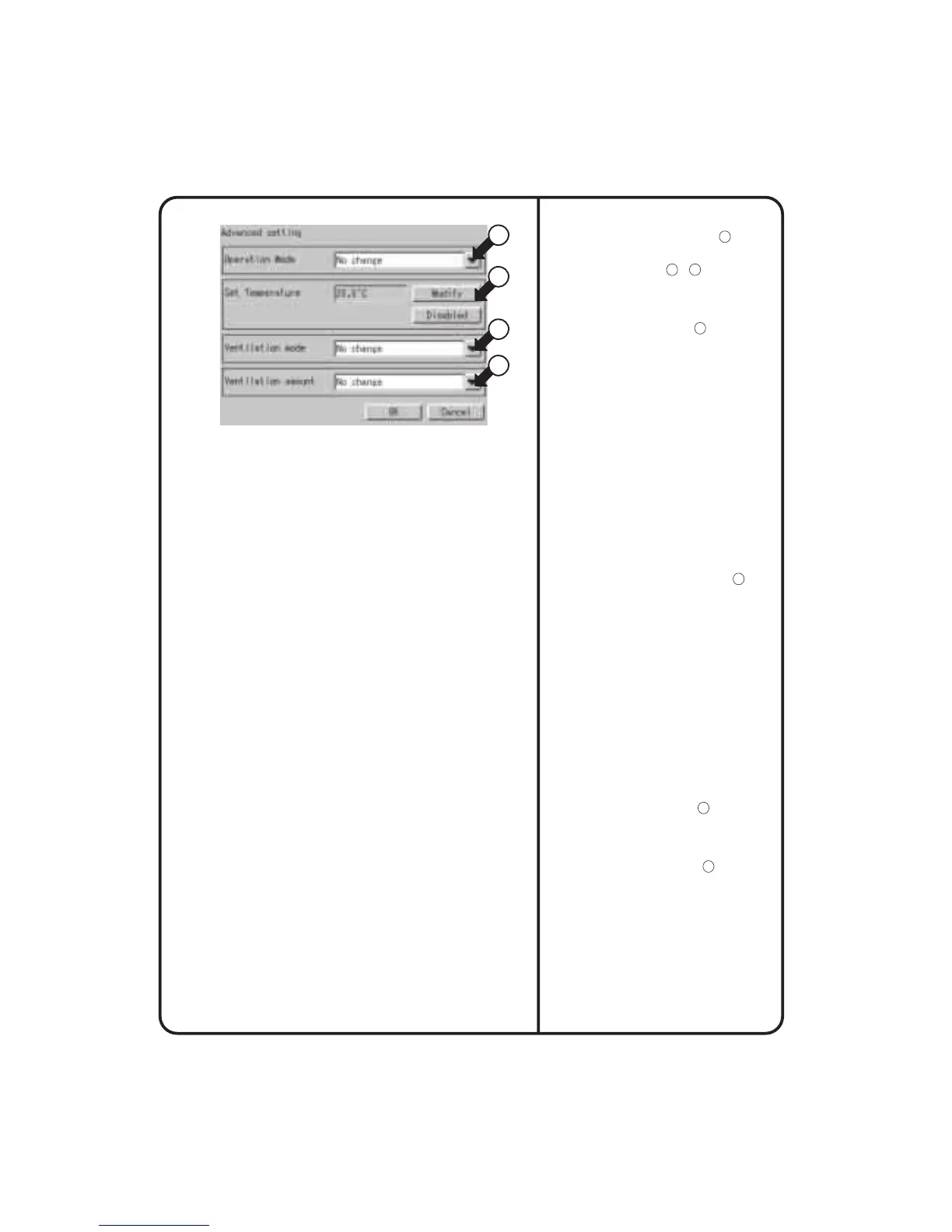
display the Advanced setting screen shown in the
Screen 4 on the left side.?The information displayed
in the boxes pointed by
17
to
20
is the current
settings of the event.
• Operation Mode : In this box, select an operation
mode specified to Zone or
Group. From the pull-down
menu (see
17
), select either of
Cool, Heat, Auto, Fan, Set Point*,
and No change.
* Set Point can be used to order the indoor unit,
which has no right to select either cooling or
heating operation in the VRV, to perform the
temperature control operation other than the fan
operation. When the interlock condition is met,
this indoor unit will operate in the same operation
mode as that of another indoor unit which has the
right to select either cooling or heating mode. For
the same reason, even if the cooling / heating
mode is set to an indoor unit which has no right
to select such modes, this unit operates in the
same operation mode as that of another indoor
unit which has the right to select either cooling or
heating mode. For detailed information about the
right to select the cooling / heating mode, please
refer to the operation manual of the
air-conditioning unit.
• Set Temperature : In this box, set a temperature of
Zone or Group. Pressing the
[Modify] button (see
18
) will
display the keyboard for
registering a temperature,
where you can input the
desired temperature. The
[Disable] button will be shown
after pressing the [Modify]
button once to set a
temperature. Pressing the
[Disable] button will cancel the
temperature specified by the
Modify operation described
above.
To the HRVs included in the interlock operation
targets, the settings described below can be made.
However, this setting menu will be displayed even
when the HRVs are not included in the targets, but
any settings made in this menu will do nothing.
• Ventilation mode : In this box, set the ventilation
mode. From the pull-down
menu (see
19
), select either of
Auto / Normal / All heat
exchange / No change.
• Ventilation amount : In this box, set the ventilation
amount. From the pull-down
menu (see
20
), select either of
Auto (Normal)/Weak (Normal)
/ Strong (Normal) / Auto
(Freshen up) / Weak (Freshen
up) / Strong (Freshen up) / No
change.
When the advanced settings are completed, press
the [OK] button to go back to the Screen 3 shown on
the previous page. Pressing the [OK] buttons in the
Screen 3 and the Screen 2 continuously to go back
to the Screen 1 shown on the previous page.
The next step is to specify a name of the simple
interlock, followed by the validity / invalidity setting.
(Details of these settings will be described in the
next page.)
Screen 4 Advanced setting
80
17
18
19
20












 To Next Page