Configuring the DriveRack™
Section 3
DriveRack
™
27
DriveRack™ User Manual
Navigation Modes
Once you have selected a program that utilizes a configuration that accommodates your appli-
cation, the DriveRack™ offers different modes of navigation to access and edit effect types with-
in the selected configuration.
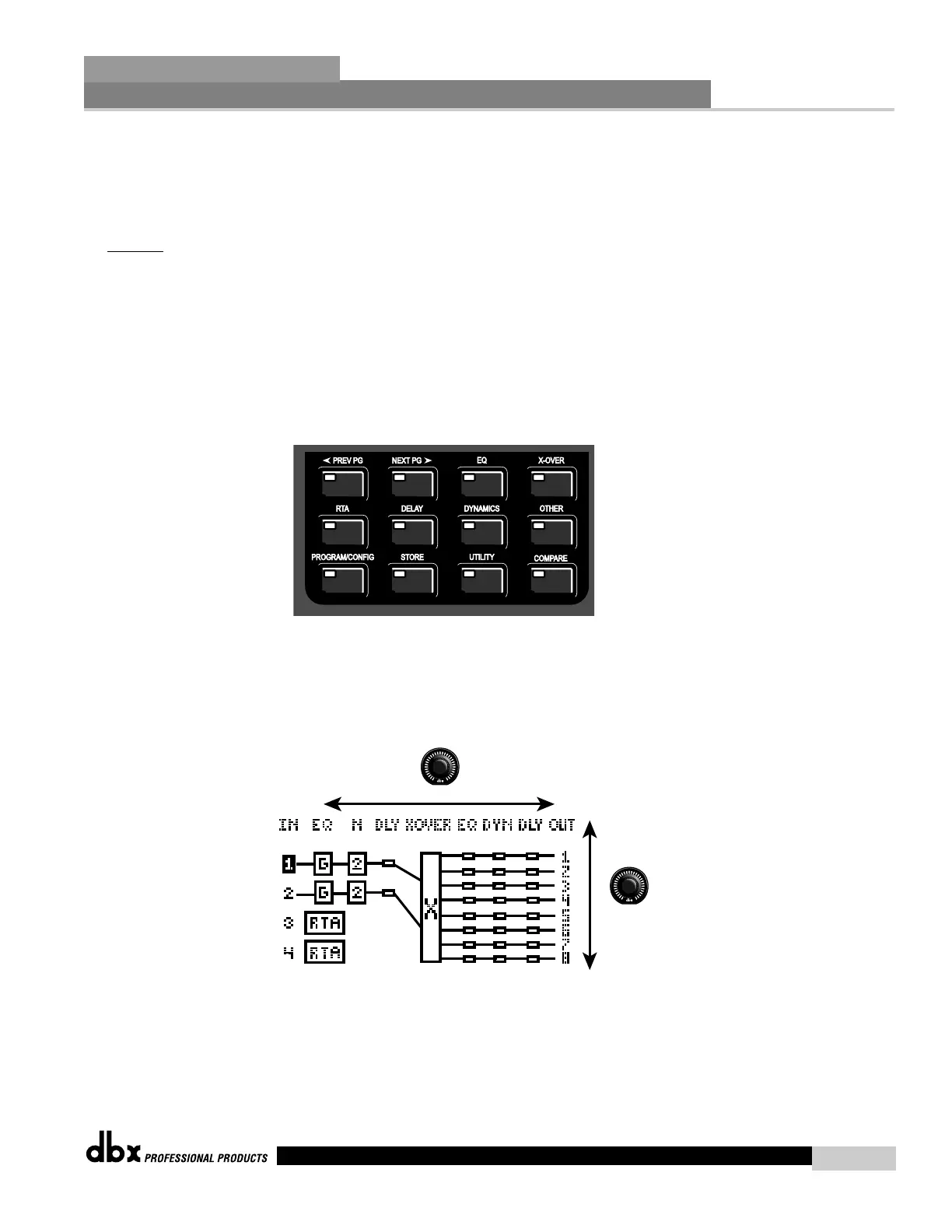
To instantly
access an effect module, simply press the corresponding button in the button array
for the desired module. The following buttons will access the following modules: EQ = PEQ,
GEQ and Notch filters (successive presses will you move through each input and output which
utilizes an EQ type module). X-OVER = Crossover(s) and filters, RTA = Real Time Audio
Analyzer, DELAY = Delay and Driver Alignment Delay (successive presses will you move
through each input and output which utilizes the Delay type module). DYNAMICS =
Compressor/Limiter (successive presses will you move through each output compressor mod-
ule. OTHER = Input and Output modules (successive presses will you move through each
input and output channel).
To roam through a program configuration, simply use the PARAMETER 2 knob to move from
left or Right within the configuration, and use the PARAMETER 3 knob to move Up and Down
within the configuration. Once you have reached the module to be edited, press either the
PARAMETER 2 or 3 knob to access the editing parameters of the modules.



 To Next Page