3
2
10
PCIe slot 3 PCIe slot 4
2
1 2
LOM PCIe slot 1
1
iDRAC
connection
1 GbE BASE-T switch
Optical switch 2
Optical switch 1
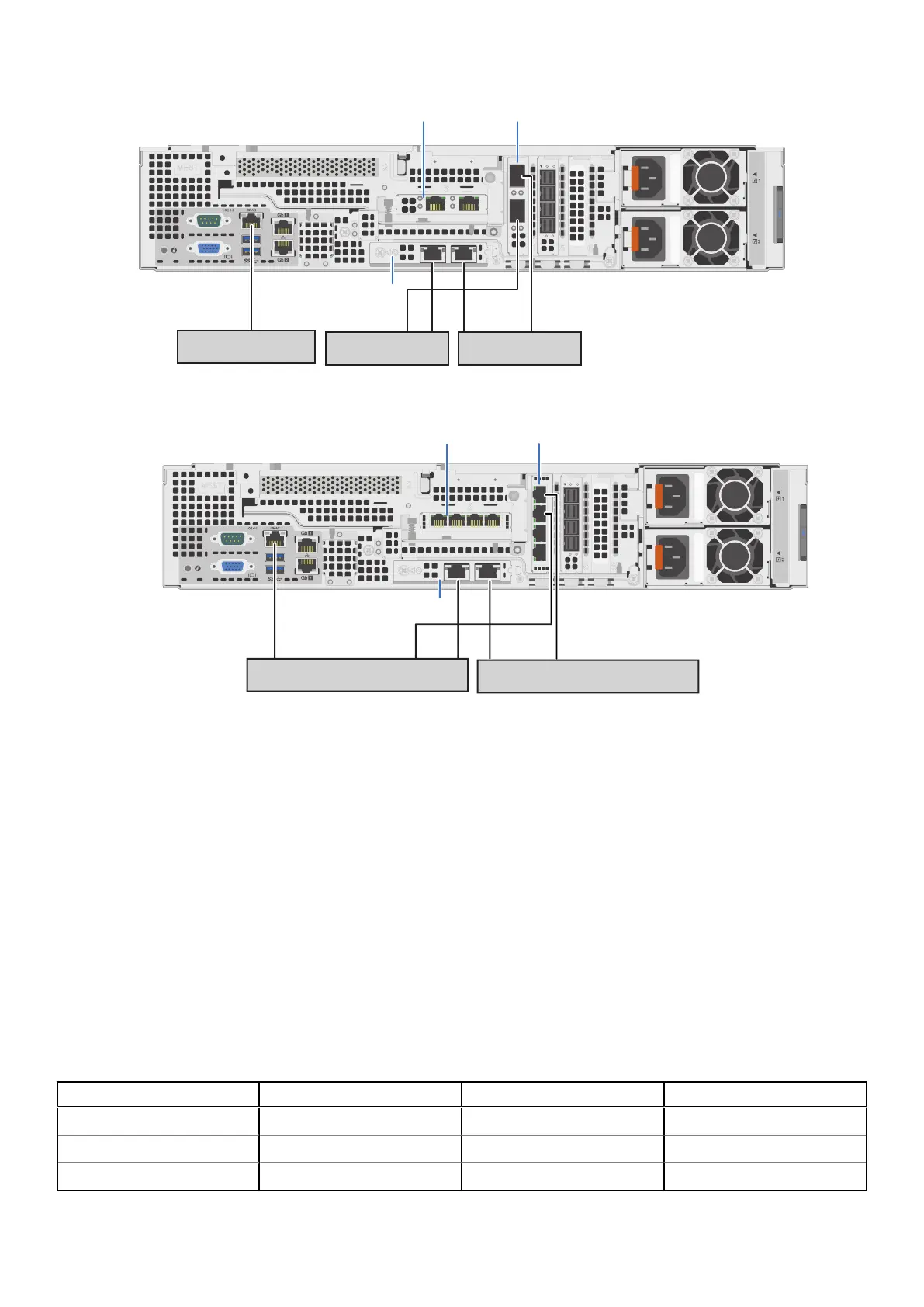
Figure 33. DM5500 recommended network connections (optical SFP28/SFP+ ports)
3
2
10
1
2
3
4
iDRAC connection to
switch 1, 2, or separate
1 GbE BASE-T switch
1
2
Copper switch 1
Copper switch 2
LOM PCIe slot 1
PCIe slot 3
PCIe slot 4
Figure 34. DM5500 recommended network connections (copper 10GBASE-T ports)
Four network ports are required for standard installation. Two ports are used for the customer management IP address, and two
ports are used for the data uplinks to the public customer network. Port 1 on the LOM PCIe slot 1 and port 1 in PCIe slot 4
are the customer management IP ports and should go to different switches for improved reliability and fault tolerance. Port 2
on the LOM PCIe slot 1 and port 2 in PCIe slot 4 are the uplink ports that are used for data traffic and should go to different
switches. Additional free ports can be used in PCIe slot 3 for networking use cases where the customer needs to set up a
separate replication network, or additional backup networks using separate uplinks.
The iDRAC cable requires a 1 GbE BASE-T connection. In the DM5500 configuration with optical SFP28/SFP+ ports in PCIe
slots 3 and 4, a separate 1 GbE BASE-T switch is required for the iDRAC connection in addition to the two optical switches.
In the
DM5500 configuration with copper 10GBASE-T ports, the iDRAC cable could be connected to either of the two copper
switches, or to a third 1 GbE BASE-T management switch.
The data uplink connections use a routable public VLAN to communicate with the rest of the company network where the
backup targets will be located. You should consult with your network administrator for proper VLAN planning and configuration
for your network environment. Use the LC-to-LC optical cables or direct attach (twinax) cables provided by Dell when
connecting the GbE ports on the
DM5500 to the external network.
The following table shows the combinations of NIC ports on the DM5500, depending on how the customer configures the HBAs.
A maximum of six optical ports are available, and a maximum of ten copper ports are available.
Table 16.
DM5500 NIC combinations
LOM (PCIe slot 1) NIC (PCIe slot 3) NIC (PCIe slot 4) Number of NIC ports
2 x 25 GbE SFP28 2 x 25 GbE SFP28 2 x 25 GbE SFP28 6 x 25 GbE SFP28
2 x 10 GbE SFP+ 2 x 10 GbE SFP+ 2 x 10 GbE SFP+ 6 x 10 GbE SFP+
2 x 10 GBASE-T 4 x 10 GBASE-T 4 x 10 GBASE-T 10 x 10 GBASE-T
42 DM5500 cabling and network requirements









 To Next Page