Removing and Replacing Parts on the Mini Tower Chassis 6-17
Expansion Cards
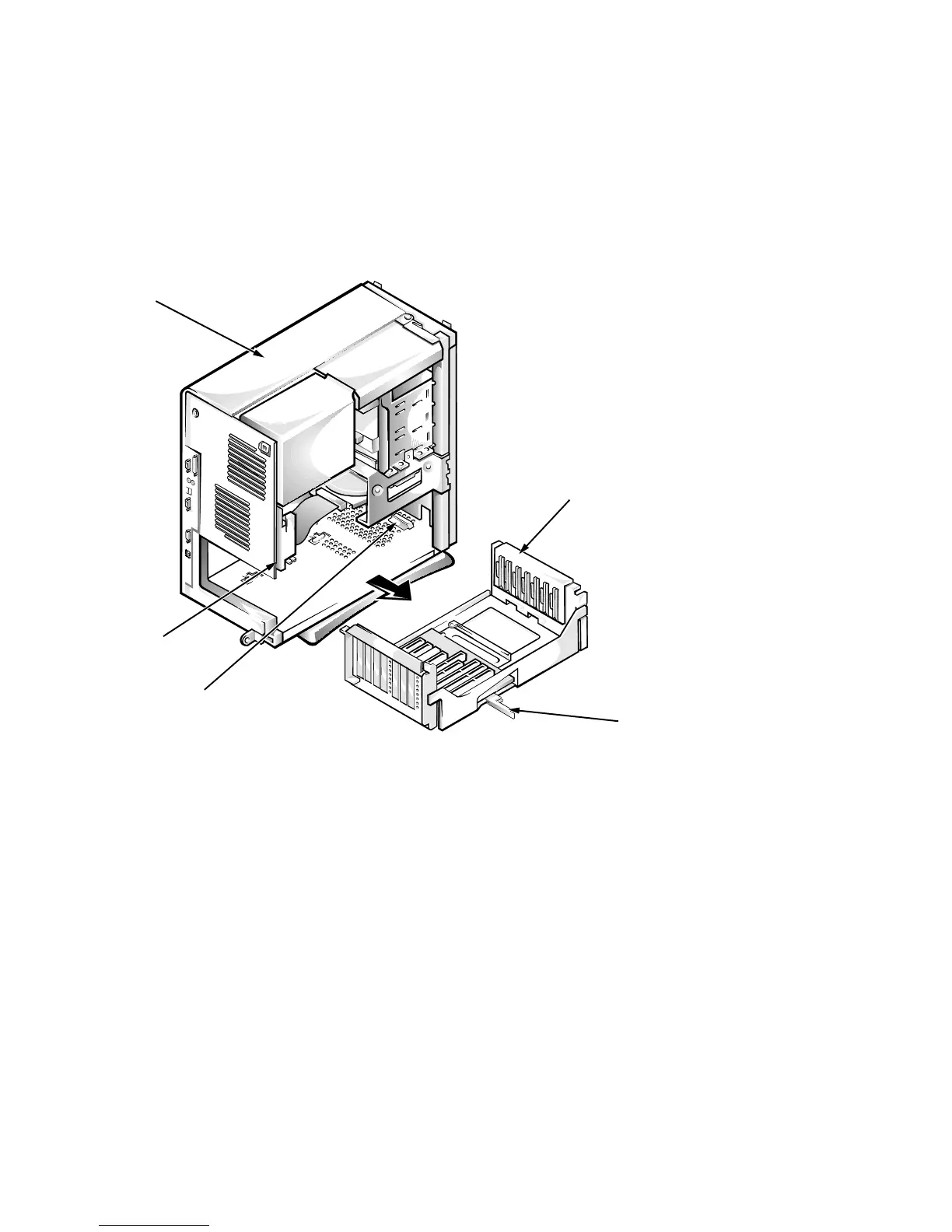
The computer has a removable expansion-card cage that contains the riser board
and any installed expansion cards. Dell recommends that you remove the
expansion-card cage first before removing or installing expansion cards.
If you are not removing any of the expansion cards, leave the external cables
attached to the expansion cards.
Expansion-Card Cage
Figure 6-17. Expansion-Card Cage Removal
To remove an expansion-card cage, follow these steps:
1. Rotate the lever toward the back of the computer until it stops in the
upright position.
2. Slide the expansion-card cage out of the computer.
To replace an expansion-card cage, align the tabs on the left and right sides of
the expansion-card cage with the slots on the back and bottom of the chassis.
With the securing lever in its extended position, slide the expansion-card cage
into place.
lever
expansion-card
cage
back slot
chassis
bottom slot








 To Next Page