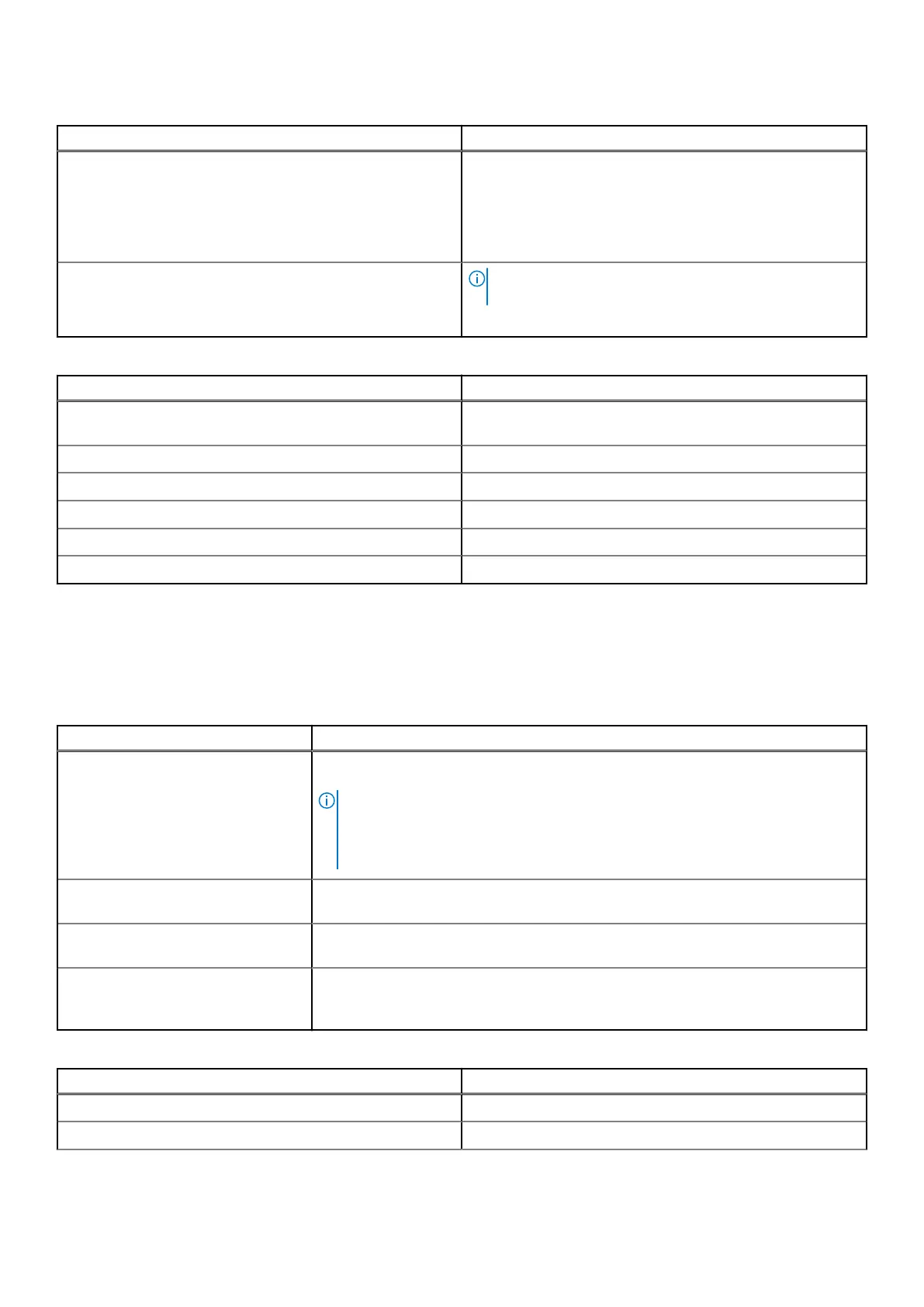
Table 25. Processor Settings details (continued)
Option Description
affected thread rather than broadcast to all threads in the
system. The feature supports operating system recovery for
cases of multiple recoverable faults that are detected close,
which would otherwise result in a fatal machine check event.
The feature is available only on Advanced RAS processors.
This option is set to Disabled by default.
Processor n
NOTE: Depending on the number of processors, there
might be up to n processors listed.
The following settings are displayed for each processor:
Table 26. Processor n details
Option Description
Family-Model-Stepping Specifies the family, model, and stepping of the processor as
defined by Intel.
Brand Specifies the brand name.
Level 2 Cache Specifies the total L2 cache.
Level 3 Cache Specifies the total L3 cache.
Number of Cores Specifies the number of cores per processor.
Microcode Specifies the processor microcode version.
SATA Settings
To view the SATA Settings screen, power on the system, press F2, and click System Setup Main Menu > System BIOS >
SATA Settings.
Table 27. SATA Settings details
Option Description
Embedded SATA Enables the embedded SATA option to be set to Off, AHCI mode , or RAID modes.
This option is set to AHCI Mode by default.
NOTE:
1. You might also need to change the Boot Mode setting to UEFI. Otherwise, you
should set the field to Non-RAID mode.
2. No ESXi and Ubuntu OS support under RAID mode.
Security Freeze Lock Sends Security Freeze Lock command to the embedded SATA drives during POST.
This option is applicable only for AHCI Mode. This option is set to Enabled by default.
Write Cache Enables or disables the command for the embedded SATA drives during POST. This
option is applicable only for AHCI Mode. This option is set to Disabled by default.
Port n
Sets the drive type of the selected device.
For AHCI Mode, BIOS support is always enabled.
Table 28. Port n
Options Descriptions
Model Specifies the drive model of the selected device.
Drive Type Specifies the type of drive attached to the SATA port.
38 Pre-operating system management applications












 To Next Page