VRRP in a VRF: Non-VLAN Scenario
The following example shows how to enable VRRP in a non-VLAN.
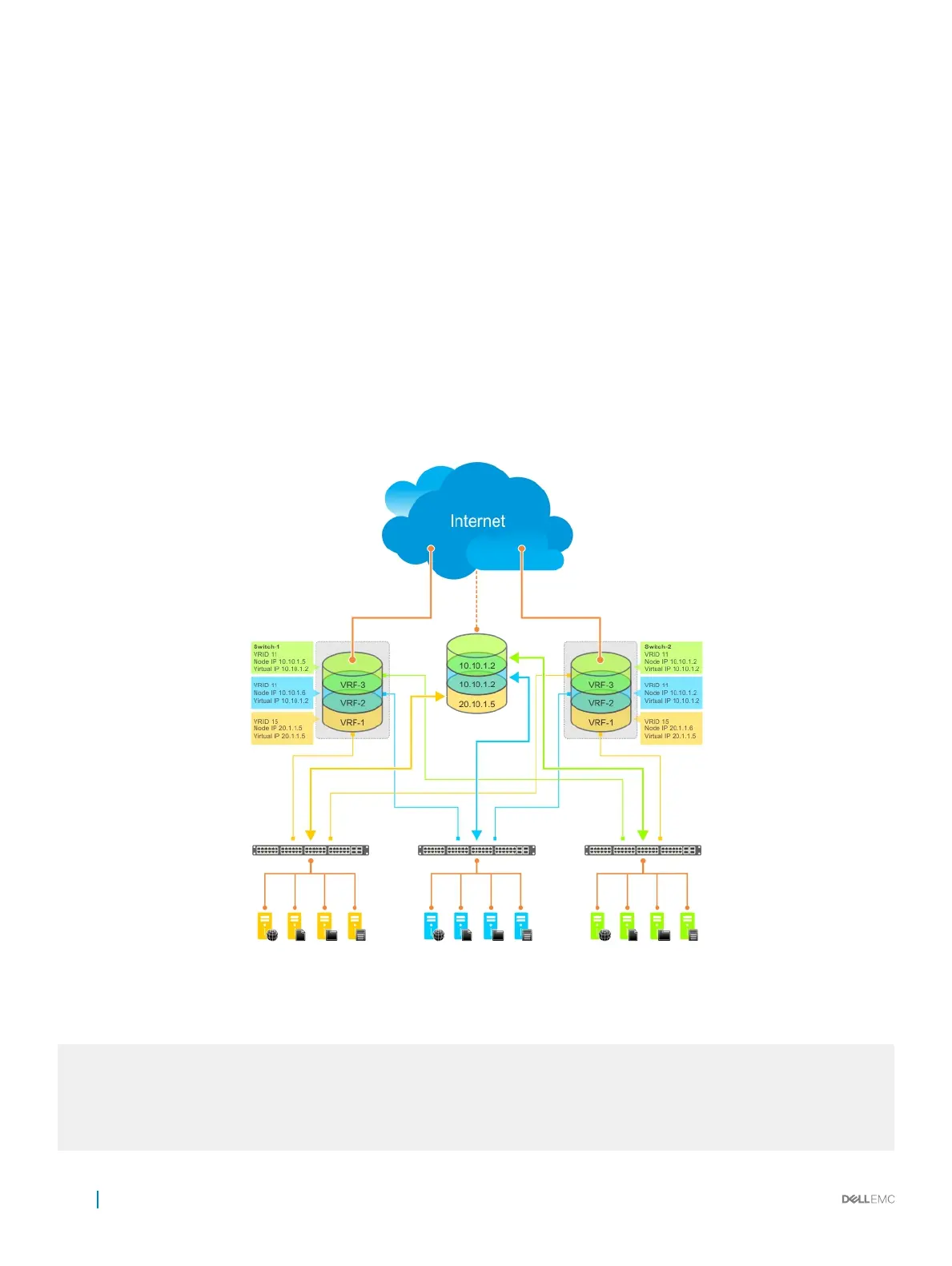
The following example shows a typical use case in which you create three virtualized overlay networks by conguring three VRFs in two
switches. The default gateway to reach the Internet in each VRF is a static route with the next hop being the virtual IP address congured
in VRRP. In this scenario, a single VLAN is associated with each VRF.
Both Switch-1 and Switch-2 have three VRF instances dened: VRF-1, VRF-2, and VRF-3. Each VRF has a separate physical interface to a
LAN switch and an upstream VPN interface to connect to the Internet. Both Switch-1 and Switch-2 use VRRP groups on each VRF
instance in order that there is one MASTER and one backup router for each VRF. In VRF-1 and VRF-2, Switch-2 serves as owner-master of
the VRRP group and Switch-1 serves as the backup. On VRF-3, Switch-1 is the owner-master and Switch-2 is the backup.
In VRF-1 and VRF-2 on Switch-2, the virtual IP and node IP address, subnet, and VRRP group are the same. On Switch-1, the virtual IP
address, subnet, and VRRP group are the same in VRF-1 and VRF-2, but the IP address of the node interface is unique. There is no
requirement for the virtual IP and node IP addresses to be the same in VRF-1 and VRF-2; similarly, there is no requirement for the IP
addresses to be dierent. In VRF-3, the node IP addresses and subnet are unique.
Figure 162. VRRP in a VRF: Non-VLAN Example
Example of Conguring VRRP in a VRF on Switch-1 (Non-VLAN)
Switch-1
S1(conf)#ip vrf default-vrf 0
!
S1(conf)#ip vrf VRF-1 1
!
S1(conf)#ip vrf VRF-2 2
!
1100
Virtual Router Redundancy Protocol (VRRP)



 To Next Page
 Loading...