DS-320SA
Instruction Manual - 29 -
www.doallsaws.com
9.2 HMI PANEL
The MITSUBISHI HMI panel uses the touchscreen technology. The graphical fields described below are
activated by touching the center of the symbol with your finger.
WARNING: Touch the screen with your clean bare fingers. Do not wear gloves or use any tool
(screwdriver, pencil, toothpick, ...) to operate the touchscreen. If the operator scratches or punctures the
screen, this damage will not be covered by warranty.
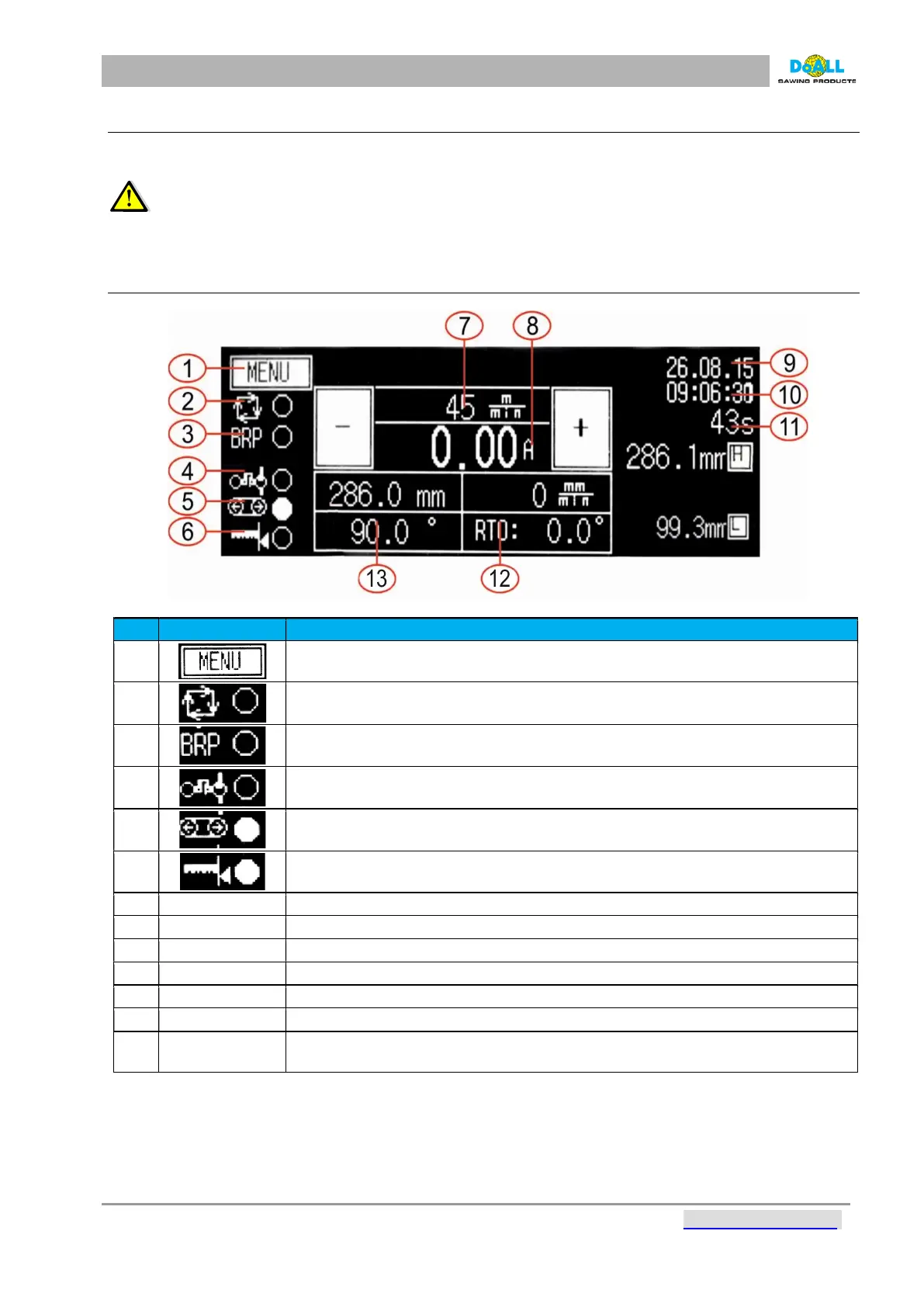
9.2.1 STARTING SCREEN
pic: 9-3
Item
Description
1
MENU button This is where all the user and service parameter settings can be
accessed (see next section)
2
Cycle(cut) indication
3
BRP indication – this is activated if the band drive load limit (a user-adjustable
parameter) is surpassed (Par. 2: BRP control current (A))
4
Hydraulic system status indication
5
Band tensioning indication
6
Upper arm position indication
7 Saw band speed control by means of the + and - buttons
8 Band drive load (Amperes)
9 Date
10 Time
11 Duration of the current or completed cycle
12 Actual turn table position (Not standard equipment).
13 RTO: angle is set as the first, moving with turn table after. Not standard
equipment).



 To Next Page