4. Setting frequency Q (width) for LFE channel equalization and level of cut using the single-band
parametric equalizer.
Required tools
• An RTA with four or more microphone inputs and averaging/multiplexing technology. A single
microphone can be used instead, but it will not produce a result as eective as a four-microphone system.
The Dolby CP950/CP950A can accept a single microphone input and can display the basic 1/3 octave EQ.
• A handheld sound pressure level (SPL) meter or another device that can produce accurate SPL
measurements. Measurements must be taken two-thirds of the way back in the room, slightly o axis
from center, and at ear height.
• High-quality microphones that should all be the same make and model. The microphones should be from
the same batch (similar serial numbers) so that they all produce similar sound results.
Setting up the real-time analyzer for 1-4 microphones
1. Position a microphone multiplexer in the center of the auditorium listening area.
2. Place each microphone in the reverberant field, not in an area that receives the most direct energy from
the speakers. In addition, avoid perfect symmetry.
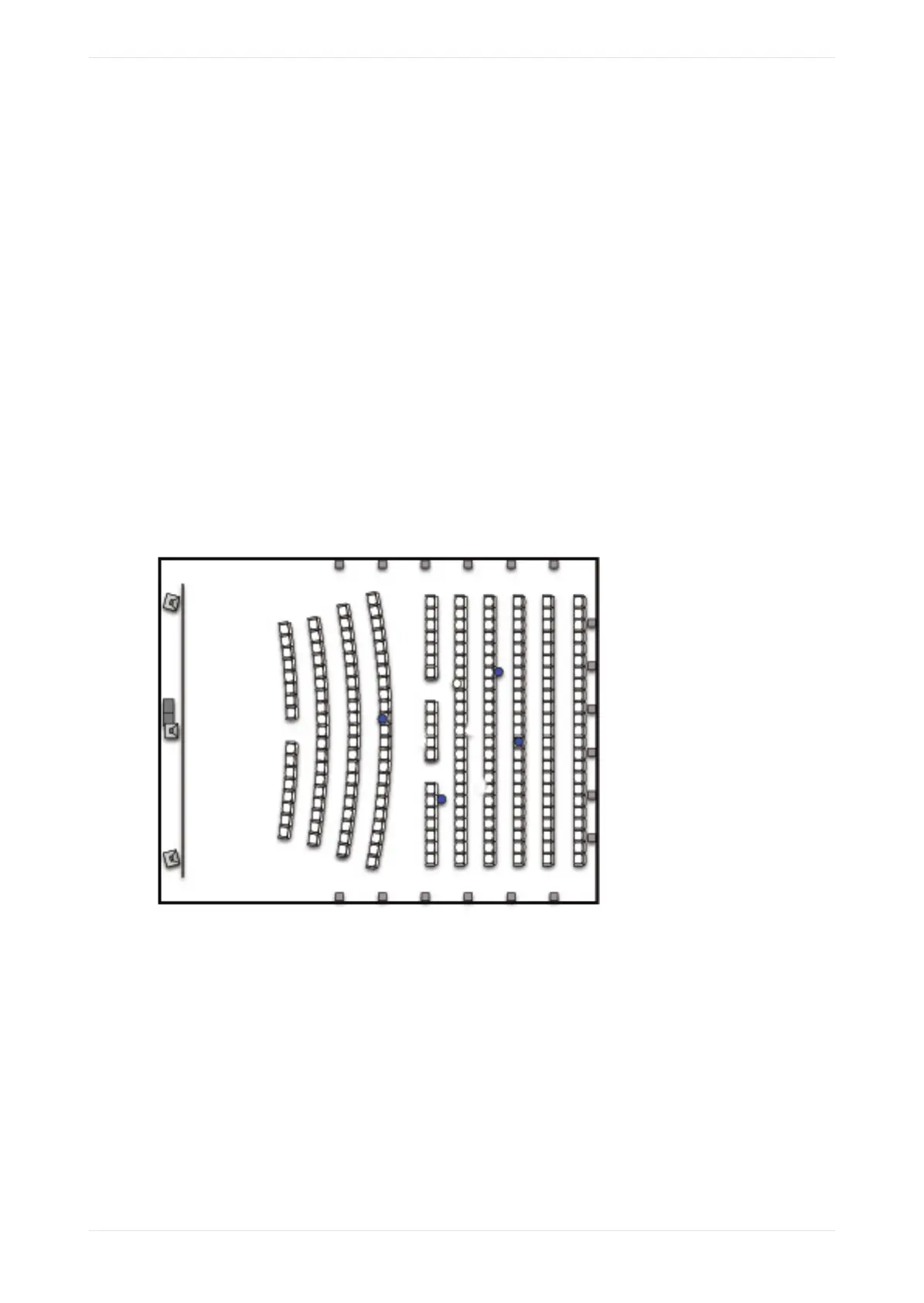
3. Arrange the microphones so that they do not form a square or rectangle parallel to the sides of the room,
as shown in the following figure (microphones are represented by blue circles). Be sure not to place any of
the multiplexing microphones on the auditorium center line. Standing waves and nodes can cause
measurement errors.
Figure 114: Position four microphones
4. During final SPL calibration, use the handheld meter at the reference listening position (RLP) that is along
the center line of the image, at a point that is approximately two-thirds the length of the room.
Real-time analyzer equalization
1. Begin with the system in the 7.1 Dolby Surround macro (or if the auditorium is configured for 5.1, use the
5.1 macro).
2. Change the CP950/CP950A fader level to 7.0.
3. Select equalization in the web client navigation bar setup menu at the le side of the screen.
The real-time analyzer appears in the equalization screen, as shown in the following figure.
Configuring equalization with the CP950 real-time analyzer
Dolby Cinema Processor CP950 and Dolby Atmos Cinema Processor CP950A Manual 89
Issue 9 Part Number 8800298 19 January 2022



 To Next Page